
网页制作中应用的50个CSS技巧(国外)
脚本之家
网页制作Webjx文章简介:CSS is almost certainly one of the best developments in web design since the first graphical web browsers were adopted on a wide scale. Where tables created clunky, slow-loading pages, CSS created much more streamlined and usable web pages. Plus, CSS 5. Other Cool Techniques, Tips, and Tricks
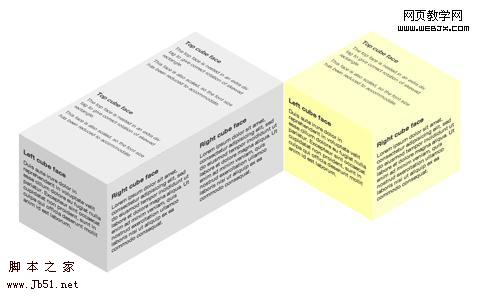
Below are a ton of other techniques and tricks you can use to really make your CSS stand out. 3D Cube Using CSS Transformations
This is probably one of the coolest CSS techniques I’ve seen. This tutorial shows how to build a 3D cube with text or other content on each side of the cube. It does it entirely with CSS; there’s no canvas, SVG, imagery, or JavaScript. There’s even instructions for creating multiple shaded cubes on a single page. The only real drawback is that it’s only supported in recent WebKit and Gecko browsers.
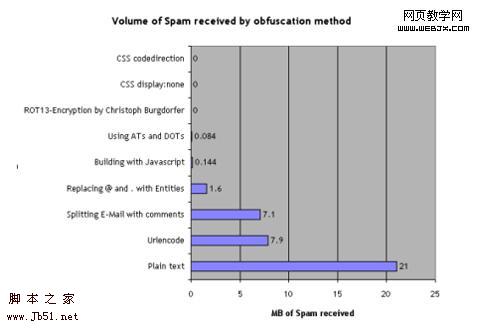
 Nine Ways to Obfuscate E-mail addresses compared
 This article gives two different methods for obfuscating email addresses with CSS. One involves using the display:none attribute while the other involves reversing the code. Both supposedly cut the amount of spam received to zero.
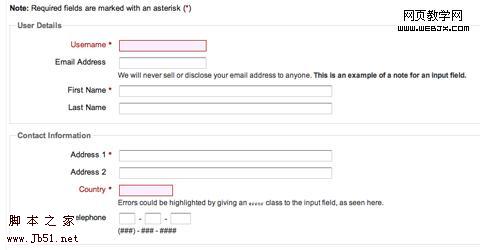
 Forms Markup and CSS - Revisited
 Here is a CSS template for form styling. The markup of the form is based on the Accessible Forms Markup from Derek Featherstone. The template is semantically correct, flexible and accessible.
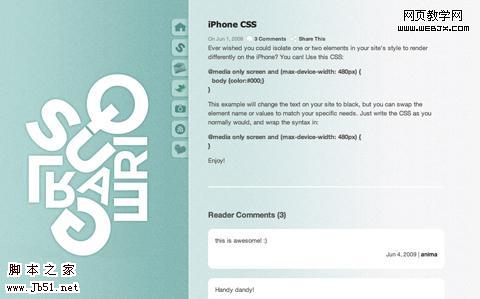
 iPhone CSS
 A very short and simple tutorial on how to make certain elements of you CSS render differently on the iPhone. It’s surprisingly simple and easy to implement.
 Improving Your Process: Faster Front End Development
 While this post offers plenty of information on things other than CSS, it also offers some great advice for improving your efficiency with CSS: mainly, write your CSS in blocks. This technique is usually done progressively as you get used to coding in this manner. The steps are simple, though, and it’s sure to make you a much faster designer.
 Image-Free CSS Tooltip Pointers - A Use for Polygonal CSS?
 This tutorial explains how to create triangles (to be used for pointers) using CSS, without the need for any images. The end result is great, though it only works for single-color images. The CSS used is incredibly simple while still being really versatile. You can create a triangle of almost any size using just a single div.
