
Linux使用tar命令进行文件归档和备份的方法
作者:拾心21
归档和压缩文件对于创建备份和通过网络传输数据非常有用,tar可以将大量文件集合到一个文件(存档)中,还可以使用 gzip,bzip2或xz压缩来压缩存档,本文就给大家介绍了Linux使用tar命令进行文件归档和备份的方法,需要的朋友可以参考下
Linux 文件归档和备份
归档和压缩文件对于创建备份和通过网络传输数据非常有用。
用于创建和使用备份存档的最古老和最常用的命令之一是 tar 命令。
tar可以将大量文件集合到一个文件(存档)中,还可以使用 gzip,bzip2或xz压缩来压缩存档。
tar 命令语法
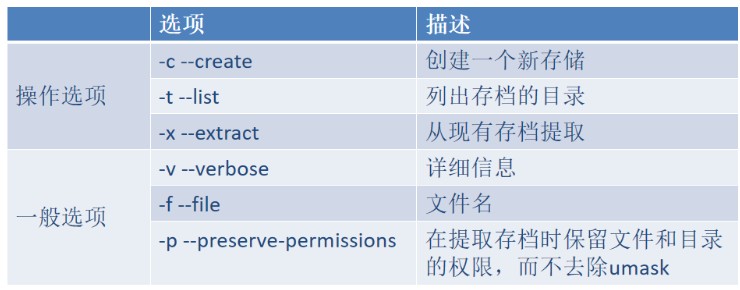
tar 包管理
打包
# 创建tar包,确保用户有权限访问目标文件
[li@centos7 ~ 21:04:06]$ tar -cf etc.tar /etc
tar: 从成员名中删除开头的“/”
tar: /etc/crypttab:无法 open: 权限不够
tar: /etc/grub.d:无法 open: 权限不够
tar: /etc/pki/CA/private:无法 open: 权限不够
tar: /etc/pki/rsyslog:无法 open: 权限不够
tar: /etc/ppp/peers/wvdial:无法 open: 权限不够
tar: /etc/ppp/chap-secrets:无法 open: 权限不够
tar: /etc/ppp/eaptls-client:无法 open: 权限不够
tar: /etc/ppp/eaptls-server:无法 open: 权限不够
tar: /etc/ppp/pap-secrets:无法 open: 权限不够
......
# 没有权限读取的文件,当然无法打包

# root用户可以打包所有文件
[root@centos7 ~ 21:06:39]# tar -cf etc.tar /etc
tar: 从成员名中删除开头的“/”
# 注意打包的时候,会将文件的第一个字符/剔除掉。解压的时候,默认解压到当前位置。

# 再次打包,如果存在相同的tar包,不会提示是否覆盖
[root@centos7 ~ 21:06:45]# tar -cf etc.tar /etc
tar: 从成员名中删除开头的“/”

# 通过添加日期,确保每天打包的文件名不一致
[root@centos7 ~ 21:07:09]# tar -cf etc-$(date +%Y%m%d).tar /etc
tar: 从成员名中删除开头的“/”
[root@centos7 ~ 21:07:44]# ls -l etc*
-rw-r--r--. 1 root root 39188480 7月  29 21:07 etc-20250729.tar
-rw-r--r--. 1 root root 39188480 7月  29 21:07 etc.tar
查看包中文件
# 查看tar包内容
[root@centos7 ~ 21:07:58]# tar -t -f etc-20250729.tar
etc/
etc/fstab
etc/crypttab
etc/mtab
etc/resolv.conf
etc/fonts/
etc/fonts/conf.d/
etc/fonts/conf.d/66-sil-nuosu.conf
.......

# 配合grep过滤
[root@centos7 ~ 21:08:50]# tar -t -f etc-20250729.tar|grep etc/host
etc/host.conf
etc/hosts
etc/hosts.allow
etc/hosts.deny
etc/hostname
提取
# 提取所有文件
[root@centos7 ~ 21:10:19]# tar -xf etc-20250729.tar

# 查看其中一个子目录
[root@centos7 ~ 21:11:48]# tree -L 1 etc/yum
etc/yum
├── pluginconf.d -> ../dnf/plugins
├── protected.d -> ../dnf/protected.d
└── vars -> ../dnf/vars

3 directories, 0 files

# 提取部分文件
[root@centos7 ~ 21:13:03]# tar -t -f etc-20250729.tar|grep etc/host
etc/host.conf
etc/hosts
etc/hosts.allow
etc/hosts.deny
etc/hostname
[root@centos7 ~ 21:13:34]# tar -xf etc-20250729.tar $(tar -t -f etc-20250729.tar|grep etc/host)
[root@centos7 ~ 21:15:22]# tree etc
etc
├── host.conf
├── hostname
└── hosts

0 directories, 3 files
tar包中追加文件
[root@centos7 ~ 21:15:36]# tar -r -f etc-20250729.tar /usr/share/doc/at/timespec
tar: 从成员名中删除开头的“/”
tar: 从硬连接目标中删除开头的“/”

[root@centos7 ~ 21:18:28]# tar -tf etc-20250729.tar |grep timespec
usr/share/doc/at/timespec
删除tar包中文件
[root@centos7 ~ 21:20:02]# tar --delete -f etc-20250729.tar usr/share/doc/at/timespec
[root@centos7 ~ 21:20:20]# tar -tf etc-20250729.tar |grep timespec
tar 包压缩管理
tar 命令支持多种压缩方法:
- gzip:-z, --gzip 文件名通常以.tar.gz结尾。最快,最老,使用最广泛。
- bzip2:-j, --bzip2 文件名通常以.tar.bz2结尾。压缩后比gzip小,没gzip使用广泛。
- xz:-J, --xz 文件名通常以.tar.xz结尾。比较新,更好的压缩比。
压缩的效果取决于被压缩的对象,例如已经压缩的图片或者rpm包,压缩效果不明显。
# 确保相关压缩工具已经安装了
[root@centos7 ~ 21:20:46]# yum install gzip bzip2 xz

# gzip压缩
[root@centos7 ~ 21:21:33]# time tar -czf etc.tar.gz /etc
tar: 从成员名中删除开头的“/”

real	0m1.050s
user	0m0.983s
sys	    0m0.064s

# bzip2 压缩
[root@centos7 ~ 21:21:59]# time tar -cjf etc.tar.bz2 /etc
tar: 从成员名中删除开头的“/”

real	0m2.557s
user	0m2.486s
sys  	0m0.041s

# xz 压缩
[root@centos7 ~ 21:22:25]# time tar -cJf etc.tar.xz /etc
tar: 从成员名中删除开头的“/”

real	0m11.739s
user	0m11.444s
sys	    0m0.268s

[root@centos7 ~ 21:23:06]# ls -lh etc.tar.*
-rw-r--r--. 1 root root  11M 7月  29 21:22 etc.tar.bz2
-rw-r--r--. 1 root root  12M 7月  29 21:21 etc.tar.gz
-rw-r--r--. 1 root root 8.3M 7月  29 21:23 etc.tar.xz

# 查看压缩的 tar 包不需要指定压缩选项
[root@centos7 ~ 21:24:08]# tar -tf etc.tar.gz
etc/
etc/fstab
etc/crypttab
etc/mtab
etc/resolv.conf
etc/fonts/
etc/fonts/conf.d/
.....
到此这篇关于Linux使用tar命令进行文件归档和备份的方法的文章就介绍到这了,更多相关Linux tar文件归档和备份内容请搜索脚本之家以前的文章或继续浏览下面的相关文章希望大家以后多多支持脚本之家!