
通过实例学习CSS布局网页
脚本之家
11.1.6 div元素的嵌套
类似于表格布局页面,为了实现复杂的布局结构,div元素也需要互相嵌套。不过在布局页面时尽量少嵌套,因为XHTML元素多重嵌套将影响浏览器对代码的解析速度。在D:\web\目录下创建网页文件(XHTML1.0),命名为div_div.htm,编写div_div.htm文件代码如代码11.6所示。
代码11.6 div嵌套:div_div.htm
<!DOCTYPE html PUBLIC "-//W3C//DTD XHTML 1.0 Transitional//EN" "http://www.w3. org/TR/xhtml1/DTD/xhtml1-transitional.dtd">
<html xmlns="http://www.w3.org/1999/xhtml">
<head>
<meta http-equiv="Content-Type" content="text/html; charset=gb2312" />
<title>div嵌套</title>
<style type="text/css">
*{margin:0px;
padding:0px;
}
#all{width:400px;
height:300px;
background-color:#600;
margin:0px auto;
}
#one{width:300px;
height:120px;
background-color:#eee;
border:1px solid #000;
margin:0px auto;
}
#two{width:300px;
height:120px;
background-color:#eee;
border:1px solid #000;
margin:0px auto;
}
</style></head>
<body>
<div id="all">
<div id="one">顶部</div>
<div id="two">底部</div>
</div>
</body>
</html>
为了更方便看到div的表现,笔者给内部div设置了浅灰色背景色和黑色边框,而外部的div为深红色背景色。本示例综合了div居中的知识,内部的2个div水平居中在其父容器(外部div)中。在浏览器地址栏输入http://localhost/div_div.htm,浏览效果如图11.6所示。
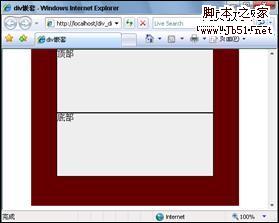
图11.6 div嵌套