
OpenClaw命令速查手册20+(核心命令 + 实战示例)
脚本之家

OpenClaw 是一个强大的 AI 助手框架,但有 40+ 核心命令,记不住怎么办?
别担心!本文为你整理了 20+ 最常用的 OpenClaw 命令,按功能分类,并提供实战示例,让你的日常工作效率提升 5 倍!
无论是配置管理、消息发送、技能部署,还是 Gateway 控制,都能在这里找到快速答案。
一、快速入门
1.1 查看帮助信息
# 查看所有命令
openclaw --help
# 查看版本号
openclaw --version
# 查看特定命令的帮助
openclaw <command> --help
# 示例:查看 config 命令帮助
openclaw config --help
1.2 初始化配置
# 首次安装后初始化配置
openclaw setup
# 交互式引导配置(推荐新手)
openclaw onboard
#配置 + 安装系统后台服务(开机自启)
openclaw onboard --install-daemon
# 打开控制面板
openclaw dashboard
二、配置管理命令
2.1 查看配置
# 查看完整配置
openclaw config get
# 查看特定配置项
openclaw config get models.default
openclaw config get providers.mistral.apiKey
# 查看特定部分配置
openclaw config get --section models
openclaw config get --section providers
示例输出:
{
  "models": {
    "default": "mistral:mixtral-8x7b"
  },
  "providers": {
    "mistral": {
      "apiKey": "***REDACTED***"
    }
  }
}
2.2 设置配置
# 设置默认模型
openclaw config set models.default mistral:mixtral-8x7b
# 设置快速模型
openclaw config set models.fast mistral:mistral-7b
# 配置 Mistral API Key
openclaw config set providers.mistral.apiKey YOUR_API_KEY_HERE
# 启用缓存
openclaw config set cache.enabled true
openclaw config set cache.maxSize 5000
2.3 删除配置
# 删除特定配置项
openclaw config unset models.fast
# 重置某个节点
openclaw config unset models
2.4 配置向导
# 打开完整配置向导
openclaw configure
# 打开特定部分配置向导
openclaw configure --section models
openclaw configure --section providers
openclaw configure --section channels
三、Gateway 控制命令
3.1 启动/停止 Gateway
# 启动 Gateway(默认端口 18789)
openclaw gateway start
# 自定义端口启动
openclaw gateway start --port 19000
# 强制启动(杀死占用进程)
openclaw gateway start --force
# 停止 Gateway
openclaw gateway stop
# 重启 Gateway
openclaw gateway restart
# 查看运行状态
openclaw gateway status
3.2 运行时 Gateway
# 前台运行 Gateway(调试用)
openclaw gateway
# 开发模式运行(隔离状态)
openclaw --dev gateway
# 查看健康状态
openclaw health
3.3 查看日志
# 查看实时日志
openclaw logs
# 查看最近 50 行日志
openclaw logs --lines 50
# 查看错误日志
openclaw logs --filter error
# 持续监控日志
openclaw logs --follow
3.4 系统服务管理
# 使用 systemd 管理(推荐生产环境)
sudo systemctl start openclaw-gateway
sudo systemctl stop openclaw-gateway
sudo systemctl restart openclaw-gateway
sudo systemctl status openclaw-gateway
# 开机自启动
sudo systemctl enable openclaw-gateway
四、消息发送命令
4.1 发送消息
# 发送消息到当前会话
openclaw message send --message "Hello"
# 发送到特定目标(Telegram)
openclaw message send \
  --channel telegram \
  --target @mychat \
  --message "Hello from OpenClaw"
# 发送到特定目标(WhatsApp)
openclaw message send \
  --channel whatsapp \
  --target +8613800138000 \
  --message "您好"
# 发送到 Slack 频道
openclaw message send \
  --channel slack \
  --target C1234567890 \
  --message "@channel 重要通知"
4.2 发送媒体文件
# 发送图片
openclaw message send \
  --channel telegram \
  --target @mychat \
  --media /tmp/photo.jpg \
  --caption "这是一张图片"
# 发送音频
openclaw message send \
  --channel whatsapp \
  --target +8613800138000 \
  --media /tmp/voice.mp3
# 发送文档
openclaw message send \
  --channel telegram \
  --target @mychat \
  --media /tmp/report.pdf
4.3 高级消息功能
# 发送 JSON 格式(脚本自动化)
openclaw message send \
  --target @mychat \
  --message "Hello" \
  --json
# 回复消息
openclaw message send \
  --target @mychat \
  --message "收到" \
  --replyTo 12345
# 指定频道
openclaw message send \
  --channel discord \
  --target channel:1234567890 \
  --message "Hello"
4.4 频道动作(投票、反应等)
# 创建投票(Telegram)
openclaw message send \
  --channel telegram \
  --target @mychat \
  --pollQuestion "OpenClaw 好用吗?" \
  --pollOption 非常好用 \
  --pollOption 一般 \
  --pollOption 还需要改进 \
  --pollDurationHours 24
# 发送反应(Discord)
openclaw message send \
  --channel discord \
  --messageId 1234567890 \
  --emoji 👍 \
  --action react
五、技能管理命令
5.1 查看技能列表
# 查看所有已安装技能
openclaw skills list
# 搜索技能
openclaw skills search weather
# 查看技能详情
openclaw skills show weather
5.2 安装/卸载技能
# 安装技能
openclaw skills install weather
# 从指定来源安装
openclaw skills install weather --source github
# 指定版本安装
openclaw skills install weather@1.2.0
# 卸载技能
openclaw skills uninstall weather
5.3 更新技能
# 更新所有技能
openclaw skills update
# 更新特定技能
openclaw skills update weather
# 同步技能
openclaw skills sync
5.4 技能开发
# 创建新技能
openclaw skills create my-skill
# 验证技能
openclaw skills validate my-skill
# 打包技能
openclaw skills pack my-skill
六、模型配置命令
6.1 查看模型
# 查看所有配置的模型
openclaw models list
# 查看默认模型
openclaw models default
# 查看模型详情
openclaw models show mistral:mixtral-8x7b
6.2 配置模型
# 设置默认模型
openclaw models set-default mistral:mixtral-8x7b
# 添加新模型
openclaw models add \
  --name my-model \
  --provider mistral \
  --id mistral-medium \
  --maxTokens 8192
# 测试模型
openclaw models test \
  --model mistral:mixtral-8x7b \
  --prompt "Hello, OpenClaw!"
6.3 模型切换
# 临时指定模型
openclaw agent \
  --model mistral:mistral-7b \
  --message "快速响应"
# 使用内置模型别名
openclaw agent --model fast --message "这个用fast模型"
openclaw agent --model premium --message "这个用premium模型"
七、频道管理命令
7.1 查看频道
# 查看所有配置的频道
openclaw channels list
# 查看频道状态
openclaw channels status
# 查看特定频道详情
openclaw channels show telegram
7.2 登录频道
# Telegram 登录
openclaw channels login --channel telegram
# WhatsApp 登录(会显示 QR 码)
openclaw channels login --channel whatsapp --verbose
# Slack 登录
openclaw channels login --channel slack
# Discord 登录
openclaw channels login --channel discord
7.3 频道测试
# 测试频道连接
openclaw channels test --channel telegram
# 发送测试消息
openclaw channels test \
  --channel telegram \
  --target @mychat \
  --message "测试消息"
7.4 频道配置
# 配置频道
openclaw channels configure --channel telegram
# 更新频道 Token
openclaw channels update \
  --channel telegram \
  --token NEW_TOKEN
# 启用/禁用频道
openclaw channels enable telegram
openclaw channels disable telegram
八、会话管理命令
8.1 查看会话
# 列出所有会话
openclaw sessions
# 列出活跃会话
openclaw sessions --active
# 列出特定频道的会话
openclaw sessions --channel telegram
# 显示最近 10 个会话
openclaw sessions --limit 10
8.2 查看会话历史
# 查看特定会话的历史
openclaw sessions history <session-key>
# 查看最近的消息
openclaw sessions history <session-key> --limit 20
# 导出会话历史
openclaw sessions history <session-key> --export > history.json
8.3 会话操作
# 发送消息到会话
openclaw sessions send \
  --session <session-key> \
  --message "你好"
# 重置会话
openclaw sessions reset <session-key>
# 删除会话
openclaw sessions delete <session-key>
九、节点管理命令(智能家居控制)
9.1 查看节点
# 查看所有配对的节点
openclaw nodes list
# 查看节点状态
openclaw nodes status
# 描述节点详情
openclaw nodes describe <node-id>
9.2 节点操作
# 发送通知到节点
openclaw nodes notify \
  --node my-phone \
  --title "提醒" \
  --body "该吃饭了"
# 设置推送优先级
openclaw nodes notify \
  --node my-phone \
  --priority timeSensitive \
  --title "紧急通知" \
  --body "快递到了"
# 查看相册(手机)
openclaw nodes camera-list --node my-phone
# 拍照
openclaw nodes camera-snap \
  --node my-phone \
  --facing back \
  --output /tmp/photo.jpg
9.3 节点配对
# 启动配对
openclaw node pairing start
# 查看待配对节点
openclaw nodes pending
# 批准配对
openclaw nodes approve --node <node-id>
# 拒绝配对
openclaw nodes reject --node <node-id>
十、记忆管理命令
10.1 搜索记忆
# 搜索记忆
openclaw memory search "OpenClaw 配置"
# 搜索并显示多行上下文
openclaw memory search "配置" --lines 5
# 搜索特定路径的记忆
openclaw memory search "配置" --path MEMORY.md
# 限制结果数量
openclaw memory search "配置" --maxResults 10
10.2 记忆操作
# 查看记忆统计
openclaw memory stats
# 清理过期记忆
openclaw memory clean
# 备份记忆
openclaw memory backup --output /tmp/memory-backup.json
十一、Cron 定时任务命令
11.1 查看 Cron 任务
# 列出所有任务
openclaw cron list
# 查看任务运行历史
openclaw cron runs <job-id>
# 查看调度器状态
openclaw cron status
11.2 创建 Cron 任务
# 创建定时任务(每天凌晨触发)
openclaw cron add \
  --name "daily-report" \
  --schedule "0 0 * * *" \
  --text "生成每日报告"
# 创建重复任务(每 30 分钟)
openclaw cron add \
  --name "check-notifications" \
  --schedule "*/30 * * * *" \
  --text "检查通知"
# 创建单次任务(特定时间)
openclaw cron add \
  --name "special-task" \
  --schedule "at" \
  --at "2026-03-01T10:00:00" \
  --text "执行特殊任务"
11.3 Cron 任务操作
# 立即运行任务
openclaw cron run <job-id>
# 更新任务
openclaw cron update <job-id> --schedule "0 6 * * *"
# 删除任务
openclaw cron remove <job-id>
# 发送唤醒事件
openclaw cron wake --text "检查新消息"
十二、系统命令
12.1 健康检查
# 运行健康检查
openclaw doctor
# 快速修复常见问题
openclaw doctor --fix
# 检查特定组件
openclaw doctor --check gateway
openclaw doctor --check channels
12.2 系统状态
# 查看频道健康状态
openclaw status
# 查看系统事件
openclaw system events
# 查看心跳状态
openclaw system heartbeat
12.3 安全检查
# 运行安全检查
openclaw security audit
# 检查权限配置
openclaw security check-permissions
# 检查 API Key 有效性
openclaw security verify-keys
十三、插件管理命令
13.1 查看插件
# 查看已安装插件
openclaw plugins list
# 查看插件详情
openclaw plugins show <plugin-name>
# 检查插件状态
openclaw plugins status
13.2 插件操作
# 启用插件
openclaw plugins enable feishu
# 禁用插件
openclaw plugins disable feishu
# 重启插件
openclaw plugins restart feishu
# 更新插件
openclaw plugins update
十四、浏览器控制命令
14.1 启动/停止浏览器
# 启动浏览器
openclaw browser start
# 停止浏览器
openclaw browser stop
# 切换配置
openclaw browser start --profile chrome
openclaw browser start --profile openclaw
14.2 浏览器操作
# 打开网页
openclaw browser open https://example.com
# 截图
openclaw browser screenshot --output /tmp/screenshot.png
# 获取快照
openclaw browser snapshot --target main
# 查看标签页
openclaw browser tabs
十五、更新与维护命令
15.1 更新 OpenClaw
# 查看更新
openclaw update --dry-run
# 执行更新
openclaw update
# 更新到特定版本
openclaw update --tag 2026.2.22
# 更新到 Beta 版
openclaw update --channel beta
15.2 配置文件管理
# 备份配置
cp ~/.openclaw/config.json ~/.openclaw/config.json.backup
# 重置配置(保留 CLI)
openclaw reset
# 完全卸载(包括数据)
openclaw uninstall
15.3 Shell 自动补全
# 生成 Bash 补全脚本
openclaw completion bash > ~/.openclaw-completion
# 生成 Zsh 补全脚本
openclaw completion zsh > ~/.zsh-completion
# 应用补全(Bash)
echo "source ~/.openclaw-completion" >> ~/.bashrc
source ~/.bashrc
十六、常用组合命令
16.1 快速部署新技能
# 一键创建、开发、测试技能
openclaw skills create my-new-skill \
  && cd ~/.openclaw/workspace/skills/my-new-skill \
  && vim SKILL.md
16.2 批量发送通知
# 发送到多个目标
openclaw message send --target @user1 --message "通知内容"
openclaw message send --target @user2 --message "通知内容"
openclaw message send --target @user3 --message "通知内容"
# 使用循环批量发送(需要脚本配合)
for target in user1 user2 user3; do
  openclaw message send --target @$target --message "通知内容"
done
16.3 Gateway 重启 + 验证
# 重启并验证
openclaw gateway restart \
  && sleep 5 \
  && openclaw gateway status \
  && openclaw health
16.4 配置备份 + 更新
# 安全更新流程
cp ~/.openclaw/config.json ~/.openclaw/config.json.backup \
  && openclaw update --dry-run \
  && openclaw update \
  && openclaw gateway restart
16.5 每日报告生成
# 生成每日报告(Cron 脚本)
0 9 * * * openclaw cron add \
  --name daily-report \
  --schedule "0 9 * * *" \
  --text "生成昨日数据分析报告"
十七、故障排除命令
17.1 Gateway 无法启动
# 检查端口占用
sudo lsof -i :18789
# 强制重启
openclaw gateway start --force
# 查看错误日志
openclaw logs --filter error
# 运行健康检查
openclaw doctor
17.2 消息发送失败
# 检查频道状态
openclaw channels status
# 测试频道
openclaw channels test --channel telegram
# 重新登录频道
openclaw channels login --channel telegram
# 查看详细日志
openclaw message send --target @mychat --message "Test" --verbose
17.3 模型调用失败
# 检查 API Key
openclaw config get providers.openai.apiKey
# 测试模型
openclaw models test --model mistral:mixtral-8x7b --prompt "test"
# 检查网络连接
ping api.openai.com
# 运行诊断
openclaw doctor --check models
17.4 技能加载失败
# 检查技能列表
openclaw skills list
# 验证技能
openclaw skills validate my-skill
# 重新安装技能
openclaw skills uninstall my-skill
openclaw skills install my-skill
# 查看错误日志
openclaw logs --filter skill
十八、生产环境最佳实践
18.1 使用环境变量
# 推荐方式:使用环境变量存储敏感信息
export OPENAI_API_KEY="sk-xxx"
export MISTRAL_API_KEY="xxx"
export TELEGRAM_BOT_TOKEN="xxx"
# 然后启动 Gateway
openclaw gateway start
18.2 配置文件权限
# 限制配置文件权限
chmod 600 ~/.openclaw/config.json
# 检查权限
ls -la ~/.openclaw/config.json
18.3 日志管理
# 配置日志轮转
sudo tee /etc/logrotate.d/openclaw <<EOF
~/.openclaw/logs/*.log {
    daily
    rotate 7
    compress
    missingok
    notifempty
}
EOF
18.4 监控与告警
# 检查 Gateway 状态(Cron 脚本)
*/5 * * * * openclaw health || \
  openclaw message send --target @admin --message "Gateway 宕机!"
十九、快捷别名配置
19.1 创建常用别名
# 添加到 ~/.bashrc 或 ~/.zshrc
alias oc='openclaw'
alias ocg='openclaw gateway'
alias ocgl='openclaw logs --follow'
alias ocs='openclaw sessions'
alias ocm='openclaw message send'
alias occ='openclaw channels'
# 应用别名
source ~/.bashrc  # Bash
source ~/.zshrc   # Zsh
19.2 使用别名
# 启动 Gateway
ocg start
# 查看实时日志
ocgl
# 发送消息
ocm --target @mychat --message "Hello"
# 查看会话
ocs
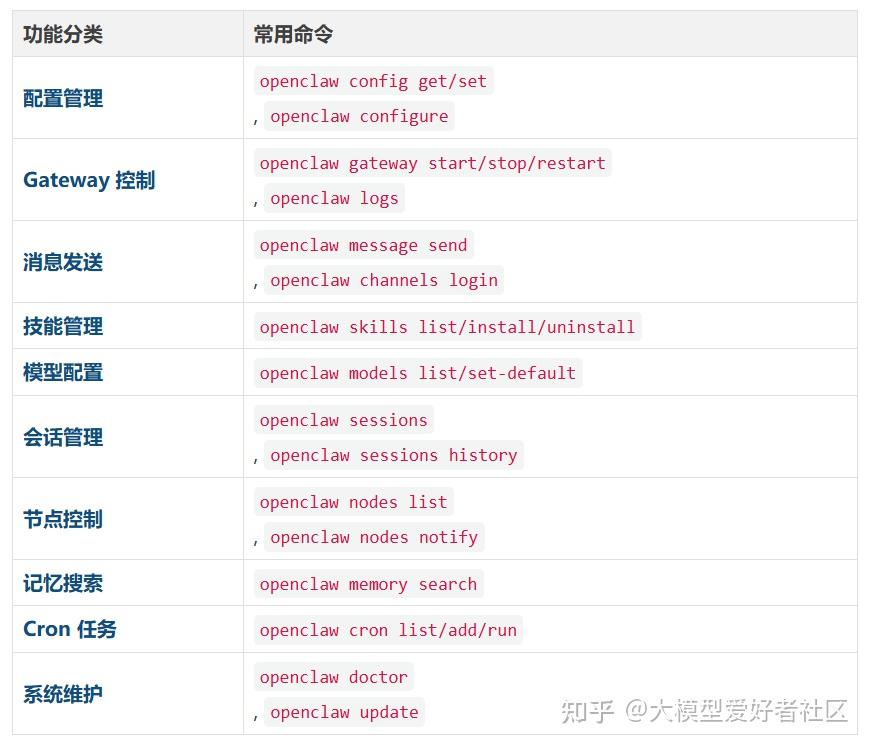
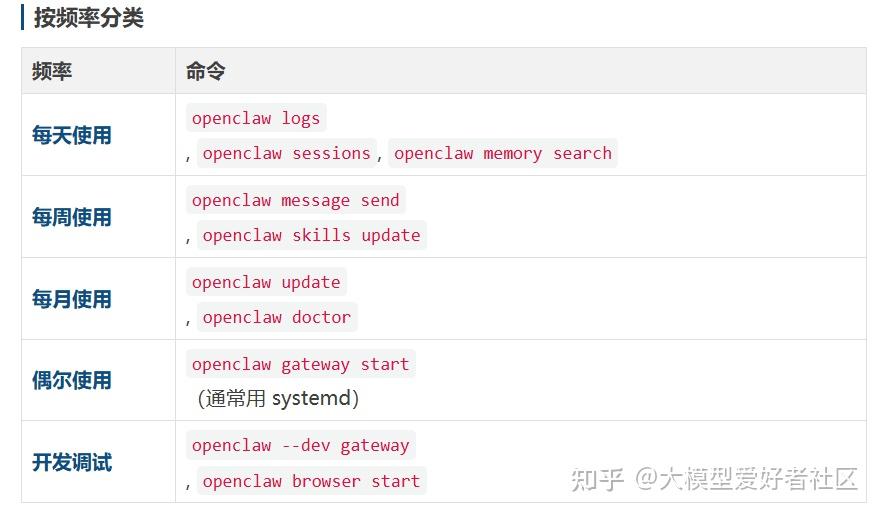
二十、命令速查表
总结
OpenClaw 提供了丰富的命令行工具,掌握这些命令可以大幅提升工作效率。