
基于Python与Slint实现的网络调试助手源码分享
作者:小灰灰搞电子
一、效果展示
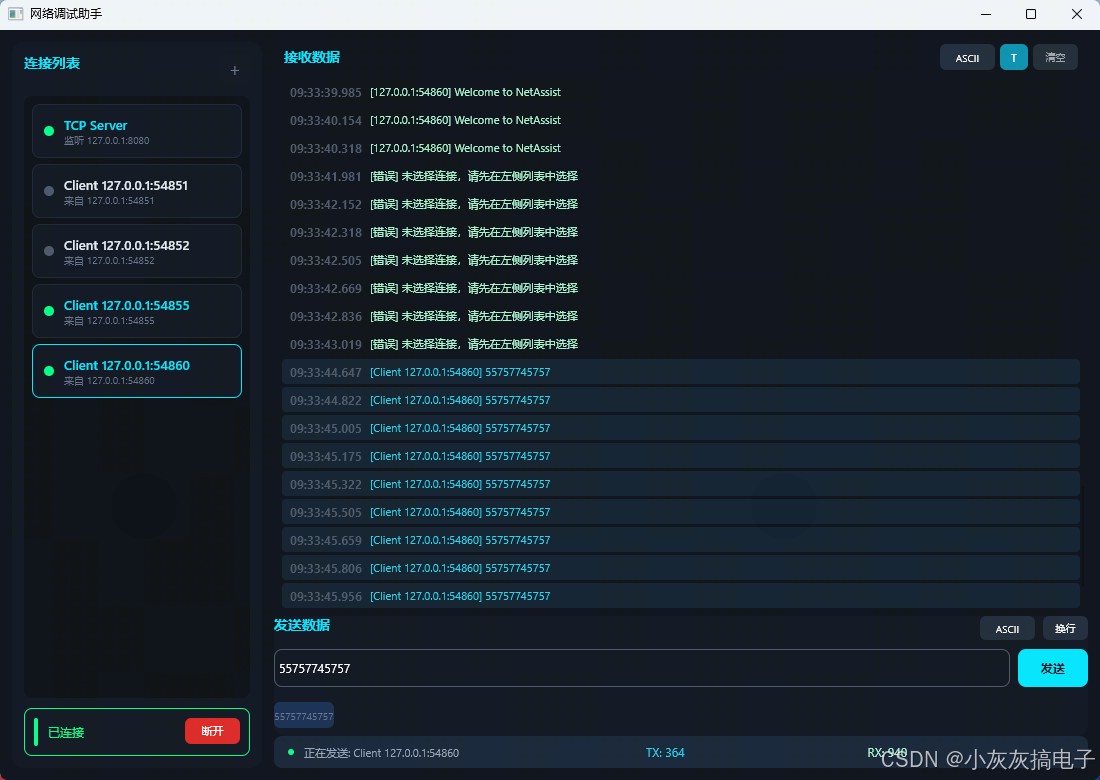
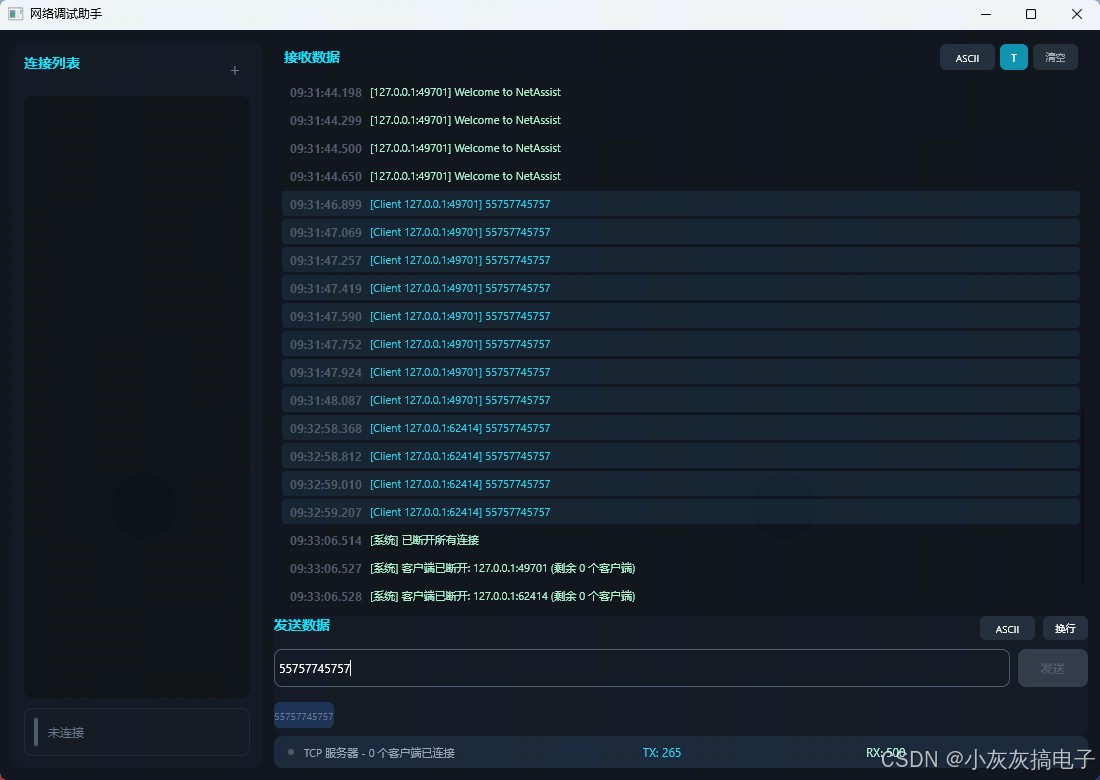
二、源码分享
1、工程结构
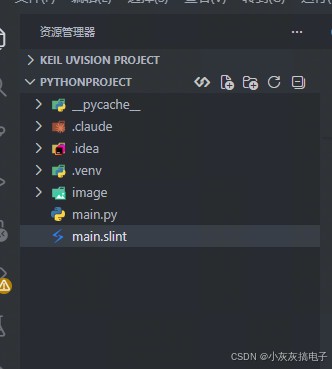
2、main.py
# -*- coding: utf-8 -*-

import os
import sys
import socket
import threading
import queue
from datetime import datetime, timedelta

import slint

# ═══════════════════════════════════════════════════════
# 全局变量
# ═══════════════════════════════════════════════════════
ui = None
connections = []  # 内部连接数据,包含 socket
tx_count = 0
rx_count = 0
send_history = []
max_history = 5
message_queue = queue.Queue()
server_socket = None
server_thread = None
server_running = False

# ═══════════════════════════════════════════════════════
# 连接管理
# ═══════════════════════════════════════════════════════
def create_connection(protocol_idx: int, ip_addr: str, port_str: str) -> bool:
    """创建新连接"""
    global server_socket, server_thread, server_running

    try:
        port = int(port_str)
        if port < 1 or port > 65535:
            add_message("[错误] 端口号必须在 1-65535 之间", False)
            return False

        if protocol_idx == 0:  # TCP 客户端
            return create_tcp_client(ip_addr, port)
        elif protocol_idx == 1:  # TCP 服务器
            return create_tcp_server(ip_addr, port)
        elif protocol_idx == 2:  # UDP
            return create_udp(ip_addr, port)
        else:
            add_message("[错误] 未知的协议类型", False)
            return False

    except Exception as e:
        add_message(f"[错误] 创建连接失败: {str(e)}", False)
        return False

def create_tcp_client(ip_addr: str, port: int) -> bool:
    """创建 TCP 客户端连接"""
    try:
        client_socket = socket.socket(socket.AF_INET, socket.SOCK_STREAM)
        client_socket.settimeout(5.0)
        client_socket.connect((ip_addr, port))
        client_socket.settimeout(None)

        conn_info = {
            "name": f"TCP Client",
            "description": f"{ip_addr}:{port}",
            "connected": True,
            "socket": client_socket,
            "mode": "tcp_client",
            "addr": (ip_addr, port)
        }
        connections.append(conn_info)
        conn_index = len(connections) - 1
        update_connections_ui()

        thread = threading.Thread(
            target=tcp_client_read_loop,
            args=(client_socket, conn_index),
            daemon=True
        )
        thread.start()

        ui.is_connected = True
        ui.status_text = f"TCP 客户端已连接到 {ip_addr}:{port}"
        add_message(f"[系统] 已连接到 {ip_addr}:{port}", False)
        return True

    except Exception as e:
        add_message(f"[错误] TCP 客户端连接失败: {str(e)}", False)
        return False

def create_tcp_server(ip_addr: str, port: int) -> bool:
    """创建 TCP 服务器"""
    global server_socket, server_thread, server_running

    try:
        server_socket = socket.socket(socket.AF_INET, socket.SOCK_STREAM)
        server_socket.setsockopt(socket.SOL_SOCKET, socket.SO_REUSEADDR, 1)
        server_socket.bind((ip_addr, port))
        server_socket.listen(5)
        server_socket.settimeout(1.0)

        server_running = True

        server_thread = threading.Thread(
            target=tcp_server_accept_loop,
            daemon=True
        )
        server_thread.start()

        conn_info = {
            "name": f"TCP Server",
            "description": f"监听 {ip_addr}:{port}",
            "connected": True,
            "socket": server_socket,
            "mode": "tcp_server"
        }
        connections.append(conn_info)
        update_connections_ui()

        ui.is_connected = True
        ui.status_text = f"TCP 服务器正在监听 {ip_addr}:{port}"
        add_message(f"[系统] 服务器已启动,监听 {ip_addr}:{port}", False)
        return True

    except Exception as e:
        add_message(f"[错误] TCP 服务器启动失败: {str(e)}", False)
        if server_socket:
            server_socket.close()
            server_socket = None
        return False

def create_udp(ip_addr: str, port: int) -> bool:
    """创建 UDP 连接"""
    try:
        udp_socket = socket.socket(socket.AF_INET, socket.SOCK_DGRAM)
        udp_socket.setsockopt(socket.SOL_SOCKET, socket.SO_REUSEADDR, 1)
        udp_socket.bind(('', port))
        udp_socket.settimeout(1.0)

        target_addr = (ip_addr, port)

        conn_info = {
            "name": f"UDP",
            "description": f"绑定:{port} 目标:{ip_addr}:{port}",
            "connected": True,
            "socket": udp_socket,
            "mode": "udp",
            "addr": target_addr
        }
        connections.append(conn_info)
        conn_index = len(connections) - 1
        update_connections_ui()

        thread = threading.Thread(
            target=udp_read_loop,
            args=(udp_socket, conn_index),
            daemon=True
        )
        thread.start()

        ui.is_connected = True
        ui.status_text = f"UDP 绑定端口 {port}, 目标 {ip_addr}:{port}"
        add_message(f"[系统] UDP 已绑定端口 {port}, 目标 {ip_addr}:{port}", False)
        return True

    except Exception as e:
        add_message(f"[错误] UDP 绑定失败: {str(e)}", False)
        return False

def disconnect_all():
    """断开所有连接"""
    global server_socket, server_running

    if server_socket:
        server_running = False
        try:
            server_socket.close()
        except:
            pass
        server_socket = None

    for conn in connections:
        if conn.get("socket"):
            try:
                conn["socket"].close()
            except:
                pass
        conn["connected"] = False

    connections.clear()
    update_connections_ui()

    ui.is_connected = False
    ui.status_text = "已断开所有连接"
    ui.selected_conn_index = -1
    add_message("[系统] 已断开所有连接", False)

# ═══════════════════════════════════════════════════════
# 数据发送
# ═══════════════════════════════════════════════════════
def send_data(data: str, is_hex: bool, add_newline: bool) -> bool:
    """发送数据 - 从选中的连接发送"""
    global tx_count

    if not ui.is_connected:
        add_message("[错误] 未建立连接", False)
        return False

    selected_index = int(ui.selected_conn_index)
    if selected_index < 0 or selected_index >= len(connections):
        add_message("[错误] 未选择连接,请先在左侧列表中选择", False)
        return False

    conn = connections[selected_index]
    if not conn.get("connected") or not conn.get("socket"):
        add_message("[错误] 选中的连接已断开", False)
        return False

    sock = conn["socket"]
    mode = conn.get("mode")

    try:
        if is_hex:
            hex_str = data.replace(" ", "").replace("-", "")
            if len(hex_str) % 2 != 0:
                add_message("[错误] HEX 数据长度必须为偶数", False)
                return False
            send_bytes = bytes.fromhex(hex_str)
        else:
            send_bytes = data.encode('utf-8')
            if add_newline:
                send_bytes += b'\r\n'

        if mode == "tcp_client":
            sock.send(send_bytes)
        elif mode == "tcp_server":
            add_message("[错误] TCP 服务器不能直接发送,请选择具体的客户端连接", False)
            return False
        elif mode == "tcp_server_client":
            sock.send(send_bytes)
        elif mode == "udp":
            target_addr = conn.get("addr")
            if target_addr:
                sock.sendto(send_bytes, target_addr)
            else:
                add_message("[错误] UDP 未设置目标地址", False)
                return False
        else:
            add_message("[错误] 未知的连接模式", False)
            return False

        tx_count += len(send_bytes)
        ui.tx_count = tx_count

        if is_hex:
            display_text = " ".join(f"{b:02X}" for b in send_bytes)
        else:
            display_text = data + ("\r\n" if add_newline else "")
        add_message(f"[{conn['name']}] {display_text}", True)
        add_history(data)

        return True

    except ValueError as e:
        add_message(f"[错误] 无效的 HEX 数据: {data}", False)
        return False
    except Exception as e:
        add_message(f"[发送错误] {str(e)}", False)
        return False

# ═══════════════════════════════════════════════════════
# 消息队列处理
# ═══════════════════════════════════════════════════════
def process_message_queue():
    """处理消息队列(在主线程中调用)"""
    global rx_count, tx_count

    while not message_queue.empty():
        try:
            msg = message_queue.get_nowait()
            msg_type = msg[0]

            if msg_type == "rx":
                data, source, rx, tx = msg[1], msg[2], msg[3], msg[4]
                rx_count = rx
                tx_count = tx
                ui.rx_count = rx_count
                ui.tx_count = tx_count

                if ui.recv_hex_mode:
                    display_text = " ".join(f"{b:02X}" for b in data)
                else:
                    try:
                        display_text = data.decode('utf-8', errors='replace')
                    except:
                        display_text = data.decode('latin-1', errors='replace')

                if source:
                    add_message(f"[{source}] {display_text}", False)
                else:
                    add_message(display_text, False)

            elif msg_type == "client_connected":
                client_addr, client_count = msg[1], msg[2]
                add_message(f"[系统] 客户端已连接: {client_addr} (当前 {client_count} 个客户端)", False)
                ui.status_text = f"TCP 服务器 - {client_count} 个客户端已连接"
                update_connections_ui()

            elif msg_type == "client_disconnected":
                client_addr, client_count = msg[1], msg[2]
                add_message(f"[系统] 客户端已断开: {client_addr} (剩余 {client_count} 个客户端)", False)
                ui.status_text = f"TCP 服务器 - {client_count} 个客户端已连接"

            elif msg_type == "conn_closed":
                conn_idx = msg[1]
                if conn_idx < len(connections):
                    connections[conn_idx]["connected"] = False
                    update_connections_ui()
                    has_connected = any(c.get("connected") for c in connections)
                    ui.is_connected = has_connected
                    if not has_connected:
                        ui.status_text = "所有连接已断开"

            elif msg_type == "error":
                text, rx, tx = msg[1], msg[2], msg[3]
                rx_count = rx
                tx_count = tx
                ui.rx_count = rx_count
                ui.tx_count = tx_count
                add_message(f"[错误] {text}", False)

        except queue.Empty:
            break

# ═══════════════════════════════════════════════════════
# 接收线程
# ═══════════════════════════════════════════════════════
def tcp_client_read_loop(client_socket, conn_index):
    """TCP 客户端接收线程"""
    global rx_count

    while True:
        try:
            data = client_socket.recv(4096)
            if data:
                rx_count += len(data)
                message_queue.put(("rx", data, "", rx_count, tx_count))
            else:
                message_queue.put(("conn_closed", conn_index))
                message_queue.put(("error", "连接已关闭", rx_count, tx_count))
                break
        except Exception as e:
            message_queue.put(("conn_closed", conn_index))
            message_queue.put(("error", str(e), rx_count, tx_count))
            break

def tcp_server_accept_loop():
    """TCP 服务器接受连接线程"""
    global rx_count, tx_count

    while server_running and server_socket:
        try:
            client_socket, client_addr = server_socket.accept()
            client_socket.settimeout(None)

            conn_info = {
                "name": f"Client {client_addr[0]}:{client_addr[1]}",
                "description": f"来自 {client_addr[0]}:{client_addr[1]}",
                "connected": True,
                "socket": client_socket,
                "mode": "tcp_server_client",
                "addr": client_addr
            }
            connections.append(conn_info)
            conn_index = len(connections) - 1

            client_count = len([c for c in connections if c.get("mode") == "tcp_server_client"])
            message_queue.put(("client_connected", f"{client_addr[0]}:{client_addr[1]}", client_count))

            thread = threading.Thread(
                target=tcp_server_client_read_loop,
                args=(client_socket, client_addr, conn_index),
                daemon=True
            )
            thread.start()

        except socket.timeout:
            continue
        except Exception as e:
            if server_running:
                message_queue.put(("error", str(e), rx_count, tx_count))
            break

def tcp_server_client_read_loop(client_socket, client_addr, conn_index):
    """TCP 服务器客户端接收线程"""
    global rx_count

    while server_running:
        try:
            data = client_socket.recv(4096)
            if data:
                rx_count += len(data)
                message_queue.put(("rx", data, f"{client_addr[0]}:{client_addr[1]}", rx_count, tx_count))
            else:
                break
        except:
            break

    try:
        client_socket.close()
    except:
        pass

    client_count = len([c for c in connections if c.get("mode") == "tcp_server_client" and c.get("connected")]) - 1
    message_queue.put(("conn_closed", conn_index))
    message_queue.put(("client_disconnected", f"{client_addr[0]}:{client_addr[1]}", client_count))

def udp_read_loop(udp_socket, conn_index):
    """UDP 接收线程"""
    global rx_count

    while True:
        try:
            data, addr = udp_socket.recvfrom(4096)
            if data:
                rx_count += len(data)
                message_queue.put(("rx", data, f"{addr[0]}:{addr[1]}", rx_count, tx_count))
        except socket.timeout:
            continue
        except Exception as e:
            message_queue.put(("conn_closed", conn_index))
            message_queue.put(("error", str(e), rx_count, tx_count))
            break

# ═══════════════════════════════════════════════════════
# UI 更新
# ═══════════════════════════════════════════════════════
def update_connections_ui():
    """更新连接列表 UI"""
    ui_data = []
    for conn in connections:
        ui_data.append({
            "name": str(conn.get("name", "")),
            "description": str(conn.get("description", "")),
            "connected": bool(conn.get("connected", False))
        })
    ui.connections = slint.ListModel(ui_data)

def add_message(text: str, is_sent: bool):
    """添加消息到接收区"""
    timestamp = datetime.now().strftime("%H:%M:%S.%f")[:-3]
    messages = list(ui.messages)
    messages.append({
        "text": text,
        "is_sent": is_sent,
        "timestamp": timestamp
    })
    max_messages = 500
    if len(messages) > max_messages:
        messages = messages[-max_messages:]
    ui.messages = slint.ListModel(messages)

def add_history(text: str):
    """添加到发送历史"""
    global send_history
    if text and text not in send_history:
        send_history.insert(0, text)
        if len(send_history) > max_history:
            send_history = send_history[:max_history]
        update_history_ui()

def update_history_ui():
    """更新历史记录 UI"""
    history_list = [{"text": h} for h in send_history]
    ui.send_history = slint.ListModel(history_list)

# ═══════════════════════════════════════════════════════
# 主程序
# ═══════════════════════════════════════════════════════
def main():
    global ui

    SLINT_PATH = os.path.join(os.path.dirname(os.path.abspath(__file__)), "main.slint")

    try:
        ui_module = slint.load_file(SLINT_PATH)
        MainWindow = ui_module.MainWindow
        ConnectionDialog = ui_module.ConnectionDialog

        ui = MainWindow()

        def on_new_connection():
            dialog = ConnectionDialog()

            def on_connect():
                protocol_idx = dialog.protocol_index
                ip_addr = dialog.ip_address
                port_str = dialog.port_number

                success = create_connection(protocol_idx, ip_addr, port_str)
                if success:
                    dialog.hide()

            def on_cancel():
                dialog.hide()

            dialog.connect_clicked = on_connect
            dialog.cancel_clicked = on_cancel
            dialog.show()

        def on_conn_double_clicked(conn_index):
            conn_index = int(conn_index)
            if conn_index < 0 or conn_index >= len(connections):
                return

            conn = connections[conn_index]
            if conn.get("connected") and conn.get("socket"):
                try:
                    conn["socket"].close()
                except:
                    pass
                conn["connected"] = False
                update_connections_ui()
                add_message(f"[系统] 已断开 {conn['name']}", False)

                has_connected = any(c.get("connected") for c in connections)
                ui.is_connected = has_connected
                if not has_connected:
                    ui.status_text = "所有连接已断开"

        def on_send_message():
            send_text = ui.send_text
            if not send_text.strip():
                return

            selected_idx = int(ui.selected_conn_index)
            if 0 <= selected_idx < len(connections):
                conn = connections[selected_idx]
                ui.status_text = f"正在发送: {conn['name']}"

            send_data(send_text, ui.send_hex_mode, ui.add_newline)

        def on_clear_messages():
            ui.messages = slint.ListModel([])
            ui.tx_count = 0
            ui.rx_count = 0

        def on_disconnect():
            disconnect_all()

        def on_history_selected(index):
            index = int(index)
            if 0 <= index < len(send_history):
                ui.send_text = send_history[index]

        ui.new_connection = on_new_connection
        ui.conn_double_clicked = on_conn_double_clicked
        ui.send_message = on_send_message
        ui.clear_messages = on_clear_messages
        ui.disconnect_conn = on_disconnect
        ui.history_selected = on_history_selected

        ui.messages = slint.ListModel([])
        ui.connections = slint.ListModel([])
        update_history_ui()

        def process_queue():
            process_message_queue()

        queue_timer = slint.Timer()
        queue_timer.start(slint.TimerMode.Repeated, timedelta(milliseconds=50), process_queue)


        ui.run()

    except Exception as e:
        print(f"启动失败: {e}")
        import traceback
        traceback.print_exc()
        sys.exit(1)


if __name__ == "__main__":
    main()
4、main.slint
import { ComboBox, LineEdit, ScrollView } from "std-widgets.slint";
export struct ConnectionInfo { name: string, description: string, connected: bool }
export struct MessageItem { text: string, is-sent: bool, timestamp: string }
export struct HistoryItem { text: string }
component ConnectionItem inherits Rectangle {
in property <string> conn-name;
in property <string> conn-desc;
in property <bool> is-connected;
in property <bool> is-selected;
callback clicked();
callback double-clicked();
background: item-touch.pressed ? #1e293b : (item-touch.has-hover ? #0e1520 : #0c1420);
border-radius: 8px;
border-width: 1px;
border-color: is-selected ? #00e5ff : #1a2332;
item-touch := TouchArea {
clicked => { root.clicked(); }
double-clicked => { root.double-clicked(); }
}
HorizontalLayout {
padding-left: 12px; padding-right: 12px;
Rectangle {y:parent.height/2 - self.height/2; width: 10px; height: 10px; border-radius: 5px; background: is-connected ? #00ff88 : #4a5568; }
VerticalLayout {
padding-left: 10px; alignment: center;
Text { text: conn-name; font-size: 13px; font-weight: 600; color: is-connected ? #00e5ff : #e2e8f0; }
Text { text: conn-desc; font-size: 10px; color: #64748b; overflow: elide; }
}
}
}
export component ConnectionDialog inherits Window {
title: "连接参数";
preferred-width: 380px; preferred-height: 450px; background: #0a0e1a;
in-out property <string> title-text: "新建连接";
callback connect-clicked(); callback cancel-clicked();
out property <int> protocol-index: protocol-combo-idx;
out property <string> ip-address: ip-input.text;
out property <string> port-number: port-input.text;
property <int> protocol-combo-idx: 1;
VerticalLayout {
padding: 20px; spacing: 15px;
Rectangle { height: 50px; background: #1e293b; border-radius: 8px;
Text { text: title-text; font-size: 16px; font-weight: 700; color: #00e5ff; horizontal-alignment: center; vertical-alignment: center; }
}
Rectangle { vertical-stretch: 1; background: #0c1420; border-radius: 8px;
VerticalLayout { padding: 20px; spacing: 12px;
HorizontalLayout { height: 35px; Text { text: "协议:"; width: 80px; color: #94a3b8; vertical-alignment: center; }
ComboBox { horizontal-stretch: 1; model: ["TCP 客户端", "TCP 服务器", "UDP"]; current-index <=> protocol-combo-idx; } }
HorizontalLayout { height: 35px; Text { text: "IP 地址:"; width: 80px; color: #94a3b8; vertical-alignment: center; }
ip-input := LineEdit { horizontal-stretch: 1; placeholder-text: "127.0.0.1"; text: "127.0.0.1"; } }
HorizontalLayout { height: 35px; Text { text: "端口:"; width: 80px; color: #94a3b8; vertical-alignment: center; }
port-input := LineEdit { horizontal-stretch: 1; placeholder-text: "8080"; text: "8080"; } }
}
}
HorizontalLayout { height: 45px; alignment: end; spacing: 12px;
Rectangle { width: 100px; height: 38px; border-radius: 8px; background: #1f2937; border-width: 1px; border-color: #4b5563;
cancel-touch := TouchArea { clicked => { root.cancel-clicked(); } }
Text { text: "取消"; color: #9ca3af; horizontal-alignment: center; vertical-alignment: center; } }
Rectangle { width: 100px; height: 38px; border-radius: 8px; background: #00e5ff;
connect-touch := TouchArea { clicked => { root.connect-clicked(); } }
Text { text: "连接"; color: #0a0e1a; font-weight: 600; horizontal-alignment: center; vertical-alignment: center; } }
}
}
}
export component MainWindow inherits Window {
title: "网络调试助手";
preferred-width: 1100px; preferred-height: 750px;
min-width: 1000px; min-height: 700px;
background: #0a0e1a;
in-out property <[ConnectionInfo]> connections;
in-out property <int> selected-conn-index: -1;
in-out property <[MessageItem]> messages:[
{ text: "欢迎使用网络调试助手", is-sent: false, timestamp: "14:55:22" },
{ text: "支持 TCP 客户端、TCP 服务器、UDP 模式", is-sent: false, timestamp: "14:55:22" },
{ text: "点击右下角新建连接按钮开始", is-sent: false, timestamp: "14:55:22" },
];
in-out property <[HistoryItem]> send-history:[];
in-out property <string> send-text: "";
in-out property <bool> send-hex-mode: false;
in-out property <bool> recv-hex-mode: false;
in-out property <bool> show-timestamp: true;
in-out property <bool> add-newline: true;
in-out property <int> tx-count: 0;
in-out property <int> rx-count: 0;
in-out property <string> status-text: "就绪";
in-out property <bool> is-connected: false;
callback new-connection();
callback conn-double-clicked(int);
callback send-message();
callback clear-messages();
callback disconnect-conn();
callback history-selected(int);
HorizontalLayout {
padding: 12px; spacing: 12px;
// 左侧面板
Rectangle {
width: 250px;
background: #0c1420;
border-radius: 12px;
VerticalLayout {
padding: 12px; spacing: 10px;
HorizontalLayout {
height: 32px;
Text { text: "连接列表"; font-size: 14px; font-weight: 700; color: #00e5ff; }
Rectangle { width: 30px; height: 30px; border-radius: 6px; background: #0e1520;
new-touch := TouchArea { clicked => { root.new-connection(); } }
Text { text: "+"; font-size: 18px; color: #64748b; horizontal-alignment: center; vertical-alignment: center; }
}
}
Rectangle { vertical-stretch: 1; background: #080c14; border-radius: 8px;
ScrollView {
VerticalLayout { spacing: 6px; padding: 8px;
for conn[idx] in connections: ConnectionItem {
height: 54px; conn-name: conn.name; conn-desc: conn.description;
is-connected: conn.connected; is-selected: idx == root.selected-conn-index;
clicked => { root.selected-conn-index = idx; }
double-clicked => { root.selected-conn-index = idx; root.conn-double-clicked(idx); }
}
}
}
}
Rectangle {
height: 48px; background: #0e1520; border-radius: 8px;
border-width: 1px; border-color: is-connected ? #00ff88 : #1a2332;
HorizontalLayout {
padding: 10px;
width: 100%; height: 100%;
Rectangle {
y:parent.height/2 - self.height/2;
width: 4px;
border-radius: 4px;
background: is-connected ? #00ff88 : #4a5568;
}
VerticalLayout { padding-left: 10px; alignment: center;
Text { text: is-connected ? "已连接" : "未连接"; font-size: 12px; color: is-connected ? #00ff88 : #64748b; }
}
if is-connected: Rectangle {
width: 55px; height: 26px;
border-radius: 6px;
background: #dc2626;
disc-touch := TouchArea { clicked => { root.disconnect-conn(); } }
Text {
text: "断开"; font-size: 11px; color: #fff;
horizontal-alignment: center; vertical-alignment: center;
}
}
}
}
}
}
Rectangle {
VerticalLayout {
Rectangle {
height: 30px;
HorizontalLayout {
spacing: 5px;
padding-left: 10px;
padding-right: 10px;
Text { text: "接收数据"; font-size: 14px; font-weight: 700; color: #00e5ff;vertical-alignment: center; }
Rectangle {
y:parent.height/2 - self.height/2; width: 55px; height: 26px; border-radius: 6px; background: recv-hex-mode ? #0891b2 : #1e293b;
TouchArea { clicked => { root.recv-hex-mode = !root.recv-hex-mode; } }
Text { text: root.recv-hex-mode ? "HEX" : "ASCII"; font-size: 10px; color: #fff; horizontal-alignment: center; vertical-alignment: center; }
}
Rectangle {
y:parent.height/2 - self.height/2; width: 28px; height: 26px; border-radius: 6px; background: show-timestamp ? #0891b2 : #1e293b;
TouchArea { clicked => { root.show-timestamp = !root.show-timestamp; } }
Text { text: "T"; font-size: 11px; color: #fff; horizontal-alignment: center; vertical-alignment: center; }
}
Rectangle {
y:parent.height/2 - self.height/2; width: 45px; height: 26px; border-radius: 6px; background: #1f2937;
clear-touch := TouchArea { clicked => { root.clear-messages(); } }
Text { text: "清空"; font-size: 10px; color: #9ca3af; horizontal-alignment: center; vertical-alignment: center; }
}
}
}
Rectangle {
ScrollView {
viewport-height: recv.preferred-height;
viewport-y: max(0px, self.viewport-height - self.height)*-1;
recv := VerticalLayout {
spacing: 3px;
padding: 8px;
for msg in messages: Rectangle {
height: 25px; background: msg.is-sent ? #0f1f2e : #0a1018; border-radius: 4px;
HorizontalLayout { padding-left: 8px; padding-right: 8px; spacing: 8px;
if show-timestamp: Text {
text: msg.timestamp; font-size: 12px;
color: #4a5568; vertical-alignment: center;
font-weight: 700;
}
Text { text: msg.text; font-size: 11px;
color: msg.is-sent ? #22d3ee : #a7f3d0;
vertical-alignment: center; horizontal-stretch: 1;
overflow: elide;
}
}
}
}
}
}
//发送区
Rectangle {
height: 120px;
background: #0c1420; border-radius: 12px;
VerticalLayout {
spacing: 5px;
HorizontalLayout { height: 28px;
Text { text: "发送数据"; font-size: 14px; font-weight: 700; color: #00e5ff; }
HorizontalLayout { horizontal-stretch: 1; alignment: end; spacing: 8px;
Rectangle { width: 55px; height: 24px; border-radius: 6px; background: send-hex-mode ? #0891b2 : #1e293b;
TouchArea { clicked => { root.send-hex-mode = !root.send-hex-mode; } }
Text { text: root.send-hex-mode ? "HEX" : "ASCII"; font-size: 10px; color: #fff; horizontal-alignment: center; vertical-alignment: center; }
}
Rectangle { width: 45px; height: 24px; border-radius: 6px; background: add-newline ? #0891b2 : #1e293b;
TouchArea { clicked => { root.add-newline = !root.add-newline; } }
Text { text: "换行"; font-size: 10px; color: #fff; horizontal-alignment: center; vertical-alignment: center; }
}
}
}
HorizontalLayout { height: 38px; spacing: 8px;
Rectangle {
border-radius: 8px;
border-color: #4a5568; border-width: 1px;
TextInput {
x:5px;
color: white; font-size: 12px;
text <=> root.send-text;
vertical-alignment: center;
accepted => { root.send-message(); }
}
}
Rectangle { width: 70px; height: 38px; border-radius: 8px; background: is-connected ? #00e5ff : #2d3748;
send-touch := TouchArea { clicked => { if is-connected { root.send-message(); } } }
Text { text: "发送"; font-size: 12px; font-weight: 600; color: is-connected ? #0a0e1a : #4a5568; horizontal-alignment: center; vertical-alignment: center; }
}
}
ScrollView {
viewport-width: send.preferred-width;
viewport-x: max(0px, self.viewport-width - self.width)*-1;
send := HorizontalLayout {
height: 30px; spacing: 6px;
for h[hi] in send-history: Rectangle {
height: 26px;
background: #172d52; border-radius: 6px;
TouchArea { clicked => { root.history-selected(hi); } }
Text { text: h.text; font-size: 10px;
color: #64748b; horizontal-alignment: center;
vertical-alignment: center; overflow: elide;
}
}
}
}
}
}
// 状态栏
Rectangle {
height: 32px; background: #152338; border-radius: 8px;
HorizontalLayout {
padding-left: 14px; padding-right: 14px;
spacing: 10px;
Rectangle {y:parent.height/2 - self.height/2; width: 6px; height: 6px; border-radius: 3px; background: is-connected ? #00ff88 : #4a5568; }
Text { text: status-text; font-size: 11px; color: #94a3b8; vertical-alignment: center; }
HorizontalLayout { horizontal-stretch: 1; }
Text { text: "TX: " + tx-count; font-size: 12px; color: #22d3ee; vertical-alignment: center; }
Text { text: " RX: " + rx-count; font-size: 12px; color: #a7f3d0; vertical-alignment: center; }
}
}
}
}
}
}
三、实现原理
本工具基于 Python + Slint 构建,核心思路是:Python 负责网络通信与业务逻辑,Slint 负责界面渲染与交互,两者通过 Slint 提供的绑定机制进行数据同步。下面从几个关键模块逐一拆解实现原理。
1、整体架构
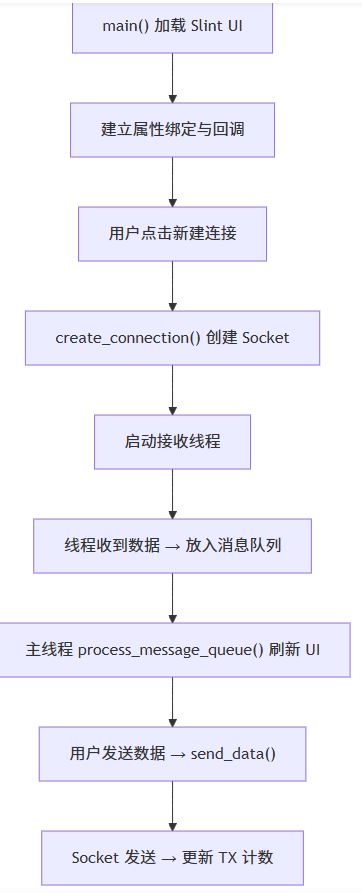
程序启动后,main() 函数会加载 main.slint 中定义的 MainWindow 组件,并建立 Python 与 UI 之间的双向绑定。UI 上的按钮点击、输入框内容变化等事件,会通过回调(callback)触发 Python 侧的函数;而 Python 侧的网络状态、收发字节数、消息列表等数据,则通过属性(property)同步回 UI 实时刷新。
整体流程如下:
2、连接管理原理
2.1 三种协议的统一抽象
create_connection() 根据用户在 UI 上选择的协议索引(0=TCP 客户端、1=TCP 服务器、2=UDP),分别调用对应的创建函数。所有连接信息统一存入 connections 列表,每条记录包含:
name:连接显示名称(如TCP Client、Client 192.168.1.10:8080)description:连接描述(如127.0.0.1:8080)connected:连接状态socket:底层 Socket 对象mode:连接模式(tcp_client/tcp_server/tcp_server_client/udp)
这种统一抽象的好处是:发送数据时只需根据 mode 分支处理,接收线程也只需按模式启动对应的读取循环,代码结构清晰且易于扩展。
2.2 TCP 客户端
create_tcp_client() 创建 socket.socket(AF_INET, SOCK_STREAM),设置 5 秒连接超时后调用 connect() 建立连接。连接成功后:
- 将连接信息追加到
connections列表; - 调用
update_connections_ui()刷新左侧连接列表; - 启动
tcp_client_read_loop后台线程持续接收数据。
2.3 TCP 服务器
create_tcp_server() 创建监听 Socket,绑定地址和端口后调用 listen(5) 开始监听,并设置 1 秒超时以便定期检查 server_running 标志。tcp_server_accept_loop 线程循环调用 accept() 接受新客户端:
- 每接受一个客户端,就为其创建独立的
tcp_server_client_read_loop线程; - 客户端连接信息同样存入
connections列表,mode标记为tcp_server_client; - 通过消息队列通知 UI 更新客户端数量。
2.4 UDP
UDP 是无连接协议,create_udp() 创建 SOCK_DGRAM Socket 并绑定本地端口,同时记录目标地址 (ip_addr, port)。udp_read_loop 线程循环调用 recvfrom() 接收数据,发送时通过 sendto() 指定目标地址。
3、数据收发原理
3.1 发送流程
send_data() 是发送数据的核心入口,流程如下:
- 校验状态:检查是否已连接、是否选中了有效连接;
- 数据编码:若为 HEX 模式,将十六进制字符串转为字节;否则按 UTF-8 编码,可选追加
\r\n换行; - 按模式发送:TCP 客户端/服务器客户端直接
send(),UDP 使用sendto()指定目标地址; - 统计与回显:累加
tx_count并同步到 UI,同时将发送内容加入消息列表和发送历史。
3.2 接收流程与线程模型
接收数据采用**「后台线程 + 消息队列 + 主线程刷新」**的经典模型,这是本工具的关键设计:
- 后台接收线程:每个连接都有独立的读取线程,调用
recv()/recvfrom()阻塞等待数据。收到数据后,不直接操作 UI,而是将数据封装成消息放入message_queue; - 消息队列:
queue.Queue()作为线程间通信的桥梁,消息类型包括rx(收到数据)、client_connected(新客户端接入)、client_disconnected(客户端断开)、conn_closed(连接关闭)、error(错误信息); - 主线程轮询:Slint 的
Timer定时触发process_message_queue(),从队列中取出消息并更新 UI 属性(消息列表、RX/TX 计数、连接状态等)。
为什么用消息队列而不是直接在线程里改 UI? 因为 Slint 的 UI 属性只能在主线程中安全修改。如果直接在接收线程里操作 ui.messages,会造成线程竞争和界面卡顿。通过消息队列将数据投递到主线程处理,既保证了线程安全,又避免了 UI 阻塞。
4、UI 与 Python 的绑定机制
4.1 属性绑定
main.slint 中通过 in-out property 声明了与 Python 交互的属性,例如:
connections:连接列表数据messages:消息记录列表tx-count/rx-count:收发字节计数is-connected:连接状态send-text:发送输入框内容
Python 侧通过 ui.xxx = value 直接赋值即可驱动 UI 刷新,例如 ui.tx_count = tx_count 会立即更新状态栏的 TX 显示。
4.2 回调机制
UI 上的交互事件通过 callback 暴露给 Python,例如:
new-connection():点击「+」按钮,弹出连接参数对话框send-message():点击「发送」按钮或按回车conn-double-clicked(idx):双击连接列表项history-selected(idx):点击发送历史记录
Python 侧通过 ui.on_xxx(callback) 注册处理函数,实现 UI 事件到业务逻辑的流转。
4.3 列表数据同步
Slint 的列表属性需要使用 slint.ListModel 包装。Python 侧每次更新列表时,都会构造新的 ListModel 并赋值给 UI 属性,例如 update_connections_ui() 和 add_message() 中的做法。这种「整体替换」的方式虽然简单,但对 500 条消息以内的场景性能完全足够。
5、关键设计要点总结
| 设计点 | 实现方式 | 解决的问题 |
|---|---|---|
| 线程安全 | 消息队列 + 主线程轮询 | 避免多线程直接操作 UI 导致崩溃 |
| 多协议支持 | 统一连接抽象 + 模式分支 | 一套 UI 同时支持 TCP/UDP 三种模式 |
| 数据格式 | ASCII / HEX 双模式 | 满足文本与二进制调试需求 |
| 发送历史 | 最近 5 条去重记录 | 方便重复发送常用指令 |
| 消息上限 | 最多保留 500 条 | 防止长时间运行内存无限增长 |
| 服务器多客户端 | 每客户端独立线程 | 支持同时与多个客户端通信 |
6、运行流程
程序启动后的完整流程如下:
main()加载 Slint UI,注册回调函数;- 用户点击「+」新建连接,选择协议并填写 IP/端口;
- Python 创建对应 Socket,启动接收线程,更新 UI 状态;
- 用户输入数据点击发送,
send_data()编码并发送,更新 TX 计数; - 接收线程收到数据放入队列,主线程定时取出并刷新消息区;
- 点击「断开」或关闭程序时,
disconnect_all()关闭所有 Socket 并清理资源。
以上就是基于Python与Slint实现的网络调试助手源码分享的详细内容,更多关于Python Slint网络调试助手的资料请关注脚本之家其它相关文章!