
python如何实现简单调用c++库
作者:倔强老吕
在 Python 中调用 C++ 库,通常有以下几种方式:
1. 实现方式
1. 使用 ctypes
适用于 C 风格的函数接口。可以用于调用编译为 `.so`(Linux)或 `.dll`(Windows)的库。
步骤:
1. 将 C++ 编译为动态链接库,并使用 `extern "C"` 导出函数。
2. 在 Python 中使用 `ctypes` 加载并调用这些函数。
示例:C++ 文件 (add.cpp)
// add.cpp
#include <iostream>
extern "C" {
    int add(int a, int b) {
        return a + b;
    }
}
编译成共享库
g++ -shared -fPIC -o libadd.so add.cpp
Python 调用代码
import ctypes

# 加载 DLL/so
lib = ctypes.CDLL('./libadd.so')

# 设置参数类型和返回值类型(可选但推荐)
lib.add.argtypes = [ctypes.c_int, cypes.c_int]
lib.add.restype = ctypes.c_int

result = lib.add(3, 4)
print("Result from C++:", result)  # 输出: Result from C++ :7
2. 使用 cffi 或 c扩展模块
- cffi: 更现代的 FFI 方法,支持 C 接口。
- 编写 C/C++ 扩展模块:适合性能关键部分。
不如 PyBind11 简洁,这里略过。
3. 使用 PyBind11
最推荐的方式,专为 Python 和 C++ 混合编程设计,功能强大且简洁。
步骤:
1. 安装 pybind11:
pip install pybind11
2. 写一个封装了 C++ 的绑定文件。
3. 编译生成 `.pyd` 或 `.so` 文件供 Python import。
示例:C++ 文件 (example.cpp)
#include <pybind11/pybind11.h>
int add(int i, int j) {
    return i + j;
}
PYBIND11_MODULE(example, m) {
    m.def("add", &add, "A function that adds two numbers");
}
编译方法 1:使用命令行
c++ -O3 -Wall -shared -std=c++11 -fPIC `python3 -m pybind11 --includes` example.cpp -o example$(python3-config --extension-suffix)
Python 调用
import example
print(example.add(3, 4))  # 输出: 7
4. 使用 SWIG
适合大型项目,但学习成本稍高。
小结
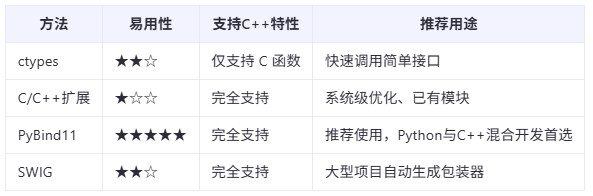
2. 使用pybind11封装一个C++类
使用 PyBind11 封装 C++ 类是一个相对直接的过程,它允许你将 C++ 类暴露给 Python 代码。下面我将展示如何使用 PyBind11 来封装一个简单的 C++ 类。
示例
假设我们有一个简单的 C++ 类 Rectangle,它有两个方法:计算矩形的面积和周长。
C++ 文件 (rectangle.cpp)```cpp
#include <pybind11/pybind11.h>
namespace py = pybind11;
class Rectangle {
public:
    Rectangle(double width, double height) : width_(width), height_(height) {}
    double area() const {
        return width_ * height_;
    }
    double perimeter() const {
        return 2 * (width_ + height_);
    }
private:
    double width_, height_;
};
PYBIND11_MODULE(rectangle_module, m) {
    py::class_<Rectangle>(m, "Rectangle") // 绑定类
        .def(py::init<double, double>()) // 绑定构造函数
        .def("area", &Rectangle::area) // 绑定成员函数
        .def("perimeter", &Rectangle::perimeter); // 绑定成员函数
}
在这个例子中:
- py::class_<Rectangle> 定义了要暴露给 Python 的 C++ 类。
- .def(py::init<double, double>()) 指定了如何创建这个类的对象(即它的构造函数)。
- .def("area", &Rectangle::area) 和 .def("perimeter", &Rectangle::perimeter) 分别绑定了类的方法 area 和 perimeter 到 Python 中。
Python 调用
一旦编译完成,你就可以像导入任何其他 Python 模块一样导入并使用这个新模块:
import rectangle_module

rect = rectangle_module.Rectangle(5, 4)
print(f"Area: {rect.area()}") # 输出: Area: 20
print(f"Perimeter: {rect.perimeter()}") # 输出: Perimeter: 18
3.Windows 上配置环境
准备工作
1. 安装 Visual Studio:确保你已经安装了 Visual Studio,并且包含“使用 C++ 的桌面开发”工作负载。
2. 安装 Python:下载并安装适合你项目的 Python 版本。
3.下载Pybind11库,这是一个仅包含头文件的轻量级库,使用起来非常方便。可以在Github下载其Release版本 pybind11 可以参考:官方文档
配置 Visual Studio 项目
1. 创建一个新的空项目。
2. 添加源文件:将上述 C++ 代码保存为 `example.cpp` 并添加到你的 Visual Studio 项目中。
3. 配置项目属性:
- C/C++ -> 常规 -> 附加包含目录:添加 pybind11/include 的路径,以及 Python 的 include 目录。
- 链接器 -> 常规 -> 附加库目录:添加 Python 的 lib 目录路径。
- 链接器 -> 输入 -> 附加依赖项:添加 pythonXY.lib(其中 XY 是你的 Python 版本号,例如 python39.lib 对于 Python 3.9)。
4. 设置输出类型:右键点击项目 -> 属性 -> 配置属性 -> 常规 -> 配置类型,选择“动态库(.dll)”。
5. 编译项目:选择合适的配置(Debug 或 Release),然后编译项目。确保在项目属性中将目标扩展名设置为 .pyd(这是 Python 在 Windows 上使用的扩展名),或者生成的 .dll 文件需要重命名为 .pyd ,其才能被 Python 正确识别。
这样,你就成功地在 Windows 上使用 Python 调用了 C++ 库。通过这种方式,你可以将复杂的 C++ 功能集成到 Python 应用程序中。对于更复杂的项目或类的封装,逻辑大致相同,但可能需要更多的细节配置。
到此这篇关于python如何实现简单调用c++库的文章就介绍到这了,更多相关python调用c++库内容请搜索脚本之家以前的文章或继续浏览下面的相关文章希望大家以后多多支持脚本之家!