
关于python中DLIB包无法安装问题解决办法
作者:学不会的某杨
本文章是基于VScode的dlib包无法安装的解决方案。
Cmake支持
问题描述(错误码展示)
Collecting dlib
  Using cached dlib-19.24.9.tar.gz (3.4 MB)
  Installing build dependencies: started
  Installing build dependencies: finished with status 'done'
  Getting requirements to build wheel: started
  Getting requirements to build wheel: finished with status 'done'
  Preparing metadata (pyproject.toml): started
  Preparing metadata (pyproject.toml): finished with status 'done'
Building wheels for collected packages: dlib
  Building wheel for dlib (pyproject.toml): started
  Building wheel for dlib (pyproject.toml): finished with status 'error'
Failed to build dlib
Note: you may need to restart the kernel to use updated packages.
  error: subprocess-exited-with-error

  × Building wheel for dlib (pyproject.toml) did not run successfully.
  │ exit code: 1
  ╰─> [48 lines of output]
      running bdist_wheel
      running build
      running build_ext
      Traceback (most recent call last):
        File "e:\python310\lib\runpy.py", line 196, in _run_module_as_main
          return _run_code(code, main_globals, None,
        File "e:\python310\lib\runpy.py", line 86, in _run_code
          exec(code, run_globals)
        File "E:\python310\Scripts\cmake.exe\__main__.py", line 4, in <module>
      ModuleNotFoundError: No module named 'cmake'

      ================================================================================
      ================================================================================
      ================================================================================

                         CMake is not installed on your system!

          Or it is possible some broken copy of cmake is installed on your system.
          It is unfortunately very common for python package managers to include
          broken copies of cmake.  So if the error above this refers to some file
          path to a cmake file inside a python or anaconda or miniconda path then you
          should delete that broken copy of cmake from your computer.

          Instead, please get an official copy of cmake from one of these known good
          sources of an official cmake:
              - cmake.org (this is how windows users should get cmake)
              - apt install cmake (for Ubuntu or Debian based systems)
              - yum install cmake (for Redhat or CenOS based systems)

          On a linux machine you can run `which cmake` to see what cmake you are
          actually using.  If it tells you it's some cmake from any kind of python
          packager delete it and install an official cmake.

          More generally, cmake is not installed if when you open a terminal window
          and type
             cmake --version
          you get an error.  So you can use that as a very basic test to see if you
          have cmake installed.  That is, if cmake --version doesn't run from the
          same terminal window from which you are reading this error message, then
          you have not installed cmake.  Windows users should take note that they
          need to tell the cmake installer to add cmake to their PATH.  Since you
          can't run commands that are not in your PATH.  This is how the PATH works
          on Linux as well, but failing to add cmake to the PATH is a particularly
          common problem on windows and rarely a problem on Linux.

      ================================================================================
      ================================================================================
      ================================================================================
      [end of output]

  note: This error originates from a subprocess, and is likely not a problem with pip.
  ERROR: Failed building wheel for dlib
ERROR: Failed to build installable wheels for some pyproject.toml based projects (dlib)
上述一段描述,主要简化为两点:(1)dlib包无法安装,在下载过程中暂停。(2)系统描述问题为缺少Cmake支持。
原因是由于dlib 是一个依赖 CMake 进行编译的 C++ 库,因此必须先正确安装 CMake。
需要注意的是,Cmake不是python中的包。而是一款软件,需要在Cmake下载官网下载。
装载流程
在电脑上下载Windows x64 Installer:。在等待过程中可以通过WIN+R调出任务运行框,

通过命令CMD调出管理员窗口,通过输入cmake --version查看是否安装Cmake或者安装的版本号。

如果在安装前试图在python的包中下载了相应名称的包,请卸载相应的包,或者通过在终端中输入pip uninstall Cmake一键卸载。
安装步骤
打开安装程序

选择ACCEPT

选择添加到系统路径

可以选择C盘以外的路径

然后一直安装,等待安装完成。
关于在VScode中出现的其他问题
问题描述
Collecting dlib
  Using cached dlib-19.24.9.tar.gz (3.4 MB)
  Installing build dependencies: started
  Installing build dependencies: finished with status 'done'
  Getting requirements to build wheel: started
  Getting requirements to build wheel: finished with status 'done'
  Preparing metadata (pyproject.toml): started
  Preparing metadata (pyproject.toml): finished with status 'done'
Building wheels for collected packages: dlib
  Building wheel for dlib (pyproject.toml): started
  Building wheel for dlib (pyproject.toml): finished with status 'error'
Failed to build dlib
Note: you may need to restart the kernel to use updated packages.
  error: subprocess-exited-with-error

  × Building wheel for dlib (pyproject.toml) did not run successfully.
  │ exit code: 1
  ╰─> [75 lines of output]
      running bdist_wheel
      running build
      running build_ext
      <string>:163: DeprecationWarning: distutils Version classes are deprecated. Use packaging.version instead.
      Building extension for Python 3.10.9 (tags/v3.10.9:1dd9be6, Dec  6 2022, 20:01:21) [MSC v.1934 64 bit (AMD64)]
      Invoking CMake setup: 'cmake C:\Users\Dell\AppData\Local\Temp\pip-install-8plz3w9k\dlib_1368adfa47b846dba7b10d50343adf33\tools\python -DCMAKE_LIBRARY_OUTPUT_DIRECTORY=C:\Users\Dell\AppData\Local\Temp\pip-install-8plz3w9k\dlib_1368adfa47b846dba7b10d50343adf33\build\lib.win-amd64-cpython-310 -DPYTHON_EXECUTABLE=e:\python310\python.exe -DDLIB_USE_FFMPEG=OFF -DCMAKE_LIBRARY_OUTPUT_DIRECTORY_RELEASE=C:\Users\Dell\AppData\Local\Temp\pip-install-8plz3w9k\dlib_1368adfa47b846dba7b10d50343adf33\build\lib.win-amd64-cpython-310 -A x64'
      -- Building for: NMake Makefiles
      CMake Error at CMakeLists.txt:5 (message):


        !!!!!!!!!!!!!!!!!!!!!!!!!!!!!!!!!!!!!!!!!!!!!!!!!!!!!!!!!!!!!!!!!!!!!!!!!!!!!!!

        You must use Visual Studio to build a python extension on windows.  If you
        are getting this error it means you have not installed Visual C++.  Note
        that there are many flavors of Visual Studio, like Visual Studio for C#
        development.  You need to install Visual Studio for C++.


        !!!!!!!!!!!!!!!!!!!!!!!!!!!!!!!!!!!!!!!!!!!!!!!!!!!!!!!!!!!!!!!!!!!!!!!!!!!!!!!


      -- Configuring incomplete, errors occurred!
      Traceback (most recent call last):
        File "e:\python310\lib\site-packages\pip\_vendor\pyproject_hooks\_in_process\_in_process.py", line 389, in <module>
          main()
        File "e:\python310\lib\site-packages\pip\_vendor\pyproject_hooks\_in_process\_in_process.py", line 373, in main
          json_out["return_val"] = hook(**hook_input["kwargs"])
        File "e:\python310\lib\site-packages\pip\_vendor\pyproject_hooks\_in_process\_in_process.py", line 280, in build_wheel
          return _build_backend().build_wheel(
        File "C:\Users\Dell\AppData\Local\Temp\pip-build-env-wthjcxg8\overlay\Lib\site-packages\setuptools\build_meta.py", line 435, in build_wheel
          return _build(['bdist_wheel', '--dist-info-dir', str(metadata_directory)])
        File "C:\Users\Dell\AppData\Local\Temp\pip-build-env-wthjcxg8\overlay\Lib\site-packages\setuptools\build_meta.py", line 423, in _build
          return self._build_with_temp_dir(
        File "C:\Users\Dell\AppData\Local\Temp\pip-build-env-wthjcxg8\overlay\Lib\site-packages\setuptools\build_meta.py", line 404, in _build_with_temp_dir
          self.run_setup()
        File "C:\Users\Dell\AppData\Local\Temp\pip-build-env-wthjcxg8\overlay\Lib\site-packages\setuptools\build_meta.py", line 512, in run_setup
          super().run_setup(setup_script=setup_script)
        File "C:\Users\Dell\AppData\Local\Temp\pip-build-env-wthjcxg8\overlay\Lib\site-packages\setuptools\build_meta.py", line 317, in run_setup
          exec(code, locals())
        File "<string>", line 243, in <module>
        File "C:\Users\Dell\AppData\Local\Temp\pip-build-env-wthjcxg8\overlay\Lib\site-packages\setuptools\__init__.py", line 115, in setup
          return distutils.core.setup(**attrs)
        File "C:\Users\Dell\AppData\Local\Temp\pip-build-env-wthjcxg8\overlay\Lib\site-packages\setuptools\_distutils\core.py", line 186, in setup
          return run_commands(dist)
        File "C:\Users\Dell\AppData\Local\Temp\pip-build-env-wthjcxg8\overlay\Lib\site-packages\setuptools\_distutils\core.py", line 202, in run_commands
          dist.run_commands()
        File "C:\Users\Dell\AppData\Local\Temp\pip-build-env-wthjcxg8\overlay\Lib\site-packages\setuptools\_distutils\dist.py", line 1002, in run_commands
          self.run_command(cmd)
        File "C:\Users\Dell\AppData\Local\Temp\pip-build-env-wthjcxg8\overlay\Lib\site-packages\setuptools\dist.py", line 1102, in run_command
          super().run_command(command)
        File "C:\Users\Dell\AppData\Local\Temp\pip-build-env-wthjcxg8\overlay\Lib\site-packages\setuptools\_distutils\dist.py", line 1021, in run_command
          cmd_obj.run()
        File "C:\Users\Dell\AppData\Local\Temp\pip-build-env-wthjcxg8\overlay\Lib\site-packages\setuptools\command\bdist_wheel.py", line 370, in run
          self.run_command("build")
        File "C:\Users\Dell\AppData\Local\Temp\pip-build-env-wthjcxg8\overlay\Lib\site-packages\setuptools\_distutils\cmd.py", line 357, in run_command
          self.distribution.run_command(command)
        File "C:\Users\Dell\AppData\Local\Temp\pip-build-env-wthjcxg8\overlay\Lib\site-packages\setuptools\dist.py", line 1102, in run_command
          super().run_command(command)
        File "C:\Users\Dell\AppData\Local\Temp\pip-build-env-wthjcxg8\overlay\Lib\site-packages\setuptools\_distutils\dist.py", line 1021, in run_command
          cmd_obj.run()
        File "C:\Users\Dell\AppData\Local\Temp\pip-build-env-wthjcxg8\overlay\Lib\site-packages\setuptools\_distutils\command\build.py", line 135, in run
          self.run_command(cmd_name)
        File "C:\Users\Dell\AppData\Local\Temp\pip-build-env-wthjcxg8\overlay\Lib\site-packages\setuptools\_distutils\cmd.py", line 357, in run_command
          self.distribution.run_command(command)
        File "C:\Users\Dell\AppData\Local\Temp\pip-build-env-wthjcxg8\overlay\Lib\site-packages\setuptools\dist.py", line 1102, in run_command
          super().run_command(command)
        File "C:\Users\Dell\AppData\Local\Temp\pip-build-env-wthjcxg8\overlay\Lib\site-packages\setuptools\_distutils\dist.py", line 1021, in run_command
          cmd_obj.run()
        File "<string>", line 168, in run
        File "<string>", line 206, in build_extension
        File "e:\python310\lib\subprocess.py", line 369, in check_call
          raise CalledProcessError(retcode, cmd)
      subprocess.CalledProcessError: Command '['cmake', 'C:\\Users\\Dell\\AppData\\Local\\Temp\\pip-install-8plz3w9k\\dlib_1368adfa47b846dba7b10d50343adf33\\tools\\python', '-DCMAKE_LIBRARY_OUTPUT_DIRECTORY=C:\\Users\\Dell\\AppData\\Local\\Temp\\pip-install-8plz3w9k\\dlib_1368adfa47b846dba7b10d50343adf33\\build\\lib.win-amd64-cpython-310', '-DPYTHON_EXECUTABLE=e:\\python310\\python.exe', '-DDLIB_USE_FFMPEG=OFF', '-DCMAKE_LIBRARY_OUTPUT_DIRECTORY_RELEASE=C:\\Users\\Dell\\AppData\\Local\\Temp\\pip-install-8plz3w9k\\dlib_1368adfa47b846dba7b10d50343adf33\\build\\lib.win-amd64-cpython-310', '-A', 'x64']' returned non-zero exit status 1.
      [end of output]

  note: This error originates from a subprocess, and is likely not a problem with pip.
  ERROR: Failed building wheel for dlib
ERROR: Failed to build installable wheels for some pyproject.toml based projects (dlib)
以上一段报错表示虽然已经下载了Cmake,但是Python环境无法编译以 C++编写的支持需要下载Visual Studio 构建工具作为帮助。下载地址为Microsoft C++ 生成工具 - Visual Studio。
安装 Visual Studio 构建工具

直接点击下载生成工具,下载完成后开始安装。
在安装程序中,选择以下组件:
- “使用 C++ 的桌面开发”(核心组件,必须选择)。
- “C++ CMake 工具”(用于支持 CMake 编译)。
- Windows SDK(通常最新版本即可,如 10.0.22621.0)。
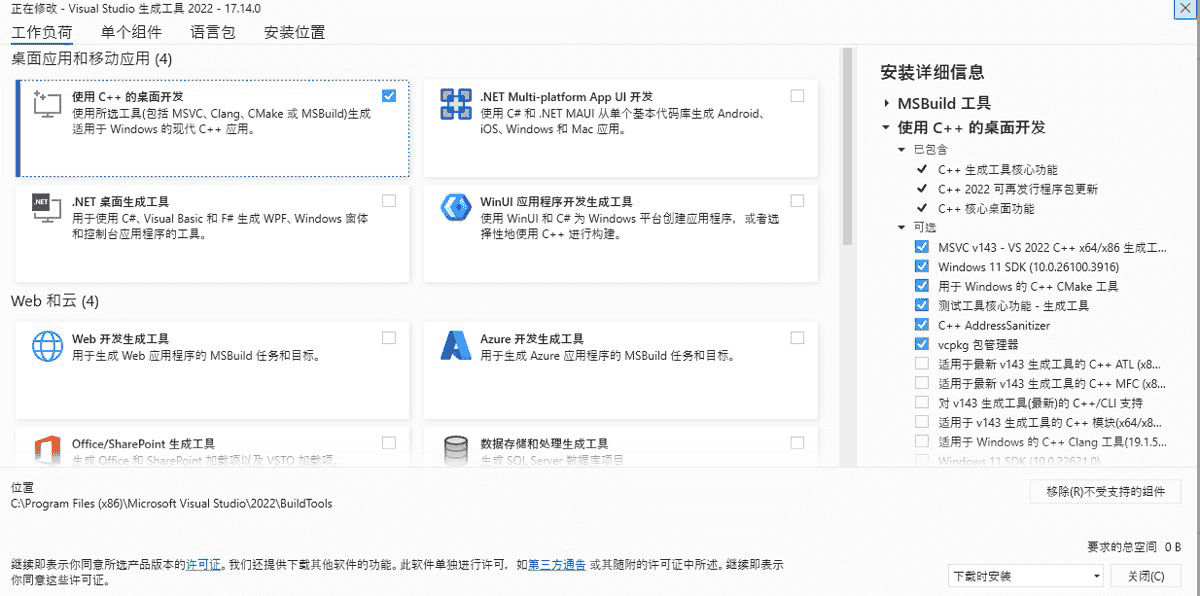
完成安装
安装过程可能需要 30 分钟到 1 小时,具体取决于网络速度和系统性能。简易过一段时间要去看一下偶尔会因为各种原因中断,选择继续下载就行。
现在我们可以下载DLIB了
使用PIP方法下载DLIB
通过命令CMD调出管理员窗口,通过输入cmake --version验证是否安装Cmake或者安装的版本号。

然后可以在编译界面的终端窗口输入pip install dlib完成安装程序。
附录
另附部分可用dlib官方模型下载地址。建议使用时去看一下dlib官方网页的Python实例代码去了解各个模型的使用方式和规范。注意下载到的模型一般是DLIB模型是压缩文件,一般要解压为dat文件并与编写的代码放置于同一目录下才可以使用。
到此这篇关于关于python中DLIB包无法安装问题解决办法的文章就介绍到这了,更多相关python中DLIB包无法安装问题内容请搜索脚本之家以前的文章或继续浏览下面的相关文章希望大家以后多多支持脚本之家!