
主流Python语音转文字(STT)库实战指南
作者:闻道且行之
前言
语音转文字(STT,Speech to Text)是人机交互、音视频处理、智能客服等领域的核心技术,Python 凭借生态丰富、易用性强的优势,成为 STT 开发的主流语言。当下各类 Python STT 库百花齐放,既有开箱即用、轻量化的本地识别库,也有对接大厂接口、高精度的云端识别工具,还涵盖了兼顾速度与准确率的开源模型类库,适配个人开发、企业级项目等不同场景。本文将聚焦 Python 生态中常用、成熟、高实用性的 STT 语音识别库,从功能特性、识别精度、部署成本、适用场景等维度展开盘点,为开发者选型提供清晰参考。
1 PaddleSpeech
PaddleSpeech 是百度飞桨开源的语音交互工具集,主打中文语音识别 / 合成能力,依托飞桨框架的高性能计算优势,在中文普通话、低音质音频识别场景下表现优异,且支持私有化部署,是企业级中文 STT 场景的首选方案之一。

1.1 安装步骤
安装命令:
conda create -n paddlespeech python=3.10
conda activate paddlespeech
python -m pip install paddlepaddle-gpu==3.2.2 -i https://www.paddlepaddle.org.cn/packages/stable/cu118/

# 安装paddlespeech
git clone https://github.com/PaddlePaddle/PaddleSpeech.git
cd PaddleSpeech
pip install pytest-runner
pip install .
注:如果这里没有n卡,这里修改成pip install paddlepaddle,具体安装选择可以看官网:PaddlePaddle
我这里之所以使用源码编译的方式去安装,是因为直接使用pip安装会有很多bug。
1.2 测试代码
import paddle
from paddlespeech.cli.asr import ASRExecutor

asr_executor = ASRExecutor()
text = asr_executor(audio_file="test.wav", model="conformer_aishell")
print(text)
1.3 遇到的报错
ERROR: Could not find a version that satisfies the requirement opencc==1.1.6 (from paddlespeech) (from versions: 0.1, 0.2, 1.1.0.post1, 1.1.1, 1.1.7, 1.1.8, 1.1.9) ERROR: No matching distribution found for opencc==1.1.6
直接去PaddleSpeech/setup.py下面修改opencc安装版本:

2 whisper
Whisper 是 OpenAI 开源的多语言语音识别模型,凭借海量多语言音频数据训练,支持 99 种语言识别,中文普通话识别准确率≈95%,且抗噪能力强,是个人开发、多语言场景的首选方案。

2.1 安装命令
conda create -n whisper_env python=3.10
conda activate whisper_env
pip install -U openai-whisper
2.2 测试代码
import whisper

model = whisper.load_model("turbo")
result = model.transcribe("audio.mp3")
print(result["text"])
如下图所示,load_model时,可选参数为:

3 FunASR
FunASR 是阿里云通义实验室开源的语音识别框架,主打中文及方言识别,在 30 + 中文方言、低音质音频场景下表现领先,是中文专属 STT 场景的最优选择。

3.1 安装步骤
conda create -n funasr python=3.10
conda activate funasr
pip3 install -U funasr
pip3 install -U modelscope huggingface_hub
pip install torch==2.3.1 torchvision==0.18.1 torchaudio==2.3.1 --index-url https://download.pytorch.org/whl/cu118
3.2 测试代码
from funasr import AutoModel
from funasr.utils.postprocess_utils import rich_transcription_postprocess

model_dir = "iic/SenseVoiceSmall"

model = AutoModel(
    model=model_dir,
    vad_model="fsmn-vad",
    vad_kwargs={"max_single_segment_time": 30000},
    device="cuda:0",
)

# en
res = model.generate(
    input=f"test.mp3",
    cache={},
    language="auto",  # "zn", "en", "yue", "ja", "ko", "nospeech"
    use_itn=True,
    batch_size_s=60,
    merge_vad=True,  #
    merge_length_s=15,
)
text = rich_transcription_postprocess(res[0]["text"])
print(text)
3.3 遇到的错误
UnboundLocalError: local variable 'AutoTokenizer' referenced before assignment
报错原因: transformers 库版本过低或未安装,导致模型加载时无法找到 AutoTokenizer 类。
解决办法: 升级 transformers 库pip install -U transformers
AssertionError: FunASRNano is not registered
报错原因: FunASR 版本过低,未注册 FunASRNano 模型类,常见于使用 Fun-ASR-Nano 系列模型时。
解决办法: 手动导入模型类from funasr.models.fun_asr_nano.model import FunASRNano
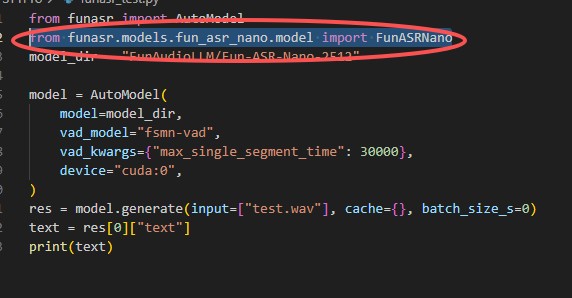
Loading remote code failed: model, No module named 'model'...OSError: Error no file named pytorch_model.bin, model.safetensors, tf_model.h5, model.ckpt.index or flax_model.msgpack found in directory xxx
报错原因: FunAudioLLM/Fun-ASR-Nano-251 模型适配性较差,远程代码加载失败或权重文件下载不完整。
解决办法: 替换为 FunASR 官方稳定支持的模型(如 iic/SenseVoiceSmall、paraformer-large),避免使用适配性不足的 Nano 系列模型。
总结
本文盘点了 Python 生态中三大主流 STT 库:PaddleSpeech 适配飞桨生态,适合企业级中文通用场景;Whisper 主打多语言识别,易用性拉满,适配个人开发;FunASR 在中文方言识别领域优势显著,适合中文专属场景。实际开发中,个人 / 多语言场景优先选 Whisper,中文方言 / 企业级场景优先选 FunASR,飞桨生态项目可选用 PaddleSpeech。开发时需注意版本适配与依赖管理,遇到问题可优先通过升级库或替换模型解决,确保识别效果与稳定性。
到此这篇关于主流Python语音转文字(STT)库实战指南的文章就介绍到这了,更多相关Python语音转文字(STT)库内容请搜索脚本之家以前的文章或继续浏览下面的相关文章希望大家以后多多支持脚本之家!