
SpringBoot启动失败Application run failed的问题分析及解决办法
作者:二哈喇子!
这个异常的问题源比较多,得具体问题具体分析,得看下面那些报错什么意思,不能直接去网上找解决办法
前言
Navicat 能看本地数据库和服务器数据库,具体是哪里的数据库要看清楚,最好cmd命令show databases看一下
项目场景一:Application run failed
提示:SpringBoot服务启动的时候报错:
这个问题遇到好多次了,一直没能记录下来,今天又碰到了
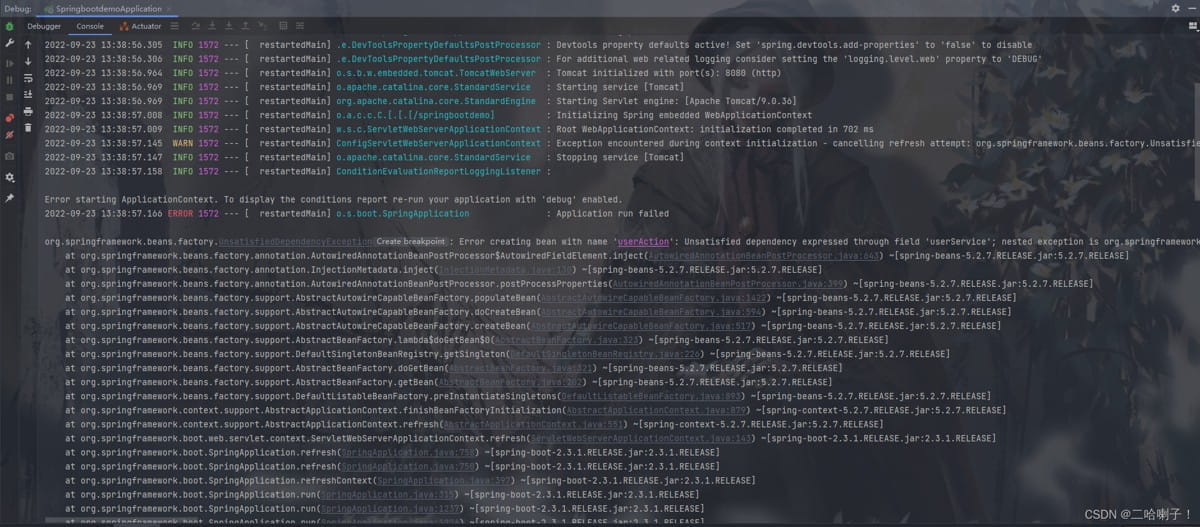
Error starting ApplicationContext. To display the conditions report re-run your application with 'debug' enabled.
ERROR 1572 --- [  restartedMain] o.s.boot.SpringApplication               : Application run failed
🧨 错误总览
下面是错误报告我用回车隔开方便查看
Error creating bean with name 'userAction':
Unsatisfied dependency expressed through field 'userService';
nested exception is ...
Caused by: org.springframework.beans.factory.UnsatisfiedDependencyException:
Error creating bean with name 'userServiceImpl':
nested exception is ...
Caused by: org.springframework.beans.factory.UnsatisfiedDependencyException:
Error creating bean with name 'userMapper' defined in file [...]
nested exception is ...
Caused by: org.springframework.beans.factory.BeanCreationException:
Error creating bean with name 'sqlSessionFactory' ...
nested exception is ...
Caused by: org.springframework.beans.BeanInstantiationException:
Failed to instantiate [org.apache.ibatis.session.SqlSessionFactory]...
nested exception is org.springframework.core.NestedIOException:
Failed to parse mapping resource: 'file [.../mapper/UserMapper.xml]'...
nested exception is org.apache.ibatis.builder.BuilderException:
Error creating document instance. Cause: org.xml.sax.SAXParseException; lineNumber: 1; columnNumber: 36;
在 XML 声明中的编码伪属性前面必须有空格。
🔍 错误根本原因
UserMapper.xml 文件的第一行 XML 声明格式不正确。
具体报错是:
在 XML 声明中的编码伪属性前面必须有空格。
这个错误通常出现在 XML 文件的最开始一行,也就是:
<?xml version="1.0" encoding="UTF-8"?><!-- 正确写法 -->
但你的文件可能写成了:
<?xml version="1.0"encoding="UTF-8"?> <!-- ❌ 错误:没有空格 -->
或者:
<?xml version="1.0" encoding="UTF-8" standalone="yes" ?>
其中某个地方少了空格、引号没闭合、语法不对等。
✅ 解决方案
✅ 第一步:检查UserMapper.xml的第一行
打开文件:
E:\桌面\springbootdemo\target\classes\mapper\UserMapper.xml
(注意:这个路径是你编译后的路径,实际修改应该去源码目录下的 XML 文件)
找到类似这一行:
<?xml version="1.0"encoding="UTF-8"?>
改成:
<?xml version="1.0" encoding="UTF-8"?>
确保:
version和encoding属性之间有空格encoding="UTF-8"写法正确- 没有多余的字符或拼写错误
✅ 第二步:验证 XML 是否语法正确
你可以将整个 XML 文件粘贴到在线 XML 验证工具中,例如:
- https://www.xmlvalidation.com/
它会告诉你哪一行哪个位置出错了。
✅ 第三步:重新构建项目
修改完 XML 后,在命令行执行:
mvn clean install
# 或者
gradle clean build
然后重启 Spring Boot 应用。
🧪 示例修复前 vs 修复后
❌ 错误示例:
<?xml version="1.0"encoding="UTF-8"?>
<mapper namespace="cn.edu.neu.springbootdemo.mapper.UserMapper">
    ...
</mapper>
✅ 正确示例:
<?xml version="1.0" encoding="UTF-8"?>
<mapper namespace="cn.edu.neu.springbootdemo.mapper.UserMapper">
    ...
</mapper>
📝 小贴士
| 问题 | 建议 |
|---|---|
| XML 报错定位难 | 使用 IDE 打开 XML 文件,一般会有语法高亮提示 |
| 编码格式混乱 | 确保文件保存为 UTF-8 格式 |
| 中文乱码 | 在 XML 头部声明 encoding=“UTF-8” 并保持文件编码一致 |
| Mapper 路径未扫描到 | 检查是否配置了 MyBatis 的 mapper-locations |
✅ 总结
| 步骤 | 内容 |
|---|---|
| 1️⃣ | 定位到 UserMapper.xml 文件 |
| 2️⃣ | 修改 XML 声明头,补上空格,如:<?xml version="1.0" encoding="UTF-8"?> |
| 3️⃣ | 清理并重新构建项目 |
| 4️⃣ | 重启应用 |
场景分析二:Application run failed
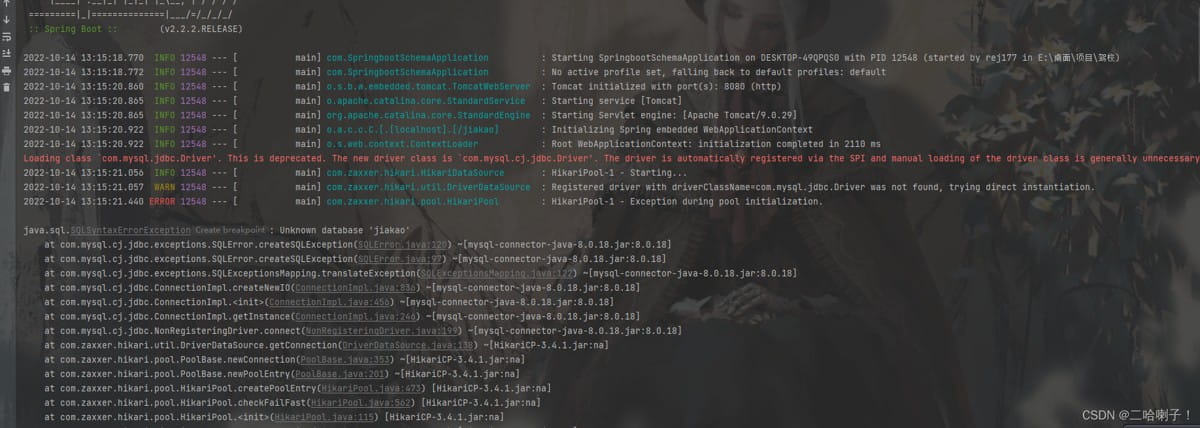
Error starting ApplicationContext. To display the conditions report re-run your application with 'debug' enabled.
2022-10-14 13:15:21.461 ERROR 12548 --- [
    main] o.s.boot.SpringApplication
    : Application run failed
原因分析
往下看原因:Caused by:
下面是错误报告我用回车隔开方便检查
Unsatisfied dependency expressed through bean property 'sqlSessionFactory'; nested exception is org.springframework.beans.factory.BeanCreationException:
Error creating bean with name 'sqlSessionFactory' defined in class path resource [com/baomidou/mybatisplus/spring/boot/starter/MybatisPlusAutoConfiguration.class]:
Bean instantiation via factory method failed; nested exception is org.springframework.beans.BeanInstantiationException:
Failed to instantiate [org.apache.ibatis.session.SqlSessionFactory]:
Factory method 'sqlSessionFactory' threw exception;
nested exception is com.baomidou.mybatisplus.exceptions.MybatisPlusException:
Error: GlobalConfigUtils setMetaData Fail !
Cause:java.sql.SQLSyntaxErrorException: Unknown database 'jiakao'
重点在最后一句,他说我这个错误是:GlobalConfigUtils setMetaData失败!
原因:java.sql SQLSyntaxErrorException:未知数据库“jiakao”
解决办法
上面的错误说数据库名字不对
打开数据库可视化工具一看,是数据库名字打错了
果然数据库名字一改后,立马跑通
总结:
重要的不是问题解决了,重要的是解决问题的过程
还有error才会影响程序的运行,warning警告不用管
根据错误的提示去想,为什么找不到这个bean/class?通过这个错误一步步去跟踪,找到根本的原因,这是积累知识的过程
等以后这种问题发现地慢慢的多起来,慢慢地积累起来,积累的经验越多越好
英语很重要,不仅仅是处理问题的时候、出错的时候、分析问题的时候都是英文
到此这篇关于SpringBoot启动失败Application run failed的解决办法的文章就介绍到这了,更多相关SpringBoot启动失败Application run failed内容请搜索脚本之家以前的文章或继续浏览下面的相关文章希望大家以后多多支持脚本之家!
您可能感兴趣的文章:
- SpringBoot整合Redis启动失败的常见错误以及解决方法
- SpringBoot项目启动失败的常见错误总结
- Springboot项目启动失败提示找不到dao类的解决
- SpringBoot应用启动失败:端口占用导致Tomcat启动失败的问题分析与解决方法
- SpringBoot启动失败的原因及其解决方法
- 解决springboot项目启动失败Could not initialize class com.fasterxml.jackson.databind.ObjectMapper问题
- SpringBoot启动失败的解决方法:A component required a bean of type ‘xxxxxxx‘ that could not be found.
- SpringBoot之ApplicationRunner解析(spring容器启动完成执行的类)