
Java poi-tl根据模板生成word文件的完整指南
作者:宋情写
这篇文章主要为大家详细介绍了Java poi-tl根据模板生成word文件的相关方法,文中的示例代码讲解详细,感兴趣的小伙伴可以跟随小编一起学习一下
基础操作
本质上是通过占位符进行内容替换
本文章仅操作docx格式的文档
- .doc (Word 97-2003): 使用OLE2格式,对应POI的 HWPF 组件
- .docx (Word 2007+): 使用OOXML格式,对应POI的 XWPF 组件
基础操作_模板部分

将模板放入resources 资源目录下,自定义文件夹中,例如:templet/word_template/demo_template.docx
代码部分
maven
		<!-- 用于生成word版报告 -->
		<dependency>
		    <groupId>com.deepoove</groupId>
		    <artifactId>poi-tl</artifactId>
		    <version>1.12.1</version>
		</dependency>
处理过程
	// 模板文件
    String templateFilePath = "templet/word_template/demo_template.docx";
    // 读取模板文件
    InputStream templateIn = getClass().getClassLoader().getResourceAsStream(templateFilePath);

    // 插入文本数据
    Map<String, Object> templateData = new HashMap<String, Object>();
    templateData.put("str1", "替换成功");

    // 生成模板文件
    XWPFTemplate template = XWPFTemplate.compile(templateIn).render(templateData);

    // 写入数据并关闭流
    template.writeAndClose(new FileOutputStream("D:/output.docx"));
    templateIn.close();
此时,文件便下载到了 D:/output.docx 的位置。
若为Web
public void pgdExport(HttpServletResponse response) throws IOException {

        // 模板文件
        String templateFilePath = "templet/word_template/demo_template.docx";
        // 读取模板文件
        InputStream templateIn = getClass().getClassLoader().getResourceAsStream(templateFilePath);

        // 插入文本数据
        Map<String, Object> templateData = new HashMap<String, Object>();
        templateData.put("str1", "替换成功");

        // 生成模板文件
        XWPFTemplate template = XWPFTemplate.compile(templateIn).render(templateData);
        ServletOutputStream outputStream = response.getOutputStream();

        // 防止文件以及文件名乱码
        String fileName = "文件名.docx";
        String encodedFileName = URLEncoder.encode(fileName, "UTF-8").replaceAll("\\+", "%20");
        response.setContentType("application/vnd.openxmlformats-officedocument.wordprocessingml.document");
        response.setHeader("Content-Disposition", "attachment; filename=\"" + encodedFileName + "\"; filename*=utf-8''" + encodedFileName);
        response.setCharacterEncoding("UTF-8");

			  // 写入数据并关闭流
        template.writeAndClose(outputStream);
        templateIn.close();
    }
// 前端js代码
// 如果此接口需要被鉴权,那么需要后端同时从Params中获取token,然后前端拼接token传递,否则此方法无法使用
// 需要注意跨域问题
window.location.href =  '你的接口地址';
插入图片
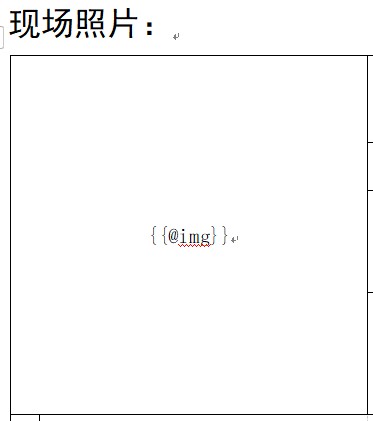
模板:占位符格式是{{@xxxx}}
代码
import com.deepoove.poi.XWPFTemplate;
import com.deepoove.poi.data.PictureType;
import com.deepoove.poi.data.Pictures;

templateData.put("img", Pictures.ofStream(in, PictureType.JPEG).size(300, 300).create());
参考文章:Java poi-tl根据模版生成word文件并插入文字、图片、表格、图表
到此这篇关于Java poi-tl根据模板生成word文件的完整指南的文章就介绍到这了,更多相关Java poi-tl模板生成word内容请搜索脚本之家以前的文章或继续浏览下面的相关文章希望大家以后多多支持脚本之家!