
SpringBoot后端实现小程序微信登录功能实现
作者:就叫年华吧丶
微信小程序登录是开发者通过微信提供的身份验证机制,获取用户唯一标识(openid)和会话密钥(session_key)的过程,这篇文章给大家介绍SpringBoot后端实现小程序微信登录功能实现,感兴趣的朋友跟随小编一起看看吧
SpringBoot实现微信小程序登录简介
微信小程序登录是开发者通过微信提供的身份验证机制,获取用户唯一标识(openid)和会话密钥(session_key)的过程。SpringBoot作为后端框架,可以与小程序前端配合完成完整的登录流程。
小程序端调用wx.login()
小程序前端调用此API获取临时登录凭证code
示例代码:
wx.login({
  success(res) {
    if (res.code) {
      // 发送code到后端
    }
  }
})
SpringBoot后端处理登录
接收小程序传来的code
向微信接口服务发起请求验证code
获取用户唯一标识openid和会话密钥session_key
返回自定义登录态
后端生成自定义登录态(如token)并返回给小程序
小程序后续请求携带此登录态
SpringBoot后端实现微信登录
1.导入HttpClient的Maven坐标
<dependency>
    <groupId>org.apache.httpcomponents</groupId>
    <artifactId>httpclient</artifactId>
    <version>4.5.13</version>
</dependency>
2.Http工具类
/**
* Http工具类
*/
public class HttpClientUtil {
static final int TIMEOUT_MSEC = 5 * 1000;
/**
* 发送GET方式请求
* @param url
* @param paramMap
* @return
*/
public static String doGet(String url,Map<String,String> paramMap){
// 创建Httpclient对象
CloseableHttpClient httpClient = HttpClients.createDefault();
String result = "";
CloseableHttpResponse response = null;
try{
URIBuilder builder = new URIBuilder(url);
if(paramMap != null){
for (String key : paramMap.keySet()) {
builder.addParameter(key,paramMap.get(key));
}
}
URI uri = builder.build();
//创建GET请求
HttpGet httpGet = new HttpGet(uri);
//发送请求
response = httpClient.execute(httpGet);
//判断响应状态
if(response.getStatusLine().getStatusCode() == 200){
result = EntityUtils.toString(response.getEntity(),"UTF-8");
}
}catch (Exception e){
e.printStackTrace();
}finally {
try {
response.close();
httpClient.close();
} catch (IOException e) {
e.printStackTrace();
}
}
return result;
}
/**
* 发送POST方式请求
* @param url
* @param paramMap
* @return
* @throws IOException
*/
public static String doPost(String url, Map<String, String> paramMap) throws IOException {
// 创建Httpclient对象
CloseableHttpClient httpClient = HttpClients.createDefault();
CloseableHttpResponse response = null;
String resultString = "";
try {
// 创建Http Post请求
HttpPost httpPost = new HttpPost(url);
// 创建参数列表
if (paramMap != null) {
List<NameValuePair> paramList = new ArrayList();
for (Map.Entry<String, String> param : paramMap.entrySet()) {
paramList.add(new BasicNameValuePair(param.getKey(), param.getValue()));
}
// 模拟表单
UrlEncodedFormEntity entity = new UrlEncodedFormEntity(paramList);
httpPost.setEntity(entity);
}
httpPost.setConfig(builderRequestConfig());
// 执行http请求
response = httpClient.execute(httpPost);
resultString = EntityUtils.toString(response.getEntity(), "UTF-8");
} catch (Exception e) {
throw e;
} finally {
try {
response.close();
} catch (IOException e) {
e.printStackTrace();
}
}
return resultString;
}
/**
* 发送POST方式请求
* @param url
* @param paramMap
* @return
* @throws IOException
*/
public static String doPost4Json(String url, Map<String, String> paramMap) throws IOException {
// 创建Httpclient对象
CloseableHttpClient httpClient = HttpClients.createDefault();
CloseableHttpResponse response = null;
String resultString = "";
try {
// 创建Http Post请求
HttpPost httpPost = new HttpPost(url);
if (paramMap != null) {
//构造json格式数据
JSONObject jsonObject = new JSONObject();
for (Map.Entry<String, String> param : paramMap.entrySet()) {
jsonObject.put(param.getKey(),param.getValue());
}
StringEntity entity = new StringEntity(jsonObject.toString(),"utf-8");
//设置请求编码
entity.setContentEncoding("utf-8");
//设置数据类型
entity.setContentType("application/json");
httpPost.setEntity(entity);
}
httpPost.setConfig(builderRequestConfig());
// 执行http请求
response = httpClient.execute(httpPost);
resultString = EntityUtils.toString(response.getEntity(), "UTF-8");
} catch (Exception e) {
throw e;
} finally {
try {
response.close();
} catch (IOException e) {
e.printStackTrace();
}
}
return resultString;
}
private static RequestConfig builderRequestConfig() {
return RequestConfig.custom()
.setConnectTimeout(TIMEOUT_MSEC)
.setConnectionRequestTimeout(TIMEOUT_MSEC)
.setSocketTimeout(TIMEOUT_MSEC).build();
}
}3.JWT工具类
import io.jsonwebtoken.Claims;
import io.jsonwebtoken.JwtBuilder;
import io.jsonwebtoken.Jwts;
import io.jsonwebtoken.SignatureAlgorithm;
import java.nio.charset.StandardCharsets;
import java.util.Date;
import java.util.Map;
public class JwtUtil {
/**
* 生成jwt
* 使用Hs256算法, 私匙使用固定秘钥
*
* @param secretKey jwt秘钥
* @param ttlMillis jwt过期时间(毫秒)
* @param claims 设置的信息
* @return
*/
public static String createJWT(String secretKey, long ttlMillis, Map<String, Object> claims) {
// 指定签名的时候使用的签名算法,也就是header那部分
SignatureAlgorithm signatureAlgorithm = SignatureAlgorithm.HS256;
// 生成JWT的时间
long expMillis = System.currentTimeMillis() + ttlMillis;
Date exp = new Date(expMillis);
// 设置jwt的body
JwtBuilder builder = Jwts.builder()
// 如果有私有声明,一定要先设置这个自己创建的私有的声明,这个是给builder的claim赋值,一旦写在标准的声明赋值之后,就是覆盖了那些标准的声明的
.setClaims(claims)
// 设置签名使用的签名算法和签名使用的秘钥
.signWith(signatureAlgorithm, secretKey.getBytes(StandardCharsets.UTF_8))
// 设置过期时间
.setExpiration(exp);
return builder.compact();
}
/**
* Token解密
*
* @param secretKey jwt秘钥 此秘钥一定要保留好在服务端, 不能暴露出去, 否则sign就可以被伪造, 如果对接多个客户端建议改造成多个
* @param token 加密后的token
* @return
*/
public static Claims parseJWT(String secretKey, String token) {
// 得到DefaultJwtParser
Claims claims = Jwts.parser()
// 设置签名的秘钥
.setSigningKey(secretKey.getBytes(StandardCharsets.UTF_8))
// 设置需要解析的jwt
.parseClaimsJws(token).getBody();
return claims;
}
}4.准备好签名所需使用的密钥,过期时间等
sky:
  jwt:
    user-secret-key: itcast
    # 设置jwt过期时间
    user-ttl: 7200000
    # 设置前端传递过来的令牌名称
    user-token-name: authentication
5.用对象类将配置文件的属性封装
@Component
@ConfigurationProperties(prefix = "sky.jwt")
@Data
public class JwtProperties {
/**
* 用户端微信用户生成jwt令牌相关配置
*/
private String userSecretKey;
private long userTtl;
private String userTokenName;
}6.WeChatProperties对象类部分属性以及配置文件
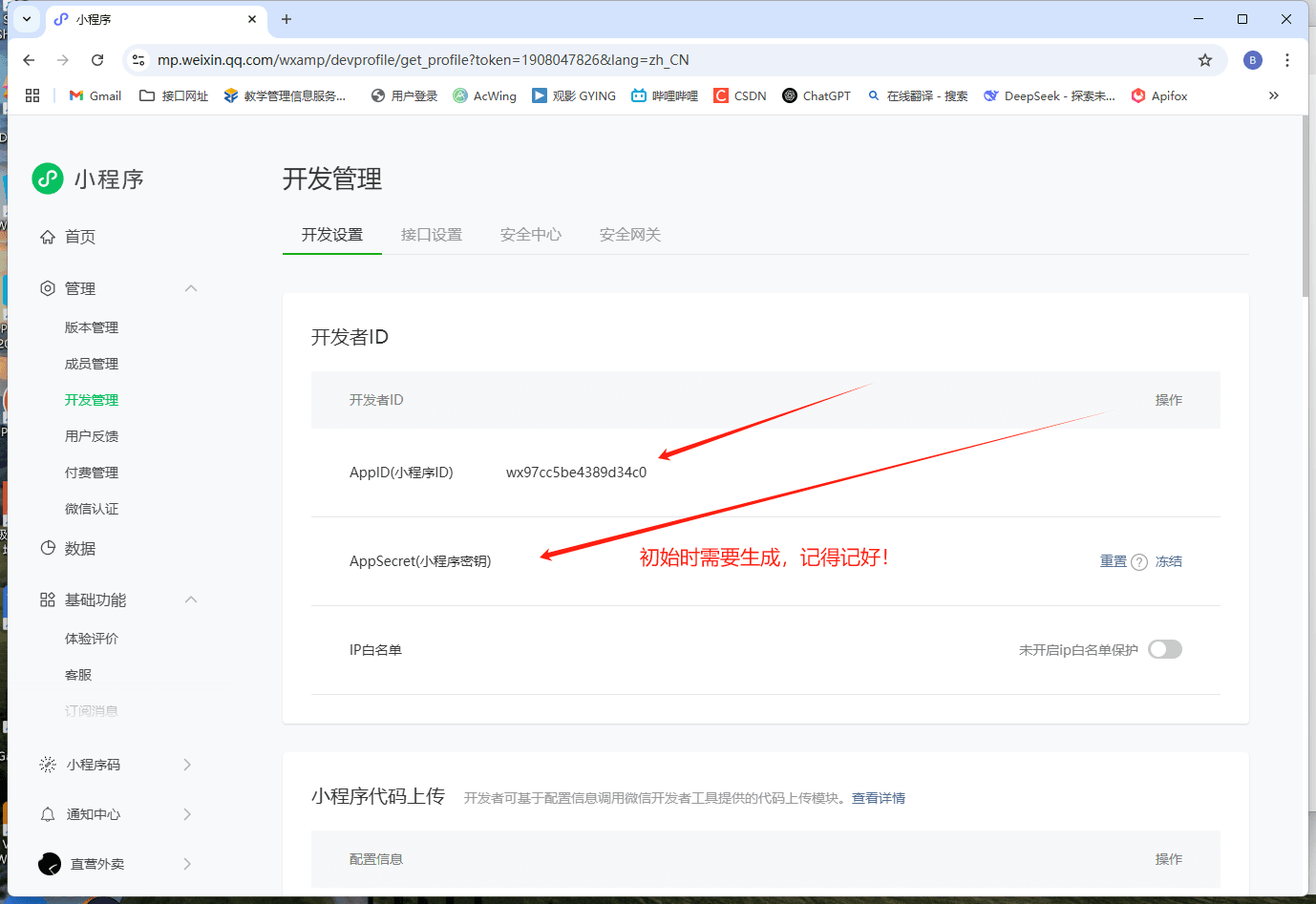
关于怎么注册大家可以移步最下方。
@Component
@ConfigurationProperties(prefix = "sky.wechat")
@Data
public class WeChatProperties {
private String appid; //小程序的appid
private String secret; //小程序的秘钥
}
//application.yml配置文件
sky:
wechat:
appid: ${sky.wechat.appid}
secret: ${sky.wechat.secret}
//application-dev.yml配置文件
sky:
wechat:
# TODO:需要在微信公众平台申请相关信息并填入
appid: ******
secret: ******7.准备好DTO数据对象
/**
* C端用户登录
*/
@Data
public class UserLoginDTO implements Serializable {
private String code;
}8.控制层接口
@RestController
@RequestMapping("/user/user")
@Slf4j
@RequiredArgsConstructor // Lombok 自动生成构造函数
@Api(tags = "C端用户相关接口")
public class UserController {
private final UserService userService;
private final JwtProperties jwtProperties;
/**
* 微信登录
* @param userLoginDTO
* @return
*/
@PostMapping("/login")
@ApiOperation("微信登录")
public Result<UserLoginVO> login(@RequestBody UserLoginDTO userLoginDTO){
log.info("微信用户登录:{}",userLoginDTO.getCode());
//微信登录
User user = userService.wxLogin(userLoginDTO);
//为微信用户生成jwt令牌
Map<String,Object> claims = new HashMap<>();
claims.put(JwtClaimsConstant.USER_ID,user.getId());
String token = JwtUtil.createJWT(jwtProperties.getUserSecretKey(),jwtProperties.getUserTtl(),claims);
UserLoginVO userLoginVO = UserLoginVO.builder()
.id(user.getId())
.openid(user.getOpenid())
.token(token)
.build();
return Result.success(userLoginVO);
}
}9.微信登录的服务层的接口和实现类
//接口
public interface UserService {
/**
* 微信登录接口
* @param userLoginDTO
* @return
*/
User wxLogin(UserLoginDTO userLoginDTO);
}
//实现类
@Service
@Slf4j
public class UserServiceImpl implements UserService {
public static final String WX_LOGIN = "https://api.weixin.qq.com/sns/jscode2session";
@Autowired
private WeChatProperties weChatProperties;
@Autowired
private UserMapper userMapper;
/**
* 微信登录
* @param userLoginDTO
* @return
*/
@Override
public User wxLogin(UserLoginDTO userLoginDTO) {
String openid = getOpenid(userLoginDTO.getCode());
//判断openid是否为空,如果为空表示登录失败,抛出业务异常
if(openid == null){
throw new LoginFailedException(MessageConstant.LOGIN_FAILED);
}
//判断当前用户是否是新用户
User user = userMapper.getByOpenid(openid);
//如果是新用户,自动完成注册
if(user == null){
user = User.builder()
.openid(openid)
.createTime(LocalDateTime.now())
.build();
userMapper.insert(user);
}
//返回这个用户对象
return user;
}
/**
* 调用微信接口服务,获取当前微信用户的openid
* @param code
* @return
*/
private String getOpenid(String code){
Map<String, String> map = new HashMap<>();
map.put("appid",weChatProperties.getAppid());
map.put("secret",weChatProperties.getSecret());
map.put("js_code",code);
map.put("grant_type","authorization_code");
String json = HttpClientUtil.doGet(WX_LOGIN, map);
JSONObject jsonObject =JSON.parseObject(json);
String openid = jsonObject.getString("openid");
return openid;
}
}
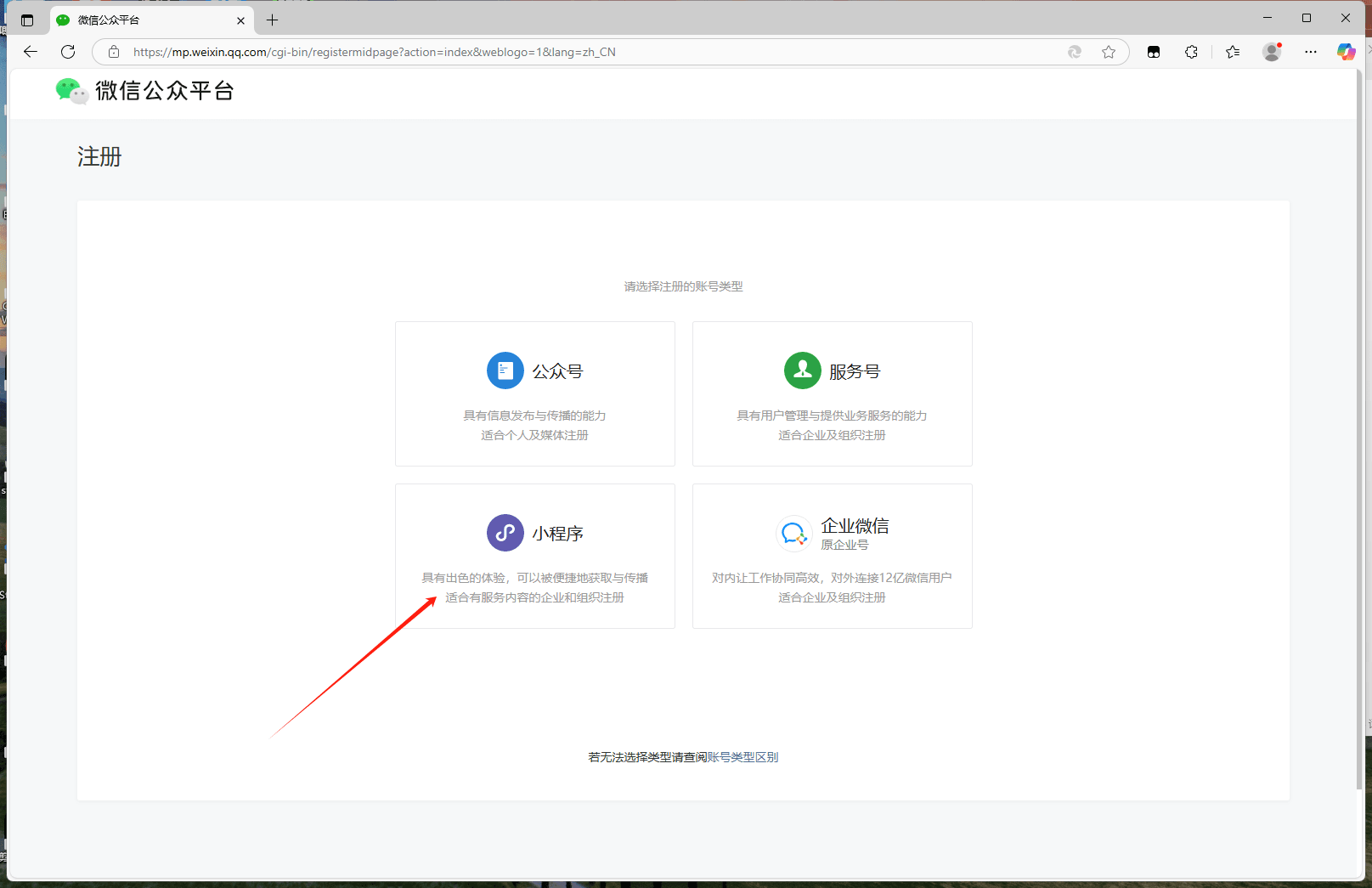
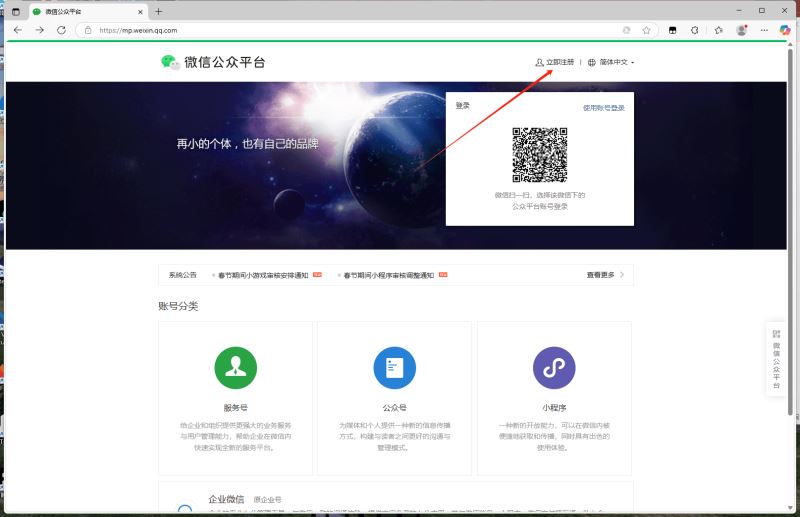
注册小程序,获取key
微信公众平台
到此这篇关于SpringBoot后端实现小程序微信登录的文章就介绍到这了,更多相关SpringBoot小程序微信登录内容请搜索脚本之家以前的文章或继续浏览下面的相关文章希望大家以后多多支持脚本之家!