
JavaScript练习语法及建议总结大全
作者:逍遙自在唯我独
JavaScript 是一个程序语言,语法规则定义了语言结构,这篇文章主要介绍了JavaScript练习语法及建议总结的相关资料,文中通过代码介绍的非常详细,需要的朋友可以参考下
基础文件
- index.html:主入口页面,它链接了所有示例页面(如DOM操作、事件处理等)和对应的JS文件。
- om.html :展示DOM操作的各种方法
- event.html :展示事件处理的各种类型
- animation.html :展示JavaScript动画效果
- ajax.html :展示AJAX请求和数据处理
- js: 存放js文件
- todo.js - 实现待办事项列表功能,包括添加、删除和标记任务完成
- counter.js - 实现计数器功能,支持增减、重置、本地存储和动画效果
- color.js - 实现颜色选择器,支持实时预览、本地存储和随机颜色生成
- form.js - 实现表单验证功能,包括用户名、邮箱和密码的实时验证
这些JS文件通过“ script ”标签被引入到HTML页面中,为页面添加交互功能。每个文件都专注于实现特定的功能模块,遵循了模块化的开发原则。
综合练习:在线笔记本
project.html :一个完整的在线笔记本应用,整合了所有JavaScript知识点
- 功能包括:
- 笔记的增删改查
- 标签管理和筛选
- 搜索功能
- 本地存储
- 动画效果
- 事件处理
- 模态框操作
练习建议 :
- 先从基础开始,依次练习:
- 主页面(index.html)
- DOM操作(dom.html)
- 事件处理(event.html)
- 动画效果(animation.html)
- AJAX请求(ajax.html)
- 最后练习综合项目(project.html),理解如何将各个知识点结合使用
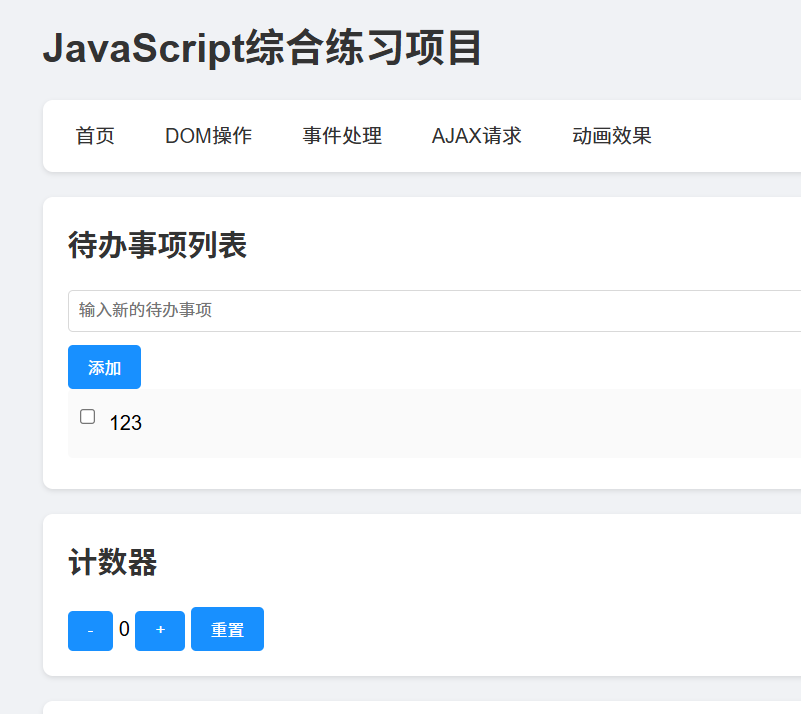
index.html
<!DOCTYPE html>
<html lang="zh-CN">
<head>
    <meta charset="UTF-8">
    <meta name="viewport" content="width=device-width, initial-scale=1.0">
    <title>JavaScript综合练习项目</title>
    <style>
        /* 基础样式 */
        * {
            margin: 0;
            padding: 0;
            box-sizing: border-box;
        }

        body {
            font-family: Arial, sans-serif;
            line-height: 1.6;
            padding: 20px;
            background-color: #f0f2f5;
        }

        .container {
            max-width: 1200px;
            margin: 0 auto;
        }

        nav {
            background-color: #fff;
            padding: 1rem;
            border-radius: 8px;
            margin-bottom: 20px;
            box-shadow: 0 2px 4px rgba(0,0,0,0.1);
        }

        nav ul {
            list-style: none;
            display: flex;
            gap: 20px;
        }

        nav a {
            text-decoration: none;
            color: #333;
            padding: 5px 10px;
            border-radius: 4px;
            transition: background-color 0.3s;
        }

        nav a:hover {
            background-color: #e6e6e6;
        }

        .section {
            background-color: #fff;
            padding: 20px;
            border-radius: 8px;
            margin-bottom: 20px;
            box-shadow: 0 2px 4px rgba(0,0,0,0.1);
        }

        h1, h2 {
            margin-bottom: 1rem;
            color: #333;
        }

        button {
            padding: 8px 16px;
            background-color: #1890ff;
            color: white;
            border: none;
            border-radius: 4px;
            cursor: pointer;
            transition: background-color 0.3s;
        }

        button:hover {
            background-color: #40a9ff;
        }

        input, textarea {
            padding: 8px;
            border: 1px solid #d9d9d9;
            border-radius: 4px;
            width: 100%;
            margin-bottom: 10px;
        }

        .todo-list {
            list-style: none;
        }

        .todo-item {
            display: flex;
            align-items: center;
            padding: 10px;
            background-color: #fafafa;
            margin-bottom: 5px;
            border-radius: 4px;
        }

        .todo-item input[type="checkbox"] {
            width: auto;
            margin-right: 10px;
        }

        .completed {
            text-decoration: line-through;
            color: #999;
        }
    </style>
</head>
<body>
    <div class="container">
        <h1>JavaScript综合练习项目</h1>

        <nav>
            <ul>
                <li><a href="index.html" rel="external nofollow" >首页</a></li>
                <li><a href="dom.html" rel="external nofollow" >DOM操作</a></li>
                <li><a href="event.html" rel="external nofollow" >事件处理</a></li>
                <li><a href="ajax.html" rel="external nofollow" >AJAX请求</a></li>
                <li><a href="animation.html" rel="external nofollow" >动画效果</a></li>
            </ul>
        </nav>

        <!-- 待办事项列表部分 -->
        <section class="section" id="todo-section">
            <h2>待办事项列表</h2>
            <div>
                <input type="text" id="todo-input" placeholder="输入新的待办事项">
                <button id="add-todo">添加</button>
            </div>
            <ul class="todo-list" id="todo-list">
                <!-- 待办事项将通过JavaScript动态添加 -->
            </ul>
        </section>

        <!-- 计数器部分 -->
        <section class="section" id="counter-section">
            <h2>计数器</h2>
            <div>
                <button id="decrease">-</button>
                <span id="count">0</span>
                <button id="increase">+</button>
                <button id="reset">重置</button>
            </div>
        </section>

        <!-- 颜色选择器部分 -->
        <section class="section" id="color-section">
            <h2>颜色选择器</h2>
            <div>
                <input type="color" id="color-picker">
                <div id="color-display" style="width: 100px; height: 100px; margin-top: 10px; border: 1px solid #ccc;"></div>
            </div>
        </section>

        <!-- 表单验证部分 -->
        <section class="section" id="form-section">
            <h2>表单验证</h2>
            <form id="validation-form">
                <div>
                    <input type="text" id="username" placeholder="用户名(3-10个字符)">
                    <span id="username-error" style="color: red;"></span>
                </div>
                <div>
                    <input type="email" id="email" placeholder="邮箱地址">
                    <span id="email-error" style="color: red;"></span>
                </div>
                <div>
                    <input type="password" id="password" placeholder="密码(至少6个字符)">
                    <span id="password-error" style="color: red;"></span>
                </div>
                <button type="submit">提交</button>
            </form>
        </section>
    </div>

    <!-- 引入JavaScript文件 -->
    <script src="js/todo.js"></script>
    <script src="js/counter.js"></script>
    <script src="js/color.js"></script>
    <script src="js/form.js"></script>
</body>
</html>
1.dom.html
<!DOCTYPE html>
<html lang="zh-CN">
<head>
    <meta charset="UTF-8">
    <meta name="viewport" content="width=device-width, initial-scale=1.0">
    <title>DOM操作示例</title>
    <style>
        /* 基础样式 */
        * {
            margin: 0;
            padding: 0;
            box-sizing: border-box;
        }

        body {
            font-family: Arial, sans-serif;
            line-height: 1.6;
            padding: 20px;
            background-color: #f0f2f5;
        }

        .container {
            max-width: 1200px;
            margin: 0 auto;
        }

        .section {
            background-color: #fff;
            padding: 20px;
            border-radius: 8px;
            margin-bottom: 20px;
            box-shadow: 0 2px 4px rgba(0,0,0,0.1);
        }

        button {
            padding: 8px 16px;
            background-color: #1890ff;
            color: white;
            border: none;
            border-radius: 4px;
            cursor: pointer;
            margin: 5px;
            transition: background-color 0.3s;
        }

        button:hover {
            background-color: #40a9ff;
        }

        .demo-box {
            border: 1px solid #d9d9d9;
            padding: 10px;
            margin: 10px 0;
            border-radius: 4px;
        }

        .highlight {
            background-color: #fff7e6;
            border-color: #ffd591;
        }

        .list-item {
            padding: 8px;
            margin: 4px 0;
            background-color: #f5f5f5;
            border-radius: 4px;
            display: flex;
            justify-content: space-between;
            align-items: center;
        }

        .success {
            color: #52c41a;
        }

        .error {
            color: #f5222d;
        }
    </style>
</head>
<body>
    <div class="container">
        <h1>DOM操作示例</h1>

        <nav>
            <button onclick="location.href='index.html'">返回首页</button>
        </nav>

        <!-- 元素选择和修改 -->
        <section class="section">
            <h2>元素选择和修改</h2>
            <div class="demo-box" id="select-demo">
                <p id="target-text">这是目标文本</p>
                <p class="sample-class">使用类选择器选择的文本</p>
                <p data-type="special">使用属性选择器选择的文本</p>
            </div>
            <div>
                <button onclick="changeText()">修改文本</button>
                <button onclick="changeStyle()">修改样式</button>
                <button onclick="changeAttribute()">修改属性</button>
            </div>
        </section>

        <!-- 元素创建和添加 -->
        <section class="section">
            <h2>元素创建和添加</h2>
            <div class="demo-box" id="create-demo">
                <div id="element-container"></div>
            </div>
            <div>
                <button onclick="createElement()">创建元素</button>
                <button onclick="cloneElement()">克隆元素</button>
                <button onclick="insertElement()">插入元素</button>
            </div>
        </section>

        <!-- 元素删除和替换 -->
        <section class="section">
            <h2>元素删除和替换</h2>
            <div class="demo-box" id="modify-demo">
                <ul id="item-list">
                    <li class="list-item">项目 1</li>
                    <li class="list-item">项目 2</li>
                    <li class="list-item">项目 3</li>
                </ul>
            </div>
            <div>
                <button onclick="removeElement()">删除元素</button>
                <button onclick="replaceElement()">替换元素</button>
                <button onclick="resetList()">重置列表</button>
            </div>
        </section>

        <!-- 事件处理 -->
        <section class="section">
            <h2>事件处理</h2>
            <div class="demo-box" id="event-demo">
                <div id="event-target" style="padding: 20px; background-color: #f5f5f5; text-align: center;">
                    在此区域内移动鼠标或点击
                </div>
                <p id="event-info"></p>
            </div>
        </section>
    </div>

    <script>
        // 元素选择和修改
        function changeText() {
            // 通过ID选择元素并修改文本
            const element = document.getElementById('target-text');
            element.textContent = '文本已被修改!' + new Date().toLocaleTimeString();
        }

        function changeStyle() {
            // 通过类名选择元素并修改样式
            const elements = document.getElementsByClassName('sample-class');
            for (let element of elements) {
                element.classList.toggle('highlight');
            }
        }

        function changeAttribute() {
            // 通过属性选择器选择元素并修改属性
            const element = document.querySelector('[data-type="special"]');
            const currentType = element.getAttribute('data-type');
            element.setAttribute('data-type', currentType === 'special' ? 'normal' : 'special');
            element.textContent = `当前属性值:${element.getAttribute('data-type')}`;
        }

        // 元素创建和添加
        let elementCount = 0;
        function createElement() {
            elementCount++;
            // 创建新元素
            const newElement = document.createElement('div');
            newElement.className = 'list-item';
            newElement.textContent = `新元素 ${elementCount}`;
            // 添加到容器
            document.getElementById('element-container').appendChild(newElement);
        }

        function cloneElement() {
            const container = document.getElementById('element-container');
            if (container.children.length > 0) {
                // 克隆最后一个元素
                const lastElement = container.lastElementChild;
                const clone = lastElement.cloneNode(true);
                clone.textContent += ' (克隆)';
                container.appendChild(clone);
            }
        }

        function insertElement() {
            const container = document.getElementById('element-container');
            // 创建新元素
            const newElement = document.createElement('div');
            newElement.className = 'list-item';
            newElement.textContent = '插入的元素';
            // 在第一个子元素之前插入
            if (container.firstChild) {
                container.insertBefore(newElement, container.firstChild);
            } else {
                container.appendChild(newElement);
            }
        }

        // 元素删除和替换
        function removeElement() {
            const list = document.getElementById('item-list');
            if (list.children.length > 0) {
                list.removeChild(list.lastElementChild);
            }
        }

        function replaceElement() {
            const list = document.getElementById('item-list');
            if (list.children.length > 0) {
                // 创建新元素
                const newElement = document.createElement('li');
                newElement.className = 'list-item';
                newElement.textContent = '替换的项目 ' + new Date().toLocaleTimeString();
                // 替换第一个元素
                list.replaceChild(newElement, list.firstElementChild);
            }
        }

        function resetList() {
            document.getElementById('item-list').innerHTML = `
                <li class="list-item">项目 1</li>
                <li class="list-item">项目 2</li>
                <li class="list-item">项目 3</li>
            `;
        }

        // 事件处理
        document.addEventListener('DOMContentLoaded', function() {
            const eventTarget = document.getElementById('event-target');
            const eventInfo = document.getElementById('event-info');

            // 鼠标移动事件
            eventTarget.addEventListener('mousemove', function(e) {
                const rect = eventTarget.getBoundingClientRect();
                const x = e.clientX - rect.left;
                const y = e.clientY - rect.top;
                eventInfo.textContent = `鼠标位置 - X: ${Math.round(x)}px, Y: ${Math.round(y)}px`;
            });

            // 点击事件
            eventTarget.addEventListener('click', function(e) {
                eventTarget.style.backgroundColor =
                    '#' + Math.floor(Math.random()*16777215).toString(16);
            });

            // 鼠标进入事件
            eventTarget.addEventListener('mouseenter', function() {
                eventTarget.style.transform = 'scale(1.02)';
            });

            // 鼠标离开事件
            eventTarget.addEventListener('mouseleave', function() {
                eventTarget.style.transform = 'scale(1)';
            });
        });
    </script>
</body>
</html>
2.event.html
<!DOCTYPE html>
<html lang="zh-CN">
<head>
    <meta charset="UTF-8">
    <meta name="viewport" content="width=device-width, initial-scale=1.0">
    <title>事件处理示例</title>
    <style>
        /* 基础样式 */
        * {
            margin: 0;
            padding: 0;
            box-sizing: border-box;
        }

        body {
            font-family: Arial, sans-serif;
            line-height: 1.6;
            padding: 20px;
            background-color: #f0f2f5;
        }

        .container {
            max-width: 1200px;
            margin: 0 auto;
        }

        .section {
            background-color: #fff;
            padding: 20px;
            border-radius: 8px;
            margin-bottom: 20px;
            box-shadow: 0 2px 4px rgba(0,0,0,0.1);
        }

        .demo-box {
            border: 1px solid #d9d9d9;
            padding: 15px;
            margin: 10px 0;
            border-radius: 4px;
            background-color: #fafafa;
        }

        .event-log {
            height: 100px;
            overflow-y: auto;
            padding: 10px;
            background-color: #f5f5f5;
            border-radius: 4px;
            margin-top: 10px;
            font-family: monospace;
        }

        .interactive-area {
            width: 200px;
            height: 200px;
            background-color: #e6f7ff;
            display: flex;
            align-items: center;
            justify-content: center;
            cursor: pointer;
            transition: all 0.3s;
            user-select: none;
        }

        .key-display {
            font-size: 2em;
            text-align: center;
            padding: 20px;
            background-color: #f0f0f0;
            border-radius: 4px;
            margin: 10px 0;
        }

        button {
            padding: 8px 16px;
            background-color: #1890ff;
            color: white;
            border: none;
            border-radius: 4px;
            cursor: pointer;
            margin: 5px;
            transition: background-color 0.3s;
        }

        button:hover {
            background-color: #40a9ff;
        }

        input[type="text"] {
            padding: 8px;
            border: 1px solid #d9d9d9;
            border-radius: 4px;
            width: 200px;
            margin: 5px;
        }

        .drag-item {
            width: 100px;
            height: 100px;
            background-color: #91d5ff;
            display: flex;
            align-items: center;
            justify-content: center;
            cursor: move;
            margin: 10px;
            transition: transform 0.2s;
        }

        .drop-zone {
            width: 200px;
            height: 200px;
            border: 2px dashed #1890ff;
            display: flex;
            align-items: center;
            justify-content: center;
            margin: 10px;
        }

        .drop-zone.dragover {
            background-color: #e6f7ff;
            border-style: solid;
        }
    </style>
</head>
<body>
    <div class="container">
        <h1>事件处理示例</h1>

        <nav>
            <button onclick="location.href='index.html'">返回首页</button>
        </nav>

        <!-- 鼠标事件 -->
        <section class="section">
            <h2>鼠标事件</h2>
            <div class="demo-box">
                <div id="mouse-area" class="interactive-area">在此区域操作鼠标</div>
                <div id="mouse-log" class="event-log"></div>
            </div>
        </section>

        <!-- 键盘事件 -->
        <section class="section">
            <h2>键盘事件</h2>
            <div class="demo-box">
                <input type="text" id="key-input" placeholder="在此输入文字">
                <div id="key-display" class="key-display">按下任意键</div>
                <div id="key-log" class="event-log"></div>
            </div>
        </section>

        <!-- 表单事件 -->
        <section class="section">
            <h2>表单事件</h2>
            <div class="demo-box">
                <form id="demo-form">
                    <input type="text" id="form-input" placeholder="输入文字">
                    <select id="form-select">
                        <option value="">请选择</option>
                        <option value="1">选项1</option>
                        <option value="2">选项2</option>
                        <option value="3">选项3</option>
                    </select>
                    <button type="submit">提交</button>
                </form>
                <div id="form-log" class="event-log"></div>
            </div>
        </section>

        <!-- 拖放事件 -->
        <section class="section">
            <h2>拖放事件</h2>
            <div class="demo-box">
                <div style="display: flex;">
                    <div id="drag-item" class="drag-item" draggable="true">拖动我</div>
                    <div id="drop-zone" class="drop-zone">放置区域</div>
                </div>
                <div id="drag-log" class="event-log"></div>
            </div>
        </section>
    </div>

    <script>
        // 工具函数:记录事件到日志
        function logEvent(logElement, message) {
            const log = document.createElement('div');
            log.textContent = `${new Date().toLocaleTimeString()} - ${message}`;
            logElement.insertBefore(log, logElement.firstChild);
            // 限制日志条数
            if (logElement.children.length > 10) {
                logElement.removeChild(logElement.lastChild);
            }
        }

        // 鼠标事件处理
        document.addEventListener('DOMContentLoaded', function() {
            const mouseArea = document.getElementById('mouse-area');
            const mouseLog = document.getElementById('mouse-log');

            // 鼠标进入
            mouseArea.addEventListener('mouseenter', function(e) {
                mouseArea.style.backgroundColor = '#bae7ff';
                logEvent(mouseLog, '鼠标进入区域');
            });

            // 鼠标移动
            mouseArea.addEventListener('mousemove', function(e) {
                const rect = mouseArea.getBoundingClientRect();
                const x = Math.round(e.clientX - rect.left);
                const y = Math.round(e.clientY - rect.top);
                mouseArea.textContent = `X: ${x}, Y: ${y}`;
            });

            // 鼠标离开
            mouseArea.addEventListener('mouseleave', function(e) {
                mouseArea.style.backgroundColor = '#e6f7ff';
                mouseArea.textContent = '在此区域操作鼠标';
                logEvent(mouseLog, '鼠标离开区域');
            });

            // 鼠标点击
            mouseArea.addEventListener('click', function(e) {
                mouseArea.style.transform = 'scale(0.95)';
                setTimeout(() => mouseArea.style.transform = 'scale(1)', 200);
                logEvent(mouseLog, '鼠标点击');
            });

            // 鼠标右键
            mouseArea.addEventListener('contextmenu', function(e) {
                e.preventDefault();
                logEvent(mouseLog, '鼠标右键点击');
            });
        });

        // 键盘事件处理
        document.addEventListener('DOMContentLoaded', function() {
            const keyInput = document.getElementById('key-input');
            const keyDisplay = document.getElementById('key-display');
            const keyLog = document.getElementById('key-log');

            // 键盘按下
            keyInput.addEventListener('keydown', function(e) {
                keyDisplay.textContent = e.key;
                keyDisplay.style.backgroundColor = '#bae7ff';
                logEvent(keyLog, `按下键: ${e.key}`);
            });

            // 键盘释放
            keyInput.addEventListener('keyup', function(e) {
                keyDisplay.style.backgroundColor = '#f0f0f0';
                logEvent(keyLog, `释放键: ${e.key}`);
            });

            // 输入事件
            keyInput.addEventListener('input', function(e) {
                logEvent(keyLog, `输入内容: ${e.target.value}`);
            });
        });

        // 表单事件处理
        document.addEventListener('DOMContentLoaded', function() {
            const form = document.getElementById('demo-form');
            const formInput = document.getElementById('form-input');
            const formSelect = document.getElementById('form-select');
            const formLog = document.getElementById('form-log');

            // 表单提交
            form.addEventListener('submit', function(e) {
                e.preventDefault();
                logEvent(formLog, '表单提交');
            });

            // 输入框焦点
            formInput.addEventListener('focus', function(e) {
                this.style.borderColor = '#40a9ff';
                logEvent(formLog, '输入框获得焦点');
            });

            formInput.addEventListener('blur', function(e) {
                this.style.borderColor = '#d9d9d9';
                logEvent(formLog, '输入框失去焦点');
            });

            // 选择框变化
            formSelect.addEventListener('change', function(e) {
                logEvent(formLog, `选择值改变: ${e.target.value}`);
            });
        });

        // 拖放事件处理
        document.addEventListener('DOMContentLoaded', function() {
            const dragItem = document.getElementById('drag-item');
            const dropZone = document.getElementById('drop-zone');
            const dragLog = document.getElementById('drag-log');

            // 拖动开始
            dragItem.addEventListener('dragstart', function(e) {
                this.style.opacity = '0.5';
                logEvent(dragLog, '开始拖动');
            });

            // 拖动结束
            dragItem.addEventListener('dragend', function(e) {
                this.style.opacity = '1';
                logEvent(dragLog, '结束拖动');
            });

            // 拖动进入放置区域
            dropZone.addEventListener('dragenter', function(e) {
                e.preventDefault();
                this.classList.add('dragover');
                logEvent(dragLog, '进入放置区域');
            });

            // 拖动在放置区域上方
            dropZone.addEventListener('dragover', function(e) {
                e.preventDefault();
            });

            // 离开放置区域
            dropZone.addEventListener('dragleave', function(e) {
                this.classList.remove('dragover');
                logEvent(dragLog, '离开放置区域');
            });

            // 在放置区域释放
            dropZone.addEventListener('drop', function(e) {
                e.preventDefault();
                this.classList.remove('dragover');
                this.appendChild(dragItem);
                logEvent(dragLog, '成功放置');
            });
        });
    </script>
</body>
</html>
3.animation.html
<!DOCTYPE html>
<html lang="zh-CN">
<head>
    <meta charset="UTF-8">
    <meta name="viewport" content="width=device-width, initial-scale=1.0">
    <title>动画效果示例</title>
    <style>
        * {
            margin: 0;
            padding: 0;
            box-sizing: border-box;
        }

        body {
            font-family: Arial, sans-serif;
            line-height: 1.6;
            padding: 20px;
            background-color: #f0f2f5;
        }

        .container {
            max-width: 1200px;
            margin: 0 auto;
        }

        .section {
            background-color: #fff;
            padding: 20px;
            border-radius: 8px;
            margin-bottom: 20px;
            box-shadow: 0 2px 4px rgba(0,0,0,0.1);
        }

        .demo-box {
            border: 1px solid #d9d9d9;
            padding: 15px;
            margin: 10px 0;
            border-radius: 4px;
            background-color: #fafafa;
            min-height: 200px;
            position: relative;
        }

        button {
            padding: 8px 16px;
            background-color: #1890ff;
            color: white;
            border: none;
            border-radius: 4px;
            cursor: pointer;
            margin: 5px;
            transition: background-color 0.3s;
        }

        button:hover {
            background-color: #40a9ff;
        }

        .animation-box {
            width: 50px;
            height: 50px;
            background-color: #1890ff;
            position: absolute;
            left: 0;
            top: 50%;
            transform: translateY(-50%);
        }

        .bounce-box {
            width: 50px;
            height: 50px;
            background-color: #52c41a;
            border-radius: 50%;
            position: absolute;
            left: 50%;
            transform: translateX(-50%);
            top: 0;
        }

        .rotate-box {
            width: 100px;
            height: 100px;
            background-color: #722ed1;
            position: absolute;
            left: 50%;
            top: 50%;
            transform: translate(-50%, -50%);
        }

        .particle {
            width: 10px;
            height: 10px;
            background-color: #f5222d;
            border-radius: 50%;
            position: absolute;
            left: 50%;
            top: 50%;
        }

        .progress-bar {
            width: 100%;
            height: 20px;
            background-color: #f5f5f5;
            border-radius: 10px;
            overflow: hidden;
            margin: 10px 0;
        }

        .progress-fill {
            width: 0;
            height: 100%;
            background-color: #1890ff;
            transition: width 0.3s ease;
        }

        .controls {
            margin: 10px 0;
        }
    </style>
</head>
<body>
    <div class="container">
        <h1>动画效果示例</h1>

        <nav>
            <button onclick="location.href='index.html'">返回首页</button>
        </nav>

        <!-- 基础动画 -->
        <section class="section">
            <h2>基础动画</h2>
            <div class="demo-box">
                <div class="controls">
                    <button onclick="startBasicAnimation()">开始动画</button>
                    <button onclick="pauseBasicAnimation()">暂停</button>
                    <button onclick="resetBasicAnimation()">重置</button>
                </div>
                <div id="basic-animation" class="animation-box"></div>
            </div>
        </section>

        <!-- 弹跳动画 -->
        <section class="section">
            <h2>弹跳动画</h2>
            <div class="demo-box">
                <div class="controls">
                    <button onclick="startBounceAnimation()">开始弹跳</button>
                    <button onclick="stopBounceAnimation()">停止</button>
                </div>
                <div id="bounce-animation" class="bounce-box"></div>
            </div>
        </section>

        <!-- 旋转和缩放 -->
        <section class="section">
            <h2>旋转和缩放</h2>
            <div class="demo-box">
                <div class="controls">
                    <button onclick="startRotateScale()">开始动画</button>
                    <button onclick="stopRotateScale()">停止</button>
                </div>
                <div id="rotate-scale" class="rotate-box"></div>
            </div>
        </section>

        <!-- 粒子效果 -->
        <section class="section">
            <h2>粒子效果</h2>
            <div class="demo-box">
                <div class="controls">
                    <button onclick="createParticles()">创建粒子</button>
                </div>
                <div id="particle-container"></div>
            </div>
        </section>

        <!-- 进度条动画 -->
        <section class="section">
            <h2>进度条动画</h2>
            <div class="demo-box">
                <div class="controls">
                    <button onclick="startProgress()">开始进度</button>
                    <button onclick="resetProgress()">重置</button>
                </div>
                <div class="progress-bar">
                    <div id="progress" class="progress-fill"></div>
                </div>
            </div>
        </section>
    </div>

    <script>
        // 基础动画
        let basicAnimationId = null;
        let basicAnimationPaused = false;
        let basicAnimationPosition = 0;
        let lastTimestamp = 0;

        function startBasicAnimation() {
            if (basicAnimationPaused) {
                basicAnimationPaused = false;
                lastTimestamp = performance.now();
                requestAnimationFrame(animateBasic);
                return;
            }

            const box = document.getElementById('basic-animation');
            const container = box.parentElement;
            const maxDistance = container.clientWidth - box.clientWidth;

            function animateBasic(timestamp) {
                if (basicAnimationPaused) return;

                if (!lastTimestamp) lastTimestamp = timestamp;
                const progress = timestamp - lastTimestamp;
                lastTimestamp = timestamp;

                basicAnimationPosition += progress * 0.2;
                if (basicAnimationPosition >= maxDistance) {
                    basicAnimationPosition = 0;
                }

                box.style.left = `${basicAnimationPosition}px`;
                basicAnimationId = requestAnimationFrame(animateBasic);
            }

            basicAnimationId = requestAnimationFrame(animateBasic);
        }

        function pauseBasicAnimation() {
            basicAnimationPaused = true;
        }

        function resetBasicAnimation() {
            basicAnimationPaused = true;
            cancelAnimationFrame(basicAnimationId);
            basicAnimationPosition = 0;
            lastTimestamp = 0;
            const box = document.getElementById('basic-animation');
            box.style.left = '0px';
        }

        // 弹跳动画
        let bounceAnimationId = null;
        let bounceVelocity = 5;
        const gravity = 0.5;
        const bounce = -0.7;

        function startBounceAnimation() {
            const box = document.getElementById('bounce-animation');
            const container = box.parentElement;
            let position = 0;

            function animate() {
                position += bounceVelocity;
                bounceVelocity += gravity;

                // 碰到底部
                if (position + box.clientHeight > container.clientHeight) {
                    position = container.clientHeight - box.clientHeight;
                    bounceVelocity *= bounce;
                }

                box.style.top = `${position}px`;
                bounceAnimationId = requestAnimationFrame(animate);
            }

            bounceAnimationId = requestAnimationFrame(animate);
        }

        function stopBounceAnimation() {
            cancelAnimationFrame(bounceAnimationId);
            const box = document.getElementById('bounce-animation');
            box.style.top = '0px';
            bounceVelocity = 5;
        }

        // 旋转和缩放
        let rotateScaleId = null;
        let angle = 0;
        let scale = 1;
        let scaleGrowing = true;

        function startRotateScale() {
            const box = document.getElementById('rotate-scale');

            function animate() {
                angle = (angle + 2) % 360;

                if (scaleGrowing) {
                    scale += 0.01;
                    if (scale >= 1.5) scaleGrowing = false;
                } else {
                    scale -= 0.01;
                    if (scale <= 0.5) scaleGrowing = true;
                }

                box.style.transform = `translate(-50%, -50%) rotate(${angle}deg) scale(${scale})`;
                rotateScaleId = requestAnimationFrame(animate);
            }

            rotateScaleId = requestAnimationFrame(animate);
        }

        function stopRotateScale() {
            cancelAnimationFrame(rotateScaleId);
            const box = document.getElementById('rotate-scale');
            box.style.transform = 'translate(-50%, -50%)';
            angle = 0;
            scale = 1;
            scaleGrowing = true;
        }

        // 粒子效果
        function createParticles() {
            const container = document.getElementById('particle-container');
            container.innerHTML = '';
            const particleCount = 20;

            for (let i = 0; i < particleCount; i++) {
                const particle = document.createElement('div');
                particle.className = 'particle';
                container.appendChild(particle);

                const angle = (Math.PI * 2 * i) / particleCount;
                const velocity = 5;
                let x = 0;
                let y = 0;
                let vx = Math.cos(angle) * velocity;
                let vy = Math.sin(angle) * velocity;
                let opacity = 1;

                function animate() {
                    x += vx;
                    y += vy;
                    vy += 0.1; // 重力
                    opacity -= 0.01;

                    if (opacity <= 0) {
                        particle.remove();
                        return;
                    }

                    particle.style.transform = `translate(${x}px, ${y}px)`;
                    particle.style.opacity = opacity;
                    requestAnimationFrame(animate);
                }

                requestAnimationFrame(animate);
            }
        }

        // 进度条动画
        let progressInterval = null;

        function startProgress() {
            const progress = document.getElementById('progress');
            let width = 0;

            progressInterval = setInterval(() => {
                if (width >= 100) {
                    clearInterval(progressInterval);
                    return;
                }
                width += 1;
                progress.style.width = `${width}%`;
            }, 50);
        }

        function resetProgress() {
            clearInterval(progressInterval);
            const progress = document.getElementById('progress');
            progress.style.width = '0%';
        }
    </script>
</body>
</html>
4.ajax.html
<!DOCTYPE html>
<html lang="zh-CN">
<head>
    <meta charset="UTF-8">
    <meta name="viewport" content="width=device-width, initial-scale=1.0">
    <title>AJAX请求示例</title>
    <style>
        * {
            margin: 0;
            padding: 0;
            box-sizing: border-box;
        }

        body {
            font-family: Arial, sans-serif;
            line-height: 1.6;
            padding: 20px;
            background-color: #f0f2f5;
        }

        .container {
            max-width: 1200px;
            margin: 0 auto;
        }

        .section {
            background-color: #fff;
            padding: 20px;
            border-radius: 8px;
            margin-bottom: 20px;
            box-shadow: 0 2px 4px rgba(0,0,0,0.1);
        }

        .demo-box {
            border: 1px solid #d9d9d9;
            padding: 15px;
            margin: 10px 0;
            border-radius: 4px;
            background-color: #fafafa;
        }

        button {
            padding: 8px 16px;
            background-color: #1890ff;
            color: white;
            border: none;
            border-radius: 4px;
            cursor: pointer;
            margin: 5px;
            transition: background-color 0.3s;
        }

        button:hover {
            background-color: #40a9ff;
        }

        button:disabled {
            background-color: #d9d9d9;
            cursor: not-allowed;
        }

        .result {
            margin-top: 10px;
            padding: 10px;
            background-color: #f5f5f5;
            border-radius: 4px;
            font-family: monospace;
            white-space: pre-wrap;
            max-height: 200px;
            overflow-y: auto;
        }

        .error {
            color: #f5222d;
        }

        .success {
            color: #52c41a;
        }

        .loading {
            display: inline-block;
            width: 20px;
            height: 20px;
            border: 3px solid #f3f3f3;
            border-top: 3px solid #1890ff;
            border-radius: 50%;
            animation: spin 1s linear infinite;
            margin-left: 10px;
            vertical-align: middle;
        }

        @keyframes spin {
            0% { transform: rotate(0deg); }
            100% { transform: rotate(360deg); }
        }

        input[type="text"], textarea {
            padding: 8px;
            border: 1px solid #d9d9d9;
            border-radius: 4px;
            width: 100%;
            margin: 5px 0;
        }

        .status {
            margin-top: 10px;
            font-style: italic;
        }
    </style>
</head>
<body>
    <div class="container">
        <h1>AJAX请求示例</h1>

        <nav>
            <button onclick="location.href='index.html'">返回首页</button>
        </nav>

        <!-- XMLHttpRequest GET请求 -->
        <section class="section">
            <h2>XMLHttpRequest GET请求</h2>
            <div class="demo-box">
                <button onclick="makeXHRGet()">发送GET请求</button>
                <div id="xhr-get-result" class="result"></div>
            </div>
        </section>

        <!-- Fetch API GET请求 -->
        <section class="section">
            <h2>Fetch API GET请求</h2>
            <div class="demo-box">
                <button onclick="makeFetchGet()">发送GET请求</button>
                <div id="fetch-get-result" class="result"></div>
            </div>
        </section>

        <!-- POST请求 -->
        <section class="section">
            <h2>POST请求</h2>
            <div class="demo-box">
                <textarea id="post-data" rows="4" placeholder="输入要发送的JSON数据">{
    "name": "张三",
    "age": 25,
    "message": "Hello, World!"
}</textarea>
                <button onclick="makePost()">发送POST请求</button>
                <div id="post-result" class="result"></div>
            </div>
        </section>

        <!-- 文件上传 -->
        <section class="section">
            <h2>文件上传</h2>
            <div class="demo-box">
                <input type="file" id="file-input">
                <button onclick="uploadFile()">上传文件</button>
                <div id="upload-progress" class="status"></div>
                <div id="upload-result" class="result"></div>
            </div>
        </section>

        <!-- 并发请求 -->
        <section class="section">
            <h2>并发请求</h2>
            <div class="demo-box">
                <button onclick="makeConcurrentRequests()">发送并发请求</button>
                <div id="concurrent-result" class="result"></div>
            </div>
        </section>
    </div>

    <script>
        // 模拟API端点
        const API_ENDPOINT = 'https://jsonplaceholder.typicode.com';

        // 工具函数:格式化响应数据
        function formatResponse(data) {
            return typeof data === 'object' ? JSON.stringify(data, null, 2) : data;
        }

        // 工具函数:显示结果
        function showResult(elementId, data, isError = false) {
            const element = document.getElementById(elementId);
            element.textContent = formatResponse(data);
            element.className = `result ${isError ? 'error' : 'success'}`;
        }

        // 工具函数:显示加载状态
        function showLoading(elementId, isLoading) {
            const element = document.getElementById(elementId);
            const loadingSpinner = element.parentElement.querySelector('.loading');

            if (isLoading) {
                if (!loadingSpinner) {
                    const spinner = document.createElement('div');
                    spinner.className = 'loading';
                    element.parentElement.insertBefore(spinner, element);
                }
            } else {
                if (loadingSpinner) {
                    loadingSpinner.remove();
                }
            }
        }

        // XMLHttpRequest GET请求
        function makeXHRGet() {
            const resultId = 'xhr-get-result';
            showLoading(resultId, true);

            const xhr = new XMLHttpRequest();
            xhr.open('GET', `${API_ENDPOINT}/posts/1`, true);

            xhr.onreadystatechange = function() {
                if (xhr.readyState === 4) {
                    showLoading(resultId, false);
                    if (xhr.status === 200) {
                        showResult(resultId, JSON.parse(xhr.responseText));
                    } else {
                        showResult(resultId, `请求失败: ${xhr.status} ${xhr.statusText}`, true);
                    }
                }
            };

            xhr.onerror = function() {
                showLoading(resultId, false);
                showResult(resultId, '网络错误', true);
            };

            xhr.send();
        }

        // Fetch API GET请求
        async function makeFetchGet() {
            const resultId = 'fetch-get-result';
            showLoading(resultId, true);

            try {
                const response = await fetch(`${API_ENDPOINT}/posts/1`);
                if (!response.ok) throw new Error(`HTTP error! status: ${response.status}`);
                const data = await response.json();
                showResult(resultId, data);
            } catch (error) {
                showResult(resultId, `请求失败: ${error.message}`, true);
            } finally {
                showLoading(resultId, false);
            }
        }

        // POST请求
        async function makePost() {
            const resultId = 'post-result';
            showLoading(resultId, true);

            try {
                const postData = JSON.parse(document.getElementById('post-data').value);
                const response = await fetch(`${API_ENDPOINT}/posts`, {
                    method: 'POST',
                    headers: {
                        'Content-Type': 'application/json'
                    },
                    body: JSON.stringify(postData)
                });

                if (!response.ok) throw new Error(`HTTP error! status: ${response.status}`);
                const data = await response.json();
                showResult(resultId, data);
            } catch (error) {
                showResult(resultId, `请求失败: ${error.message}`, true);
            } finally {
                showLoading(resultId, false);
            }
        }

        // 文件上传
        function uploadFile() {
            const resultId = 'upload-result';
            const progressElement = document.getElementById('upload-progress');
            const fileInput = document.getElementById('file-input');
            const file = fileInput.files[0];

            if (!file) {
                showResult(resultId, '请选择文件', true);
                return;
            }

            showLoading(resultId, true);
            const formData = new FormData();
            formData.append('file', file);

            const xhr = new XMLHttpRequest();
            xhr.open('POST', `${API_ENDPOINT}/posts`, true);

            xhr.upload.onprogress = function(e) {
                if (e.lengthComputable) {
                    const percentComplete = Math.round((e.loaded / e.total) * 100);
                    progressElement.textContent = `上传进度: ${percentComplete}%`;
                }
            };

            xhr.onload = function() {
                showLoading(resultId, false);
                if (xhr.status === 200) {
                    showResult(resultId, '文件上传成功');
                } else {
                    showResult(resultId, `上传失败: ${xhr.status} ${xhr.statusText}`, true);
                }
            };

            xhr.onerror = function() {
                showLoading(resultId, false);
                showResult(resultId, '网络错误', true);
            };

            xhr.send(formData);
        }

        // 并发请求
        async function makeConcurrentRequests() {
            const resultId = 'concurrent-result';
            showLoading(resultId, true);

            try {
                const requests = [
                    fetch(`${API_ENDPOINT}/posts/1`).then(r => r.json()),
                    fetch(`${API_ENDPOINT}/posts/2`).then(r => r.json()),
                    fetch(`${API_ENDPOINT}/posts/3`).then(r => r.json())
                ];

                const results = await Promise.all(requests);
                showResult(resultId, results);
            } catch (error) {
                showResult(resultId, `请求失败: ${error.message}`, true);
            } finally {
                showLoading(resultId, false);
            }
        }

        // 自定义AJAX函数封装
        function ajax(options) {
            return new Promise((resolve, reject) => {
                const xhr = new XMLHttpRequest();

                xhr.open(options.method || 'GET', options.url, true);

                if (options.headers) {
                    Object.keys(options.headers).forEach(key => {
                        xhr.setRequestHeader(key, options.headers[key]);
                    });
                }

                xhr.onreadystatechange = function() {
                    if (xhr.readyState === 4) {
                        if (xhr.status >= 200 && xhr.status < 300) {
                            resolve({
                                data: JSON.parse(xhr.responseText),
                                status: xhr.status,
                                statusText: xhr.statusText
                            });
                        } else {
                            reject(new Error(`请求失败: ${xhr.status} ${xhr.statusText}`));
                        }
                    }
                };

                xhr.onerror = () => reject(new Error('网络错误'));

                xhr.send(options.data);
            });
        }
    </script>
</body>
</html>
5. color.js
// color.js - 颜色选择器功能实现

// 等待DOM完全加载后执行
document.addEventListener('DOMContentLoaded', function() {
    // 获取DOM元素
    const colorPicker = document.getElementById('color-picker');    // 颜色选择输入框
    const colorDisplay = document.getElementById('color-display');  // 颜色显示区域

    // 从localStorage加载保存的颜色
    function loadColor() {
        // 尝试从localStorage获取保存的颜色值
        const savedColor = localStorage.getItem('selectedColor');
        if (savedColor) {
            // 如果有保存的颜色,更新选择器和显示区域
            colorPicker.value = savedColor;
            updateColorDisplay(savedColor);
        }
    }

    // 保存颜色到localStorage
    function saveColor(color) {
        localStorage.setItem('selectedColor', color);
    }

    // 更新颜色显示
    function updateColorDisplay(color) {
        // 更新显示区域的背景颜色
        colorDisplay.style.backgroundColor = color;

        // 计算颜色的亮度
        const rgb = hexToRgb(color);
        const brightness = calculateBrightness(rgb);

        // 根据背景色的亮度设置文本颜色
        colorDisplay.style.color = brightness > 128 ? '#000' : '#fff';

        // 显示颜色值
        colorDisplay.textContent = color.toUpperCase();

        // 添加过渡动画
        addTransitionEffect();
    }

    // 将十六进制颜色转换为RGB
    function hexToRgb(hex) {
        // 移除#号(如果有)
        hex = hex.replace('#', '');

        // 将十六进制转换为RGB值
        const r = parseInt(hex.substring(0, 2), 16);
        const g = parseInt(hex.substring(2, 4), 16);
        const b = parseInt(hex.substring(4, 6), 16);

        return { r, g, b };
    }

    // 计算颜色的亮度
    function calculateBrightness({ r, g, b }) {
        // 使用相对亮度公式:(0.299*R + 0.587*G + 0.114*B)
        return (0.299 * r + 0.587 * g + 0.114 * b);
    }

    // 添加过渡效果
    function addTransitionEffect() {
        // 添加过渡类
        colorDisplay.classList.add('color-transition');

        // 移除过渡类
        setTimeout(() => {
            colorDisplay.classList.remove('color-transition');
        }, 300);
    }

    // 生成随机颜色
    function generateRandomColor() {
        // 生成随机的RGB值
        const r = Math.floor(Math.random() * 256);
        const g = Math.floor(Math.random() * 256);
        const b = Math.floor(Math.random() * 256);

        // 转换为十六进制
        const hex = '#' + [
            r.toString(16).padStart(2, '0'),
            g.toString(16).padStart(2, '0'),
            b.toString(16).padStart(2, '0')
        ].join('');

        return hex;
    }

    // 添加双击事件来生成随机颜色
    colorDisplay.addEventListener('dblclick', function() {
        const randomColor = generateRandomColor();
        colorPicker.value = randomColor;
        updateColorDisplay(randomColor);
        saveColor(randomColor);
    });

    // 添加颜色选择事件监听器
    colorPicker.addEventListener('input', function(e) {
        // 获取选择的颜色
        const selectedColor = e.target.value;
        // 更新显示并保存
        updateColorDisplay(selectedColor);
        saveColor(selectedColor);
    });

    // 添加动画样式
    const style = document.createElement('style');
    style.textContent = `
        #color-display {
            display: flex;
            align-items: center;
            justify-content: center;
            font-family: monospace;
            transition: background-color 0.3s ease;
            cursor: pointer;
        }

        .color-transition {
            animation: colorPulse 0.3s ease;
        }

        @keyframes colorPulse {
            0% { transform: scale(1); }
            50% { transform: scale(1.05); }
            100% { transform: scale(1); }
        }
    `;
    document.head.appendChild(style);

    // 添加提示信息
    colorDisplay.title = '双击生成随机颜色';

    // 页面加载时加载保存的颜色
    loadColor();
});
6. counter.js
// counter.js - 计数器功能实现

// 等待DOM完全加载后执行
document.addEventListener('DOMContentLoaded', function() {
    // 获取DOM元素
    const decreaseBtn = document.getElementById('decrease');    // 减少按钮
    const increaseBtn = document.getElementById('increase');    // 增加按钮
    const resetBtn = document.getElementById('reset');          // 重置按钮
    const countSpan = document.getElementById('count');        // 显示计数的span元素

    // 计数变量
    let count = 0;

    // 从localStorage加载保存的计数
    function loadCount() {
        // 尝试从localStorage获取保存的计数值
        const savedCount = localStorage.getItem('count');
        if (savedCount !== null) {
            // 如果有保存的值,更新count和显示
            count = parseInt(savedCount);
            updateDisplay();
        }
    }

    // 保存计数到localStorage
    function saveCount() {
        localStorage.setItem('count', count.toString());
    }

    // 更新显示
    function updateDisplay() {
        // 更新显示的数字
        countSpan.textContent = count;

        // 根据数值设置颜色
        if (count > 0) {
            countSpan.style.color = 'green';
        } else if (count < 0) {
            countSpan.style.color = 'red';
        } else {
            countSpan.style.color = 'black';
        }
    }

    // 减少计数
    function decrease() {
        // 计数减1
        count--;
        // 保存并更新显示
        saveCount();
        updateDisplay();
        // 添加动画效果
        addAnimation('decrease');
    }

    // 增加计数
    function increase() {
        // 计数加1
        count++;
        // 保存并更新显示
        saveCount();
        updateDisplay();
        // 添加动画效果
        addAnimation('increase');
    }

    // 重置计数
    function reset() {
        // 重置为0
        count = 0;
        // 保存并更新显示
        saveCount();
        updateDisplay();
        // 添加动画效果
        addAnimation('reset');
    }

    // 添加动画效果
    function addAnimation(type) {
        // 移除之前的动画类
        countSpan.classList.remove('animate-increase', 'animate-decrease', 'animate-reset');

        // 添加新的动画类
        countSpan.classList.add(`animate-${type}`);

        // 动画结束后移除类
        setTimeout(() => {
            countSpan.classList.remove(`animate-${type}`);
        }, 500);
    }

    // 添加事件监听器
    decreaseBtn.addEventListener('click', decrease);
    increaseBtn.addEventListener('click', increase);
    resetBtn.addEventListener('click', reset);

    // 添加键盘事件支持
    document.addEventListener('keydown', function(e) {
        // 根据按键执行相应操作
        switch(e.key) {
            case 'ArrowDown':
            case '-':
                decrease();
                break;
            case 'ArrowUp':
            case '+':
                increase();
                break;
            case 'r':
            case 'R':
                reset();
                break;
        }
    });

    // 添加动画样式
    const style = document.createElement('style');
    style.textContent = `
        @keyframes increase {
            0% { transform: scale(1); }
            50% { transform: scale(1.2); }
            100% { transform: scale(1); }
        }

        @keyframes decrease {
            0% { transform: scale(1); }
            50% { transform: scale(0.8); }
            100% { transform: scale(1); }
        }

        @keyframes reset {
            0% { transform: rotate(0); }
            100% { transform: rotate(360deg); }
        }

        .animate-increase {
            animation: increase 0.5s ease;
        }

        .animate-decrease {
            animation: decrease 0.5s ease;
        }

        .animate-reset {
            animation: reset 0.5s ease;
        }
    `;
    document.head.appendChild(style);

    // 页面加载时加载保存的计数
    loadCount();
});
7. todo.js
// todo.js - 待办事项列表功能实现

// 等待DOM完全加载后执行
document.addEventListener('DOMContentLoaded', function() {
    // 获取DOM元素
    const todoInput = document.getElementById('todo-input');     // 输入框
    const addButton = document.getElementById('add-todo');       // 添加按钮
    const todoList = document.getElementById('todo-list');       // 待办事项列表

    // 存储待办事项的数组
    let todos = [];

    // 从localStorage加载保存的待办事项
    function loadTodos() {
        // 尝试从localStorage获取数据
        const savedTodos = localStorage.getItem('todos');
        if (savedTodos) {
            // 如果有数据,解析JSON字符串并更新todos数组
            todos = JSON.parse(savedTodos);
            // 渲染待办事项列表
            renderTodos();
        }
    }

    // 保存待办事项到localStorage
    function saveTodos() {
        // 将todos数组转换为JSON字符串并保存
        localStorage.setItem('todos', JSON.stringify(todos));
    }

    // 渲染待办事项列表
    function renderTodos() {
        // 清空列表
        todoList.innerHTML = '';

        // 遍历todos数组,创建并添加列表项
        todos.forEach((todo, index) => {
            // 创建列表项
            const li = document.createElement('li');
            li.className = 'todo-item';

            // 创建复选框
            const checkbox = document.createElement('input');
            checkbox.type = 'checkbox';
            checkbox.checked = todo.completed;
            // 添加复选框改变事件
            checkbox.addEventListener('change', () => toggleTodo(index));

            // 创建文本span
            const span = document.createElement('span');
            span.textContent = todo.text;
            // 如果待办事项已完成,添加completed类
            if (todo.completed) {
                span.classList.add('completed');
            }

            // 创建删除按钮
            const deleteButton = document.createElement('button');
            deleteButton.textContent = '删除';
            deleteButton.style.marginLeft = 'auto';
            // 添加删除按钮点击事件
            deleteButton.addEventListener('click', () => deleteTodo(index));

            // 将元素添加到列表项
            li.appendChild(checkbox);
            li.appendChild(span);
            li.appendChild(deleteButton);

            // 将列表项添加到列表
            todoList.appendChild(li);
        });
    }

    // 添加新的待办事项
    function addTodo() {
        // 获取输入的文本并去除首尾空格
        const text = todoInput.value.trim();

        // 如果文本不为空
        if (text) {
            // 创建新的待办事项对象
            const todo = {
                text: text,
                completed: false
            };

            // 添加到数组
            todos.push(todo);

            // 清空输入框
            todoInput.value = '';

            // 保存并重新渲染
            saveTodos();
            renderTodos();
        }
    }

    // 删除待办事项
    function deleteTodo(index) {
        // 从数组中删除指定索引的项
        todos.splice(index, 1);
        // 保存并重新渲染
        saveTodos();
        renderTodos();
    }

    // 切换待办事项的完成状态
    function toggleTodo(index) {
        // 切换指定索引项的completed状态
        todos[index].completed = !todos[index].completed;
        // 保存并重新渲染
        saveTodos();
        renderTodos();
    }

    // 添加事件监听器
    // 点击添加按钮时添加待办事项
    addButton.addEventListener('click', addTodo);

    // 在输入框中按回车键时添加待办事项
    todoInput.addEventListener('keypress', function(e) {
        // 如果按下的是回车键(keyCode 13)
        if (e.keyCode === 13) {
            addTodo();
        }
    });

    // 页面加载时加载保存的待办事项
    loadTodos();
});
8. form.js
// form.js - 表单验证功能实现

// 等待DOM完全加载后执行
document.addEventListener('DOMContentLoaded', function() {
    // 获取DOM元素
    const form = document.getElementById('validation-form');          // 表单
    const username = document.getElementById('username');            // 用户名输入框
    const email = document.getElementById('email');                  // 邮箱输入框
    const password = document.getElementById('password');            // 密码输入框
    const usernameError = document.getElementById('username-error'); // 用户名错误提示
    const emailError = document.getElementById('email-error');       // 邮箱错误提示
    const passwordError = document.getElementById('password-error'); // 密码错误提示

    // 验证规则对象
    const validationRules = {
        // 用户名验证规则
        username: {
            test: (value) => {
                return value.length >= 3 && value.length <= 10;
            },
            message: '用户名长度必须在3-10个字符之间'
        },
        // 邮箱验证规则
        email: {
            test: (value) => {
                // 使用正则表达式验证邮箱格式
                const emailRegex = /^[^\s@]+@[^\s@]+\.[^\s@]+$/;
                return emailRegex.test(value);
            },
            message: '请输入有效的邮箱地址'
        },
        // 密码验证规则
        password: {
            test: (value) => {
                // 密码至少6个字符,包含至少一个数字和一个字母
                const passwordRegex = /^(?=.*[A-Za-z])(?=.*\d)[A-Za-z\d]{6,}$/;
                return passwordRegex.test(value);
            },
            message: '密码至少6个字符,必须包含数字和字母'
        }
    };

    // 验证单个字段
    function validateField(field, errorElement) {
        // 获取字段值并去除首尾空格
        const value = field.value.trim();
        // 获取字段名
        const fieldName = field.id;
        // 获取对应的验证规则
        const rule = validationRules[fieldName];

        // 如果输入为空
        if (!value) {
            showError(errorElement, '此字段不能为空');
            return false;
        }

        // 使用验证规则测试值
        if (!rule.test(value)) {
            showError(errorElement, rule.message);
            return false;
        }

        // 验证通过,清除错误提示
        clearError(errorElement);
        return true;
    }

    // 显示错误信息
    function showError(element, message) {
        element.textContent = message;
        element.style.display = 'block';
        // 添加抖动动画
        element.classList.add('error-shake');
        setTimeout(() => {
            element.classList.remove('error-shake');
        }, 500);
    }

    // 清除错误信息
    function clearError(element) {
        element.textContent = '';
        element.style.display = 'none';
    }

    // 添加实时验证
    username.addEventListener('input', () => validateField(username, usernameError));
    email.addEventListener('input', () => validateField(email, emailError));
    password.addEventListener('input', () => validateField(password, passwordError));

    // 添加表单提交事件处理
    form.addEventListener('submit', function(e) {
        // 阻止表单默认提交行为
        e.preventDefault();

        // 验证所有字段
        const isUsernameValid = validateField(username, usernameError);
        const isEmailValid = validateField(email, emailError);
        const isPasswordValid = validateField(password, passwordError);

        // 如果所有字段都验证通过
        if (isUsernameValid && isEmailValid && isPasswordValid) {
            // 创建成功提示
            showSuccessMessage();
            // 重置表单
            form.reset();
            // 清除所有错误提示
            clearError(usernameError);
            clearError(emailError);
            clearError(passwordError);
        }
    });

    // 显示成功消息
    function showSuccessMessage() {
        // 创建成功消息元素
        const successMessage = document.createElement('div');
        successMessage.textContent = '表单提交成功!';
        successMessage.style.cssText = `
            position: fixed;
            top: 20px;
            right: 20px;
            background-color: #4caf50;
            color: white;
            padding: 15px 25px;
            border-radius: 4px;
            animation: slideIn 0.5s ease;
        `;

        // 添加到页面
        document.body.appendChild(successMessage);

        // 3秒后移除消息
        setTimeout(() => {
            successMessage.style.animation = 'slideOut 0.5s ease';
            setTimeout(() => {
                document.body.removeChild(successMessage);
            }, 500);
        }, 3000);
    }

    // 添加动画样式
    const style = document.createElement('style');
    style.textContent = `
        @keyframes slideIn {
            from { transform: translateX(100%); opacity: 0; }
            to { transform: translateX(0); opacity: 1; }
        }

        @keyframes slideOut {
            from { transform: translateX(0); opacity: 1; }
            to { transform: translateX(100%); opacity: 0; }
        }

        @keyframes shake {
            0%, 100% { transform: translateX(0); }
            25% { transform: translateX(-10px); }
            75% { transform: translateX(10px); }
        }

        .error-shake {
            animation: shake 0.5s ease;
            color: #f44336;
        }

        #username-error, #email-error, #password-error {
            font-size: 0.8em;
            margin-top: -8px;
            margin-bottom: 10px;
            display: none;
        }
    `;
    document.head.appendChild(style);
});
综合练习
<!DOCTYPE html>
<html lang="zh-CN">
<head>
<meta charset="UTF-8">
<meta name="viewport" content="width=device-width, initial-scale=1.0">
<title>在线笔记本 - JavaScript综合练习</title>
<style>
* {
margin: 0;
padding: 0;
box-sizing: border-box;
}
body {
font-family: Arial, sans-serif;
line-height: 1.6;
padding: 20px;
background-color: #f0f2f5;
}
.container {
max-width: 1200px;
margin: 0 auto;
}
.header {
background-color: #fff;
padding: 20px;
border-radius: 8px;
margin-bottom: 20px;
box-shadow: 0 2px 4px rgba(0,0,0,0.1);
display: flex;
justify-content: space-between;
align-items: center;
}
.notes-container {
display: grid;
grid-template-columns: repeat(auto-fill, minmax(300px, 1fr));
gap: 20px;
margin-top: 20px;
}
.note {
background-color: #fff;
padding: 20px;
border-radius: 8px;
box-shadow: 0 2px 4px rgba(0,0,0,0.1);
transition: transform 0.3s ease;
position: relative;
}
.note:hover {
transform: translateY(-5px);
}
.note-title {
font-size: 1.2em;
margin-bottom: 10px;
color: #1890ff;
}
.note-content {
margin-bottom: 15px;
color: #333;
}
.note-footer {
display: flex;
justify-content: space-between;
align-items: center;
color: #999;
font-size: 0.9em;
}
.note-actions {
display: flex;
gap: 10px;
}
button {
padding: 8px 16px;
background-color: #1890ff;
color: white;
border: none;
border-radius: 4px;
cursor: pointer;
transition: background-color 0.3s;
}
button:hover {
background-color: #40a9ff;
}
button.delete {
background-color: #ff4d4f;
}
button.delete:hover {
background-color: #ff7875;
}
.modal {
display: none;
position: fixed;
top: 0;
left: 0;
width: 100%;
height: 100%;
background-color: rgba(0,0,0,0.5);
justify-content: center;
align-items: center;
z-index: 1000;
}
.modal-content {
background-color: #fff;
padding: 20px;
border-radius: 8px;
width: 90%;
max-width: 500px;
position: relative;
animation: slideIn 0.3s ease;
}
@keyframes slideIn {
from { transform: translateY(-100px); opacity: 0; }
to { transform: translateY(0); opacity: 1; }
}
.modal-close {
position: absolute;
top: 10px;
right: 10px;
font-size: 24px;
cursor: pointer;
color: #999;
}
input[type="text"], textarea {
width: 100%;
padding: 8px;
margin: 10px 0;
border: 1px solid #d9d9d9;
border-radius: 4px;
}
textarea {
height: 150px;
resize: vertical;
}
.search-box {
display: flex;
gap: 10px;
margin-bottom: 20px;
}
.search-box input {
flex: 1;
}
.loading {
display: none;
width: 20px;
height: 20px;
border: 3px solid #f3f3f3;
border-top: 3px solid #1890ff;
border-radius: 50%;
animation: spin 1s linear infinite;
margin: 20px auto;
}
@keyframes spin {
0% { transform: rotate(0deg); }
100% { transform: rotate(360deg); }
}
.toast {
position: fixed;
bottom: 20px;
right: 20px;
padding: 10px 20px;
background-color: #52c41a;
color: white;
border-radius: 4px;
display: none;
animation: fadeIn 0.3s ease;
}
@keyframes fadeIn {
from { opacity: 0; transform: translateY(20px); }
to { opacity: 1; transform: translateY(0); }
}
.error {
background-color: #ff4d4f;
}
.tags {
display: flex;
flex-wrap: wrap;
gap: 5px;
margin: 10px 0;
}
.tag {
padding: 2px 8px;
background-color: #e6f7ff;
border-radius: 12px;
font-size: 0.9em;
color: #1890ff;
cursor: pointer;
transition: background-color 0.3s;
}
.tag:hover {
background-color: #bae7ff;
}
</style>
</head>
<body>
<div class="container">
<nav>
<button onclick="location.href='index.html'">返回首页</button>
</nav>
<div class="header">
<h1>在线笔记本</h1>
<button id="add-note-btn">添加笔记</button>
</div>
<div class="search-box">
<input type="text" id="search-input" placeholder="搜索笔记...">
<button id="search-btn">搜索</button>
</div>
<div class="tags" id="tags-container"></div>
<div class="loading" id="loading"></div>
<div class="notes-container" id="notes-container"></div>
</div>
<!-- 添加/编辑笔记的模态框 -->
<div class="modal" id="note-modal">
<div class="modal-content">
<span class="modal-close">×</span>
<h2 id="modal-title">添加笔记</h2>
<input type="text" id="note-title-input" placeholder="笔记标题">
<textarea id="note-content-input" placeholder="笔记内容"></textarea>
<input type="text" id="note-tags-input" placeholder="标签(用逗号分隔)">
<button id="save-note-btn">保存</button>
</div>
</div>
<div class="toast" id="toast"></div>
<script>
// 状态管理
const state = {
notes: [],
tags: new Set(),
currentNoteId: null,
filterTag: null
};
// DOM元素
const elements = {
notesContainer: document.getElementById('notes-container'),
modal: document.getElementById('note-modal'),
modalClose: document.querySelector('.modal-close'),
modalTitle: document.getElementById('modal-title'),
addNoteBtn: document.getElementById('add-note-btn'),
saveNoteBtn: document.getElementById('save-note-btn'),
titleInput: document.getElementById('note-title-input'),
contentInput: document.getElementById('note-content-input'),
tagsInput: document.getElementById('note-tags-input'),
searchInput: document.getElementById('search-input'),
searchBtn: document.getElementById('search-btn'),
loading: document.getElementById('loading'),
toast: document.getElementById('toast'),
tagsContainer: document.getElementById('tags-container')
};
// 工具函数
const utils = {
// 生成唯一ID
generateId: () => Date.now().toString(36) + Math.random().toString(36).substr(2),
// 格式化日期
formatDate: (date) => new Date(date).toLocaleString(),
// 显示加载动画
showLoading: () => elements.loading.style.display = 'block',
// 隐藏加载动画
hideLoading: () => elements.loading.style.display = 'none',
// 显示提示消息
showToast: (message, isError = false) => {
elements.toast.textContent = message;
elements.toast.style.display = 'block';
elements.toast.className = `toast ${isError ? 'error' : ''}`;
setTimeout(() => elements.toast.style.display = 'none', 3000);
},
// 防抖函数
debounce: (func, wait) => {
let timeout;
return function executedFunction(...args) {
const later = () => {
clearTimeout(timeout);
func(...args);
};
clearTimeout(timeout);
timeout = setTimeout(later, wait);
};
}
};
// 笔记相关操作
const noteOperations = {
// 添加笔记
addNote: (note) => {
state.notes.unshift(note);
note.tags.forEach(tag => state.tags.add(tag));
localStorage.setItem('notes', JSON.stringify(state.notes));
renderNotes();
renderTags();
},
// 编辑笔记
editNote: (id, updates) => {
const index = state.notes.findIndex(note => note.id === id);
if (index !== -1) {
state.notes[index] = { ...state.notes[index], ...updates };
localStorage.setItem('notes', JSON.stringify(state.notes));
renderNotes();
renderTags();
}
},
// 删除笔记
deleteNote: (id) => {
state.notes = state.notes.filter(note => note.id !== id);
localStorage.setItem('notes', JSON.stringify(state.notes));
renderNotes();
renderTags();
},
// 搜索笔记
searchNotes: (query) => {
const searchTerm = query.toLowerCase();
return state.notes.filter(note => {
const matchesSearch = note.title.toLowerCase().includes(searchTerm) ||
note.content.toLowerCase().includes(searchTerm);
const matchesTag = !state.filterTag || note.tags.includes(state.filterTag);
return matchesSearch && matchesTag;
});
}
};
// 渲染函数
function renderNotes(notes = state.notes) {
elements.notesContainer.innerHTML = '';
notes.forEach(note => {
const noteElement = document.createElement('div');
noteElement.className = 'note';
noteElement.innerHTML = `
<h3 class="note-title">${note.title}</h3>
<div class="note-content">${note.content}</div>
<div class="tags">
${note.tags.map(tag => `<span class="tag">${tag}</span>`).join('')}
</div>
<div class="note-footer">
<span>${utils.formatDate(note.date)}</span>
<div class="note-actions">
<button onclick="openEditNoteModal('${note.id}')">编辑</button>
<button class="delete" onclick="deleteNoteWithConfirm('${note.id}')">删除</button>
</div>
</div>
`;
elements.notesContainer.appendChild(noteElement);
// 添加动画效果
setTimeout(() => noteElement.style.opacity = '1', 10);
});
}
function renderTags() {
elements.tagsContainer.innerHTML = '';
Array.from(state.tags).forEach(tag => {
const tagElement = document.createElement('span');
tagElement.className = `tag ${state.filterTag === tag ? 'active' : ''}`;
tagElement.textContent = tag;
tagElement.onclick = () => filterByTag(tag);
elements.tagsContainer.appendChild(tagElement);
});
}
// 模态框操作
function openAddNoteModal() {
state.currentNoteId = null;
elements.modalTitle.textContent = '添加笔记';
elements.titleInput.value = '';
elements.contentInput.value = '';
elements.tagsInput.value = '';
elements.modal.style.display = 'flex';
}
function openEditNoteModal(id) {
const note = state.notes.find(note => note.id === id);
if (note) {
state.currentNoteId = id;
elements.modalTitle.textContent = '编辑笔记';
elements.titleInput.value = note.title;
elements.contentInput.value = note.content;
elements.tagsInput.value = note.tags.join(', ');
elements.modal.style.display = 'flex';
}
}
function closeModal() {
elements.modal.style.display = 'none';
}
// 事件处理函数
function saveNote() {
const title = elements.titleInput.value.trim();
const content = elements.contentInput.value.trim();
const tags = elements.tagsInput.value
.split(',').map(tag => tag.trim())
.filter(tag => tag.length > 0);
if (!title || !content) {
utils.showToast('标题和内容不能为空', true);
return;
}
const note = {
title,
content,
tags,
date: new Date().toISOString()
};
if (state.currentNoteId) {
noteOperations.editNote(state.currentNoteId, note);
utils.showToast('笔记已更新');
} else {
note.id = utils.generateId();
noteOperations.addNote(note);
utils.showToast('笔记已添加');
}
closeModal();
}
function deleteNoteWithConfirm(id) {
if (confirm('确定要删除这个笔记吗?')) {
noteOperations.deleteNote(id);
utils.showToast('笔记已删除');
}
}
function filterByTag(tag) {
state.filterTag = state.filterTag === tag ? null : tag;
renderNotes(noteOperations.searchNotes(elements.searchInput.value));
renderTags();
}
// 搜索功能
const handleSearch = utils.debounce(() => {
const searchResults = noteOperations.searchNotes(elements.searchInput.value);
renderNotes(searchResults);
}, 300);
// 初始化
function init() {
// 加载保存的笔记
const savedNotes = localStorage.getItem('notes');
if (savedNotes) {
state.notes = JSON.parse(savedNotes);
state.notes.forEach(note => {
note.tags.forEach(tag => state.tags.add(tag));
});
}
// 渲染笔记和标签
renderNotes();
renderTags();
// 事件监听
elements.addNoteBtn.onclick = openAddNoteModal;
elements.modalClose.onclick = closeModal;
elements.saveNoteBtn.onclick = saveNote;
elements.searchInput.oninput = handleSearch;
elements.searchBtn.onclick = handleSearch;
// 点击模态框外部关闭
window.onclick = (event) => {
if (event.target === elements.modal) {
closeModal();
}
};
// 键盘事件
document.addEventListener('keydown', (e) => {
if (e.key === 'Escape' && elements.modal.style.display === 'flex') {
closeModal();
}
});
}
// 启动应用
init();
</script>
</body>
</html>总结
到此这篇关于JavaScript练习语法及建议总结大全的文章就介绍到这了,更多相关JS练习语法内容请搜索脚本之家以前的文章或继续浏览下面的相关文章希望大家以后多多支持脚本之家!