
IDEA2020.1常用配置说明
作者:Coder-Uv
该配置基于IDEA2020.1版本,如后续有版本更新或者配置变更,再更新
idea64.exe.vmoptions配置
为提供IDEA启动速度和性能,需修改该文件中标红的配置项
`-Xms2048m` # java heap初始值,建议将其与Xmx配置的一样
`-Xmx2048m` # java heap最大值
`-XX:ReservedCodeCacheSize=1536m` # 预留保存代码的内存空间
-XX:+UseConcMarkSweepGC # 老年代使用CMS垃圾回收策略(并发标记清除)
-XX:SoftRefLRUPolicyMSPerMB=50 #每兆堆空闲空间中SoftReference的存活时间(单位:秒)
-Xverify:none
-ea # 开启断言
-XX:CICompilerCount=2
-Dsun.io.useCanonPrefixCache=false
-Djava.net.preferIPv4Stack=true # 在使用ipv4的主机上运行ip6系统需开启此项
-Djdk.http.auth.tunneling.disabledSchemes=""
-XX:+HeapDumpOnOutOfMemoryError
-XX:-OmitStackTraceInFastThrow
-Djdk.attach.allowAttachSelf=true
-Dkotlinx.coroutines.debug=off
-Djdk.module.illegalAccess.silent=true
配置一些IDEA的配置、日志、插件存储路径.windows环境下默认存储在C盘的用户目录下,由于会占用较大空间,建议配置到其他目录。
#---------------------------------------------------------------------
# Uncomment this option if you want to customize path to IDE config folder. Make sure you're using forward slashes.
#---------------------------------------------------------------------
idea.config.path=D:/Program Files/JetBrains/.IntelliJIdea/config

#---------------------------------------------------------------------
# Uncomment this option if you want to customize path to IDE system folder. Make sure you're using forward slashes.
#---------------------------------------------------------------------
idea.system.path=D:/Program Files/JetBrains/.IntelliJIdea/system

#---------------------------------------------------------------------
# Uncomment this option if you want to customize path to user installed plugins folder. Make sure you're using forward slashes.
#---------------------------------------------------------------------
idea.plugins.path=${idea.config.path}/plugins

#---------------------------------------------------------------------
# Uncomment this option if you want to customize path to IDE logs folder. Make sure you're using forward slashes.
#---------------------------------------------------------------------
idea.log.path=${idea.system.path}/log
常用IDEA插件
仅介绍日常使用的IDEA插件,排名不分先后,根据字母顺序排序
- Alibaba Java Coding Guidelines:阿里巴巴代码规范检查插件.当前版本为2.0.2。2.0.1版本将导致IDEA2020.1无法打开设置页面
- BashSupport:提供bash支持,支持运行配置、语法高亮、重命名、文档查找、检查、快速修复等功能
- Chinese (Simplified) Language Pack EAP:IDEA官方汉化插件,用于更好地了解IDEA的配置项。因为不少配置项仍未汉化,所以平常这个插件都是置于disabled。
- Easy Code:基于IntelliJ IDEA开发的代码生成插件,支持自定义任意模板(Java,html,js,xml)。支持数据库类型与java类型映射关系配置;
- 支持同时生成生成多张表的代码。
- Extra Icons:为IDEA未设置图标的文件类型提供图标配置。
- Free MyBatis plugin:增强idea对mybatis支持的插件,支持生成mapper xml文件、自动补全及语法错误提示和从mapper跳转到mapper.xml
- Git Commit Template:git提交信息模板
- Grep Console:日志高亮显示插件
- Maven Helper:更好地管理maven依赖,解决maven冲突等问题
- Rainbow Brackets:给配对括号配置不同颜色插件
- Translation:提供谷歌翻译、有道翻译、百度翻译功能
IDEA详细配置
仅介绍基于个人习惯而配置的一些选项
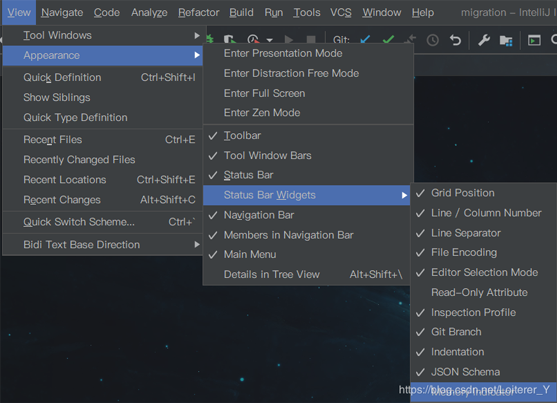
编辑页面显示内存使用情况
菜单栏->View->Appearance->Status Bar Widgets->Memory Indicator
IDEA主题配置
File->Settings->Appearance & Behavior-> Appearance->Theme
IDEA 菜单栏字体及大小配置
File->Settings->Appearance & Behavior-> Appearance->Use custom font
禁止自动打开上次的项目
File->Settings->Appearance & Behavior->System Settings->Reopen last project on startup
IDEA编辑器主题配置
File->Settings->Editor-> Color Scheme->Shcheme
设置鼠标悬浮提示: 当鼠标悬浮与方法名时显示方法参数等信息
File->Settings->Editor-> Color Editing->Quick Documentation->Show quick documentation on mouse move
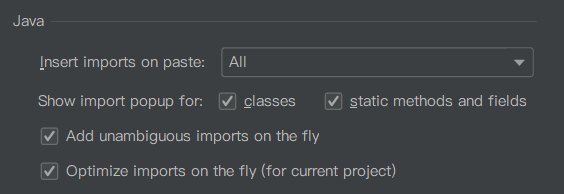
设置自动导包功能
File->Settings->Editor-> General->Auto Import->Java
Add unambiguous imports on the fly:自动导入不明确的结构;
Optimize imports on the fly: 自动优化导入的包
忽略大小写提示
File->Settings->Editor-> General->Code Completion

取消单行tabs显示
File->Settings->Editor-> General->Editor Tabs->Show tabs in one row
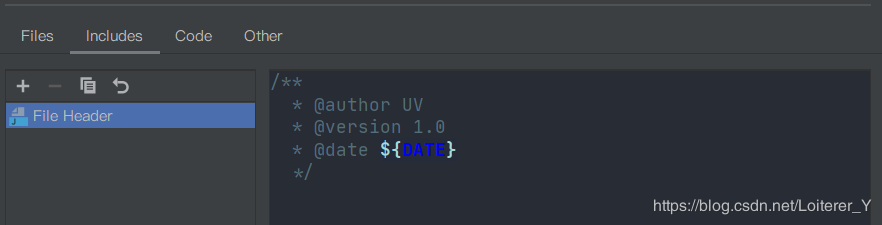
配置类的文档注释信息
File->Settings->Editor-> File and Code Templates->Includes
快捷键生成serialVersionUID
File->Settings->Editor->Inspections

设置文件编码
File->Settings->Editor->File Encodings
Global Encoding: 全局编码
Project Encoding: 项目编码

建议全部设置为utf-8
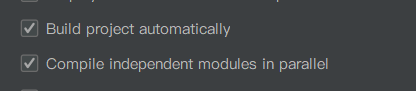
配置自动编译
File->Settings->Build, Execution, Deployment->Compiler
debug配置
File->Settings->Build, Execution, Deployment->Debugger

开启该配置,可减少debug时的内存占用
maven配置
File->Settings->Build, Execution, Deployment->Build Tools->Maven
maven home directory: maven安装目录
User settings file:maven配置文件路径
Local repository:maven本地仓库目录
到此这篇关于IDEA2020.1常用配置说明的文章就介绍到这了,更多相关IDEA2020.1 配置内容请搜索脚本之家以前的文章或继续浏览下面的相关文章希望大家以后多多支持脚本之家!