
平面设计 > Illustrator教程 >
Illustrator 收缩和膨胀效果 隐藏功能
脚本之家
为你喜欢的效果创建图形样式
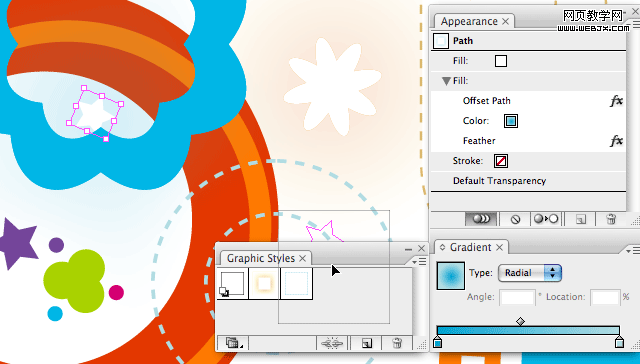
If you like the effects you’ve created and you want to apply them to other objects in the future, then you can create a Graphic Style simply by dragging the object into the Graphic Styles palette. You can reapply the style effect by selecting the object and then clicking the Style in the Graphic Styles palette.
当你做了一个效果还想用在其他的对象时,你可以将其保存为图形样式。 打开图形样式面板,把你要保存的效果对象拖到面板上,以后选中要用该样式的对象,在图形样式面板中点击样式就可以应用了。通过外观面板编辑对象外观
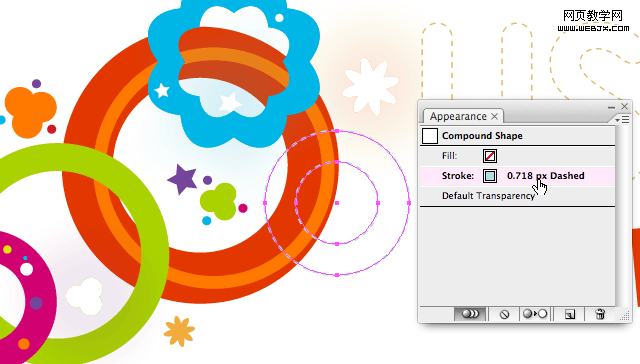
给对象指定了新的图形样式以后,你可以对这样式的每个属性进行设置,像效果、填色、描边的颜色、渐变填充、羽化设置等等。
If you like the effects you’ve created and you want to apply them to other objects in the future, then you can create a Graphic Style simply by dragging the object into the Graphic Styles palette. You can reapply the style effect by selecting the object and then clicking the Style in the Graphic Styles palette.
当你做了一个效果还想用在其他的对象时,你可以将其保存为图形样式。 打开图形样式面板,把你要保存的效果对象拖到面板上,以后选中要用该样式的对象,在图形样式面板中点击样式就可以应用了。通过外观面板编辑对象外观
给对象指定了新的图形样式以后,你可以对这样式的每个属性进行设置,像效果、填色、描边的颜色、渐变填充、羽化设置等等。